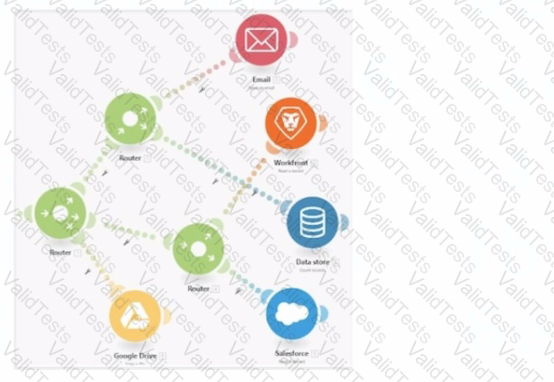
The image depicts a Workfront Fusion scenario usingRoutersto split and manage multiple execution paths.
Fusion executes modules in aleft-to-rightandtop-to-bottomsequence along each path. Routers direct the flow to downstream modules.
Determining the Execution Sequence:
Path 1:
The first path begins withGoogle Drive. The Router branches out, directing execution sequentially to other modules.
Path 2:
The second path starts withEmailand continues downwards through the remaining modules.
Order Within Branches:
After passing through a Router, each branch completes its sequence of modules before moving to the next Router.
Why Option D is Correct:
Execution begins from the leftmost module (Google Drive) and flows rightward. The sequence is as follows:
Google Drive
Email
Data Store
Workfront
Salesforce
This matches the visual layout and Fusion's execution rules for scenarios with Routers.
Why the Other Options are Incorrect:
Option A ("Google Drive > Email > Workfront > Data Store > Salesforce"):
Incorrect becauseWorkfrontdoes not precedeData Storein the execution order.
Option B ("Email > Workfront > Data Store > Salesforce > Google Drive"):
Incorrect because execution begins withGoogle Drive, not Email.
Option C ("Email > Data Store > Workfront > Salesforce"):
Incorrect because it excludesGoogle Driveas the starting point and places modules out of sequence.
Execution Rules in Workfront Fusion:
Fusion executes modules in the order they appear visually, starting from left to right and top to bottom within each branch.
Routers split the execution into separate branches, which are completed sequentially.
References and Supporting Documentation:
Adobe Workfront Fusion: Execution Flow Rules
Workfront Community: Understanding Router and Module Execution
The correct execution sequence is Google Drive > Email > Data Store > Workfront > Salesforce, ensuring all paths are processed as per the scenario's layout.
Contribute your Thoughts:
Chosen Answer:
This is a voting comment (?). You can switch to a simple comment. It is better to Upvote an existing comment if you don't have anything to add.



Submit