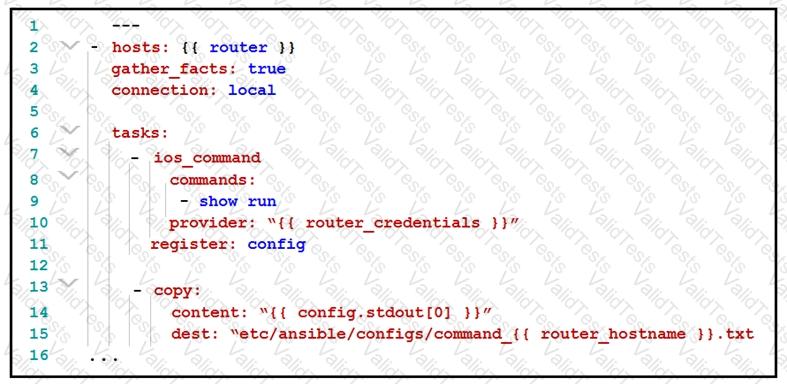
The provided Ansible playbook is designed to connect to an IOS router and execute the "show run" command to retrieve the current running configuration. The configuration is then registered in a variable called config. The next task copies the output stored in the config variable to a file in a specified directory on the local machine. The file is named based on the router's hostname.
Here are the steps:
Define the hosts: The playbook targets the {{ router }} group or host.
Gather facts: Enabled with gather_facts: true to collect useful information about the target devices.
Connection type: Local, meaning the playbook runs on the local machine where Ansible is invoked.
Task 1 - ios_command:
Executes the "show run" command.
Uses the provided router credentials.
Registers the command output to the config variable.
Task 2 - copy:
Takes the first element from config.stdout (the output of the "show run" command).
Copies this content to a file in /etc/ansible/configs/, naming the file command_{{ router_hostname }}.txt.
[Reference:, Cisco DevNet Associate Certification Guide: Chapter on Automation and Programmability, specifically on using Ansible for network automation., Ansible Documentation: Module ios_command and copy., , ]



Submit