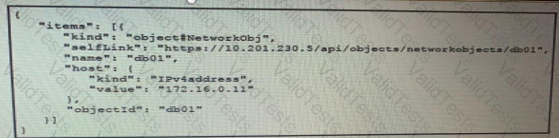
To extract the value "172.16.0.11" from the given JSON data, you need to navigate through the JSON structure using the correct keys and indices. The JSON structure provided is as follows:
Access the 'items' key: This gives you a list containing one object.
Access the first object in the 'items' list: Using the index [0].
Access the 'host' key: This contains the 'kind' and 'value' keys.
Access the 'value' key within the 'host' object: This gives you the required value "172.16.0.11".
Thus, the correct way to access the value "172.16.0.11" is data['items'][0]['host']['value'].
References:
JSON Parsing in Python: Python JSON Module
Cisco DevNet Documentation: DevNet JSON Handling
Contribute your Thoughts:
Chosen Answer:
This is a voting comment (?). You can switch to a simple comment. It is better to Upvote an existing comment if you don't have anything to add.



Submit