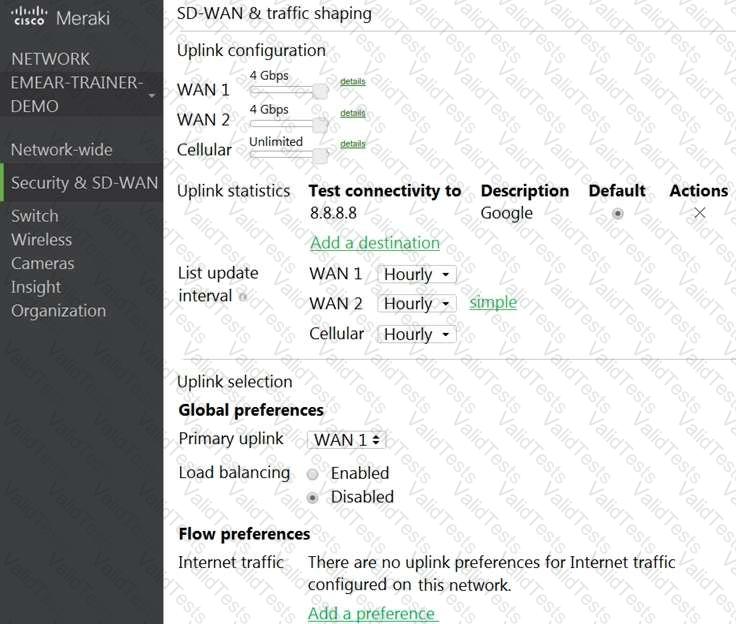
To clarify, to optimize load balancing asymmetrically with a 4:1 ratio between links, two actions that are required are:
Enable load balancing: This option allows the MX to use both of its uplinks for load balancing. When load balancing is enabled under Security & SD-WAN > Configure > SD-WAN & Traffic shaping, traffic flows will be distributed between the two uplinks proportional to the WAN 1 and WAN 2 bandwidths specified under Uplink configuration1.
Change the assigned speeds of WAN 1 and WAN 2 so that the ratio is 4:1: The assigned speed of a WAN link is a value that indicates the bandwidth available on that link. By changing the assigned speeds of WAN 1 and WAN 2 so that they reflect the desired load-balancing ratio, the administrator can ensure that the MX uses both links efficiently and proportionally1. For example, if WAN 1 has a bandwidth of 100 Mbps and WAN 2 has a bandwidth of 25 Mbps, then setting their assigned speeds to 100 Mbps and 25 Mbps respectively will achieve a 4:1 load-balancing ratio.
Contribute your Thoughts:
Chosen Answer:
This is a voting comment (?). You can switch to a simple comment. It is better to Upvote an existing comment if you don't have anything to add.



Submit