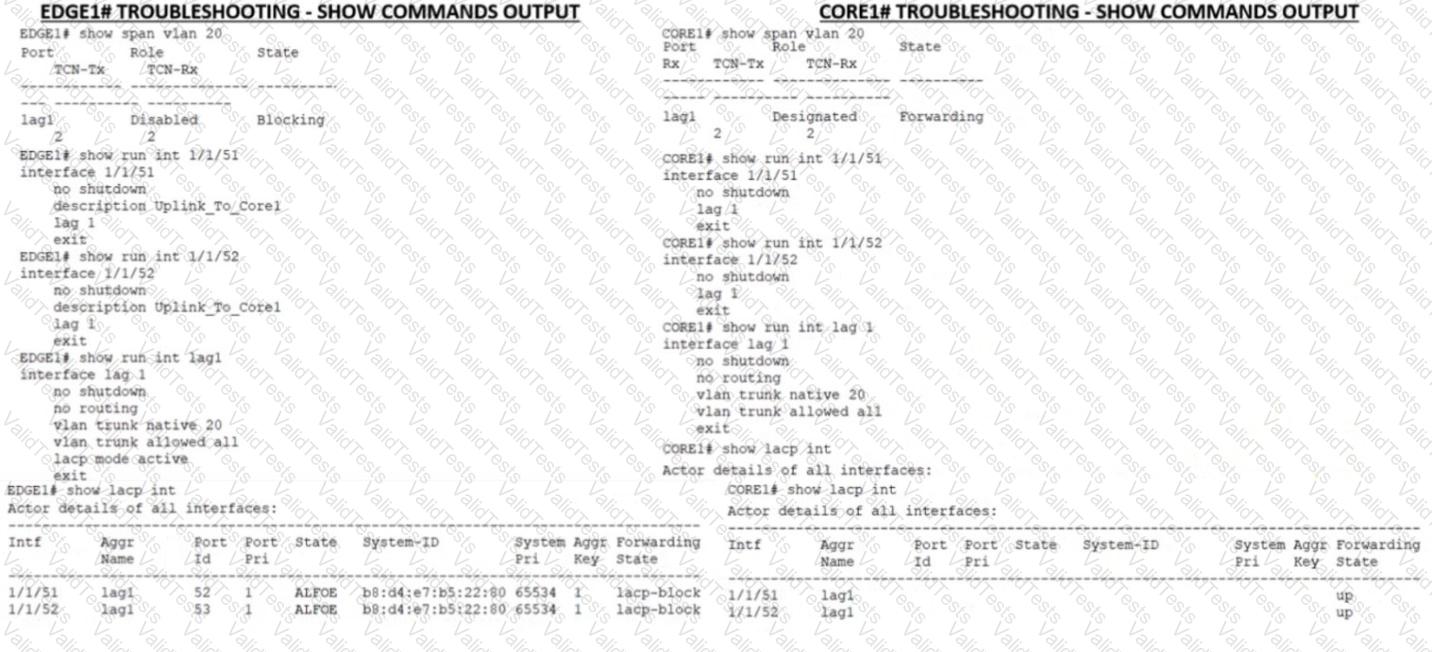
You put in a few show commands on switches EDGE1 and CORE1 to attempt to gather information to troubleshoot the issue Use the show command output images to determine the reason for the EDGE1 uplink being down
A.
The physical interfaces are not members of the correct LAG.
B.
Spanning-Tree block state is preventing the Core uplink from having connectivity to the edge
C.
The Core is connected to the incorrect physical interlaces
LACP is a protocol that allows multiple physical links to be aggregated into a single logical link for increased bandwidth and redundancy. LACP must be configured on both ends of the link for it to work properly. In this case, EDGE1 has LACP configured on its uplink port-channel 1, but CORE1 does not have LACP configured on its corresponding port-channel 1. This causes a mismatch and prevents the link from coming up.References:https://www.arubanetworks.com/techdocs/ArubaOS_86_Web_Help/Content/arubaos-solutions/1-overview/lacp.htm
Contribute your Thoughts:
Chosen Answer:
This is a voting comment (?). You can switch to a simple comment. It is better to Upvote an existing comment if you don't have anything to add.



Submit