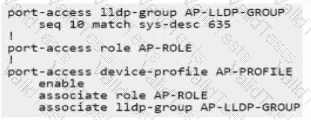
The goal is to configure the switch to automatically apply a specific device profile (named AP-PROFILE in the options) to ports where an Aruba AP Model 635 connects, using LLDP information for detection.
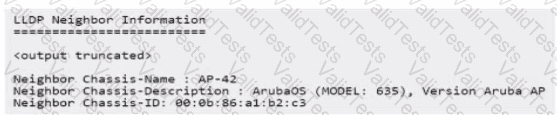
LLDP Information:The LLDP neighbor output shows:
Neighbor Chassis-Description: ArubaOS (MODEL: 635), Version Aruba AP
Neighbor Chassis-Name: AP-42
Device Profile Mechanism:This involves creating an LLDP group that matches specific attributes of the desired device, creating a device profile containing the desired port configurations (VLAN, PoE, QoS, Role, etc.), associating the profile with the LLDP group, and enabling the feature globally.
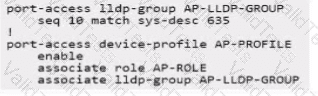
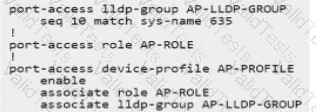
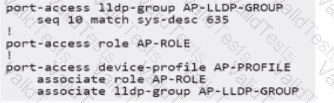
Analyzing Configuration Options:All options configure an LLDP group AP-LLDP-GROUP and a device profile AP-PROFILE. The key is the matching condition within the LLDP group and the completeness of the profile configuration.
Matching Condition:
Options A, C, D use seq 10 match sys-desc 635. This condition checks if the LLDP System Description contains the string "635". Based on the output (...MODEL: 635...), this conditionwill matchthe target AP.
Option B uses seq 10 match sys-name 635. This checks if the LLDP System Name contains "635". The output shows Neighbor Chassis-Name: AP-42. This conditionwill not match.
Contribute your Thoughts:
Chosen Answer:
This is a voting comment (?). You can switch to a simple comment. It is better to Upvote an existing comment if you don't have anything to add.



Submit