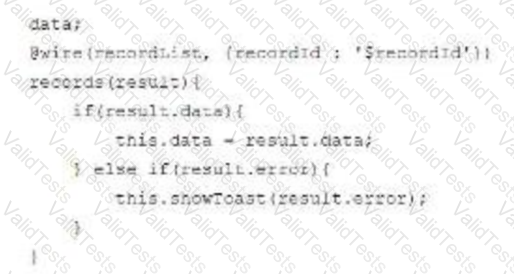
A developer is creating a Lightning web component that displays a list of records in a lightning-datatable. After saving a new record to the database, the list is not updating.
What should the developer change in the code above for this to
happen?
A.
Call rafrasnApex() ON this.dazta.
B.
Create a new variable to store the result and annotate it with @track.
C.
Create a variable to store the result and call refreshpex().
In Lightning Web Components (LWC), the data displayed in a component is not automatically refreshed when a new record is saved to the database. To refresh the displayed list of records in a lightning-datatable after a save operation, developers should use the refreshApex() function. This function is imported from the @salesforce/apex module and is used to refresh the cache and re-execute the Apex wire method to fetch the latest data from the server. The @track decorator is no longer necessary in most cases due to reactive properties being the default behavior in LWC as of Spring '20 release. Also, calling refreshApex() on this.data directly or creating a new tracked variable will not initiate a refresh of the cached data.
References:
Get Updated Data with refreshApex()
Lightning Web Components and Salesforce Data
Contribute your Thoughts:
Chosen Answer:
This is a voting comment (?). You can switch to a simple comment. It is better to Upvote an existing comment if you don't have anything to add.



Submit