Comprehensive and Detailed In-Depth Explanation:
The given expression uses the Split function, which divides a string into an array based on a delimiter.
Step-by-Step Execution Guide: Understanding Split() Behavior
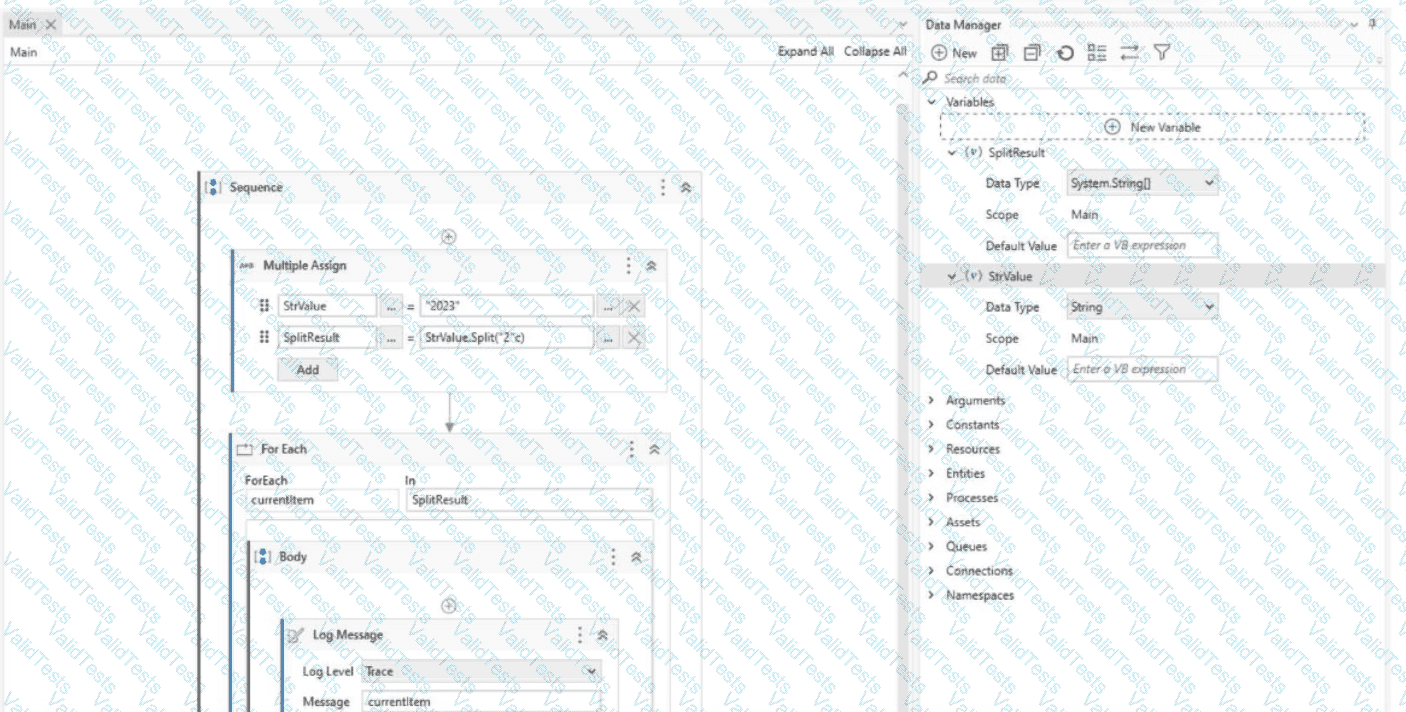
Given Code in UiPath:
Dim StrValue As String = "2023"
Dim SplitResult() As String = StrValue.Split("2"c) ' Split by character "2"
For Each currentItem In SplitResult
Log Message: currentItem
Next
Step-by-Step Breakdown:
Index
Content in SplitResult
Explanation
0
"" (empty)
Before the first "2"
1
"0"
Between the two "2"s
2
"3"
After the last "2"
???? Final Output: 0 3 (each part printed separately).
Real-World Use Case: Extracting File Extensions
???? Scenario: A bot processes filenames and needs to extract extensions.
vb
CopyEdit
Dim FileName As String = "Report.PDF"
Dim Extension As String = FileName.Split("."c)(1)
???? Output: "PDF"
???? Split is powerful for handling structured text processing!
Why the other options are incorrect?
❌ A. 00 – The split function does not duplicate numbers.
❌ B. 20 23 – The space between 20 and 23 never exists after splitting.
❌ C. 2023 – The split function removes the delimiter (2), so 2023 is not possible.
✅ Reference:
UiPath Documentation: String Manipulation
UiPath Forum: Using Split Function



Submit