 A screenshot of a computer
AI-generated content may be incorrect.
A screenshot of a computer
AI-generated content may be incorrect.
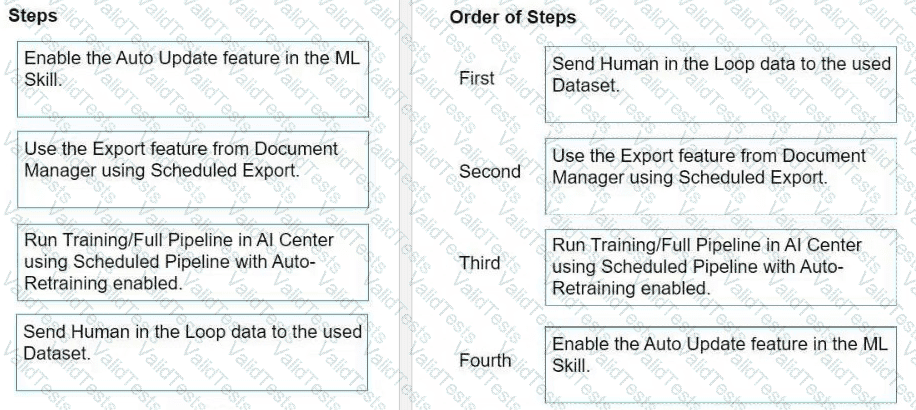
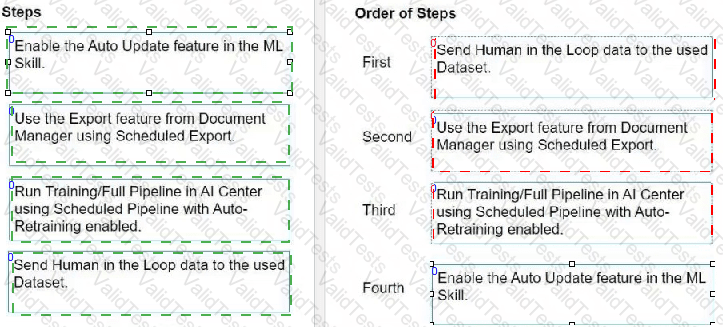
To automatically retrain and deploy a Document Understanding Machine Learning (ML) Model in AI Center with data from the Document Validation Action, the steps should be followed in this order:
Send Human in the Loop data to the used Dataset.
This step involves sending the data that has been validated and corrected by human reviewers to the dataset. This data will be used for training the ML model.
Use the Export feature from Document Manager using Scheduled Export.
After the data is reviewed and validated, it needs to be exported from the Document Manager. Scheduled Export automates this process, ensuring the dataset in AI Center is regularly updated with new data.
Run Training/Full Pipeline in AI Center using Scheduled Pipeline with Auto-Retraining enabled.
With the updated data in the dataset, the next step is to run the training or the full pipeline. The use of Scheduled Pipeline with Auto-Retraining ensures that the ML model is automatically retrained with the latest data.
Enable the Auto Update feature in the ML Skill.
Finally, enabling the Auto Update feature in the ML Skill ensures that the newly trained model is automatically deployed, making the improved model available for document understanding tasks.
Following these steps in the specified order allows for a streamlined process of continuously improving the ML model based on human-validated data, ensuring better accuracy and efficiency in document understanding tasks over time.



Submit