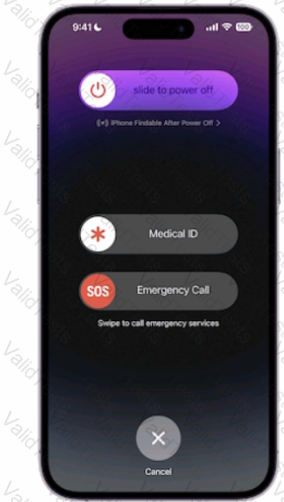
The image shows the Emergency SOS screen on an iPhone, which allows you to quickly call emergency services and access your Medical ID. To get to this screen, you need to press and hold the side button and one of the volume buttons until the Emergency SOS slider appears. This works on iPhone 8 and later models. If you continue holding the buttons, a countdown will begin and an alert will sound. At the end of the countdown, your iPhone will automatically call emergency services. Alternatively, you can swipe right on the Emergency SOS slider to call emergency services immediately. You can also tap the Medical ID button to view or share yourmedical information, or the cancel button to exit the screen. References: 1 Use Emergency SOS on your iPhone - Apple Support 2 How to trigger Emergency SOS on your iPhone (and shut it off) - iMore
Contribute your Thoughts:
Chosen Answer:
This is a voting comment (?). You can switch to a simple comment. It is better to Upvote an existing comment if you don't have anything to add.



Submit