Dynamic input in AutoCAD allows you to enter coordinates and angles directly in the command line, providing real-time feedback on the drawing. To draw lines at specific angles and lengths, you use the format length<angle.
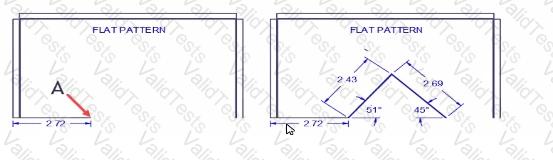
Start Point (A): Begin drawing from point A.
Enter Length and Angle: For the first line, input 2.43<51 to draw a line that is 2.43 units long at an angle of 51 degrees from the horizontal.
Enter Length and Angle for Second Line: For the second line, input 2.69<-45 to draw a line that is 2.69 units long at an angle of -45 degrees from the horizontal.
Using dynamic input in this manner ensures precise drawing and proper alignment as per the given angles and lengths.
Contribute your Thoughts:
Chosen Answer:
This is a voting comment (?). You can switch to a simple comment. It is better to Upvote an existing comment if you don't have anything to add.



Submit