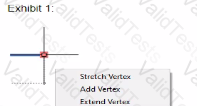
The vertex options in the multi-functional grip menu are specific to certain types of geometry in AutoCAD. Let's break down why the vertex options are missing in Exhibit 2.
Understanding Grip Menus:
Grip menus provide different options depending on the type of object selected. These options can include stretching vertices, adding vertices, or other object-specific commands.
Geometry Types and Grip Menus:
Polyline: Offers vertex-related options such as adding, stretching, or removing vertices.
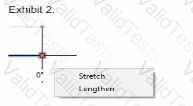
Line: Offers basic options such as stretching or lengthening but does not provide vertex-related options because a line has only two endpoints.
Block: May not offer vertex manipulation directly unless exploded into its component objects.
Dimension: Offers dimension-specific grip options, not typically including vertex manipulation.
Analyzing Exhibit 2:
Exhibit 2 shows a grip menu with only the "Stretch" and "Lengthen" options available. This menu is typical for a simple line object, which does not have intermediate vertices that can be manipulated individually like a polyline.
Therefore, the correct answer is C. The Geometry is a line.
Chosen Answer:
This is a voting comment (?). You can switch to a simple comment. It is better to Upvote an existing comment if you don't have anything to add.



Submit