Pre-Summer Special Limited Time 70% Discount Offer - Ends in 0d 00h 00m 00s - Coupon code: validbest

Exam ACP-01101 All Questions

View all questions & answers for the ACP-01101 exam

Autodesk Certified Professional ACP-01101 Question # 20 Topic 3 Discussion

ACP-01101 Exam Topic 3 Question 20 Discussion:
Question #: 20
Topic #: 3

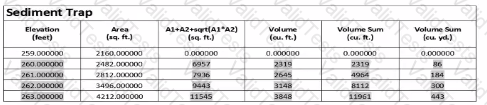
Exhibit.

ACP-01101 Question 20

A CAD designer inserts a table linked to data from an Excel spreadsheet using the Data Links feature. The cell setting "Keep Data Formats and Formulas" was enabled when inserting the table shown in the exhibit

Although all numerical values were rounded to the nearest whole number in Excel, only some retained that rounding upon inserting the table into AutoCAD

What should the CAD designer do to make sure the numerical formatting of the table in AutoCAD permanently matches the source data in Excel?


A.

In Excel set the format of all numerical cells to Number with 0 decimal places


B.

in AutoCAD, update the Field precision value of numerical cells to 0


C.

in AutoCAD, set the Data Format of all numerical cells to Whole Number


D.

In Excel, within advanced document properties set data format to embedded


Get Premium ACP-01101 Questions

Contribute your Thoughts:


Chosen Answer:
This is a voting comment (?). It is better to Upvote an existing comment if you don't have anything to add.