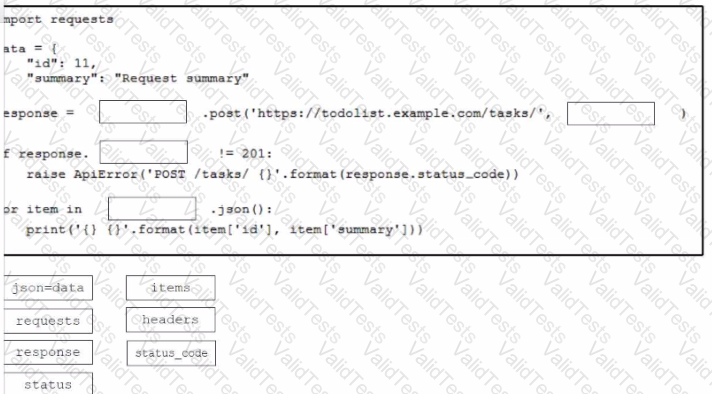
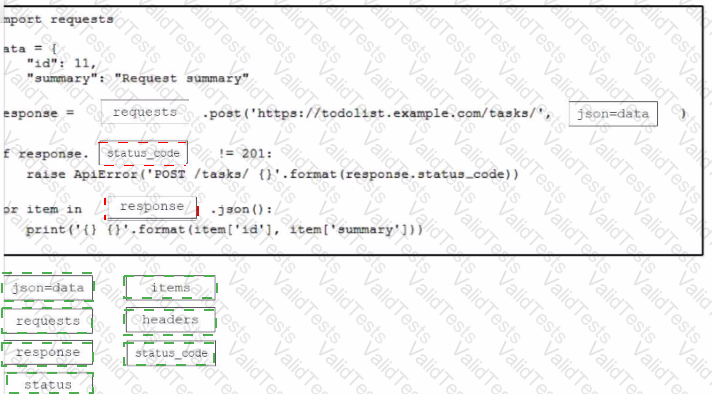
Drag and drop the code from the bottom onto the box where the code is missing to construct a Python script that calls a REST API request. Not all options are used.
The requests library is used to make HTTP requests in Python. It is a popular third-party library that simplifies interactions with web APIs.
Creating the Data Payload:
The data dictionary contains the information to be sent in the body of the POST request. It includes an id and a summary.
Making the POST Request:
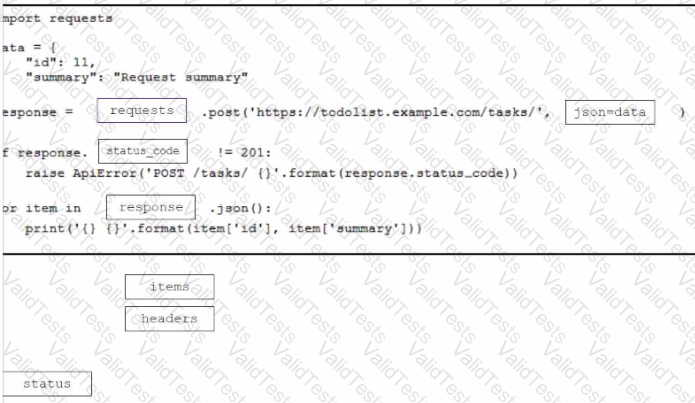
The requests.post method is used to send a POST request to the specified URL (https://todolist.example.com/tasks/). The json=data parameter automatically converts the data dictionary to a JSON-formatted string and sets the appropriate headers.
Checking the Response Status Code:
The script checks if the status_code of the response is not equal to 201. A status code of 201 indicates that the request was successful and a resource was created.
If the status code is not 201, an ApiError is raised with a message that includes the status code.
Processing the JSON Response:
The response.json() method is used to parse the JSON response into a Python dictionary.
The script iterates over the items in the JSON response and prints the id and summary of each item.
References:
Cisco DevNet Associate Certification Guide, Sections on interacting with REST APIs using Python
Official documentation for the Requests library: Requests: HTTP for Humans
Contribute your Thoughts:
Chosen Answer:
This is a voting comment (?). You can switch to a simple comment. It is better to Upvote an existing comment if you don't have anything to add.



Submit