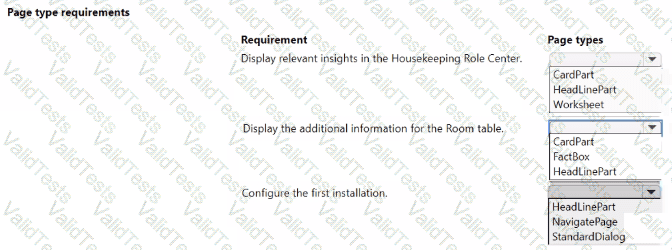
For the requirements provided, the appropriate page types should be selected as follows:
Display relevant insights in the Housekeeping Role Center: HeadlinePart
Display the additional information for the Room table: FactBox
Configure the first installation: StandardDialog
Comprehensive Detailed Explanation
In the context of Microsoft Dynamics 365 Business Central, page types are crucial for determining how information is presented to the user.
HeadlinePart: This page type is designed to display key data and insights in a concise and visually appealing manner, often used in Role Centers to highlight important information. It is suitable for the Housekeeping Role Center to display relevant insights.
FactBox: This page type is used to display supplementary information related to a selected record in the main part of the page. It's often used to show additional details about a record in a list, card, or document page. In this scenario, it is suitable for showing additional information about a specific Room when viewing the Room table.
StandardDialog: This is a page type that provides a modal dialog for user interaction, commonly used for setup wizards, confirmations, and input forms that require user action before proceeding. This is appropriate for configuring the first installation, where a step-by-step guided interaction is necessary.
Contribute your Thoughts:
Chosen Answer:
This is a voting comment (?). You can switch to a simple comment. It is better to Upvote an existing comment if you don't have anything to add.



Submit