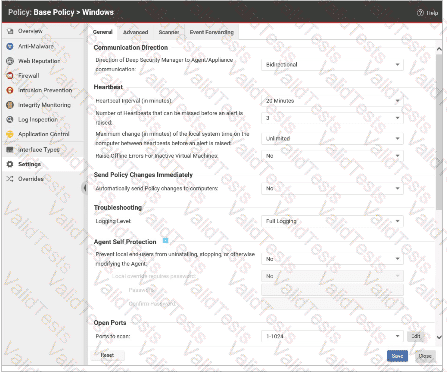
In the exhibit, under "Agent Self Protection," the toggle is disabled (blue switch is to the left, "No"), which means the self-protection feature is off.
This means local users/administrators on the server can uninstall, stop, or modify the agent via standard Windows tools (like the Control Panel).
Option A is incorrect: "Automatically send Policy changes to computers" is set to "No," so policy changes will not be pushed instantly; they’ll take effect at the next agent heartbeat.
Option C is incorrect: Heartbeat interval is set to 22 minutes (not 10).
Option D is incorrect: The alert threshold is for "missed heartbeats" and is set to 3, but the heartbeat interval is 22 minutes, not 20.
[References:, , Trend Micro Deep Security Help: Agent Self Protection, , Deep Security 20 LTS Administrator's Guide, Policy Configuration, , Exhibit screenshot details]



Submit