Pre-Summer Special Limited Time 70% Discount Offer - Ends in 0d 00h 00m 00s - Coupon code: validbest

Pass the Fortinet Network Security Expert FCP_FMG_AD-7.6 Questions and answers with ValidTests

Exam FCP_FMG_AD-7.6 All Questions
Exam FCP_FMG_AD-7.6 Premium Access

View all detail and faqs for the FCP_FMG_AD-7.6 exam

Viewing page 2 out of 2 pages
Viewing questions 11-20 out of questions
Questions # 11:

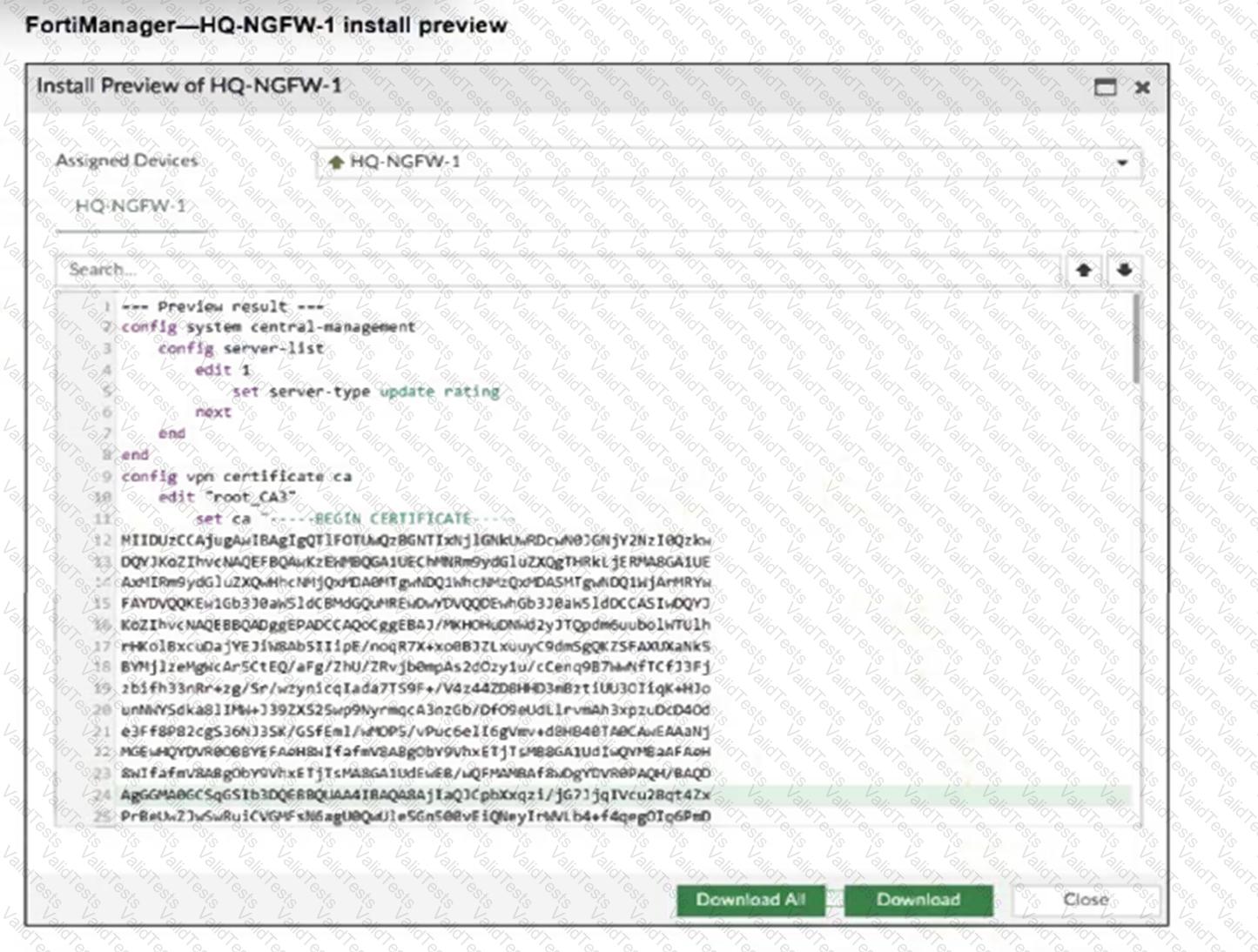
Refer to the exhibit.
Question # 11

An administrator assigned a new policy package to FortiGate HQ-NGFW-1. In the installation preview, they noticed some settings they did not modify and are unsure about the changes.

Based on the exhibit, which two things will happen if they continue with the installation? (Choose two.)

Options:

A.

FortiGate HQ-NGFW-1 can use FortiManager firmware templates to upgrade firmware and ratings.

B.

FortiGate HQ-NGFW-1 can contact the FortiManager acting as FortiGuard Distribution Server (FDS) to download FortiGuard updates.

C.

FortiGate HQ-NGFW-1 will use the root_CA3 certificate in firewall address objects or policies.

D.

FortiManager will install the CA certificate named root_CA3 to authenticate FortiGate-to-FortiManager communication protocol (FGFM) tunnel connections with FortiGate HQ- NGFW-1.

Expert Solution
Questions # 12:

Which two conditions trigger FortiManager to create a new revision history? (Choose two.)

Options:

A.

When FortiManager installs device-level changes on a managed device

B.

When changes to the device-level database are made on FortiManager

C.

When FortiManager is auto-updated with configuration changes made directly on a managed device

D.

When a provisioning template is assigned to a managed device on the device-level database

Expert Solution
Questions # 13:

Push updates are failing on a FortiGate device located behind a network address translation (NAT) device?

Which two settings should the administrator check to correct this problem? (Choose two.)

Options:

A.

Make sure the NAT device IP address and the correct ports are configured on FortiManager.

B.

Make sure FortiGuard updates and web service are enabled on the FortiGuard service interface.

C.

Make sure the virtual IP address and the correct ports are configured on the NAT device.

D.

Make sure the Bind to IP address option on the FortiGuard service interface is set to the virtual IP address from the NAT device.

Expert Solution
Questions # 14:

Refer to the exhibits.

Question # 14

Question # 14

Question # 14

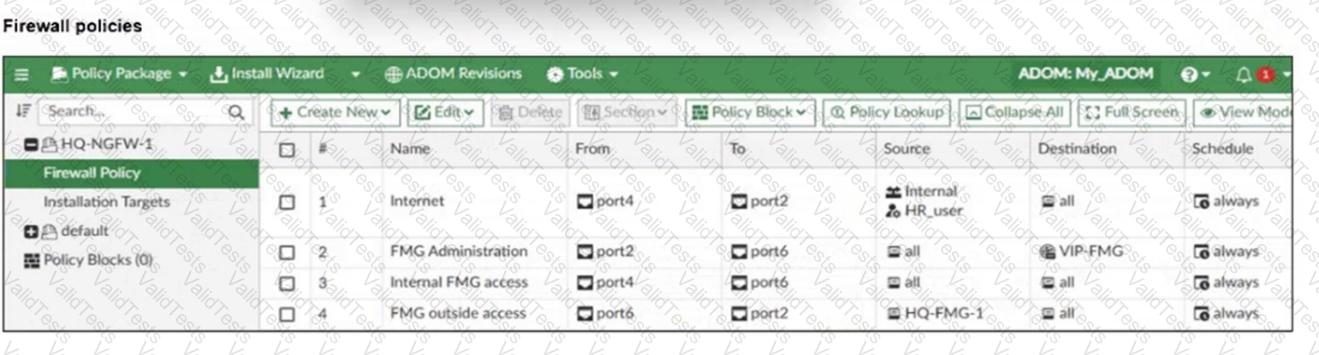
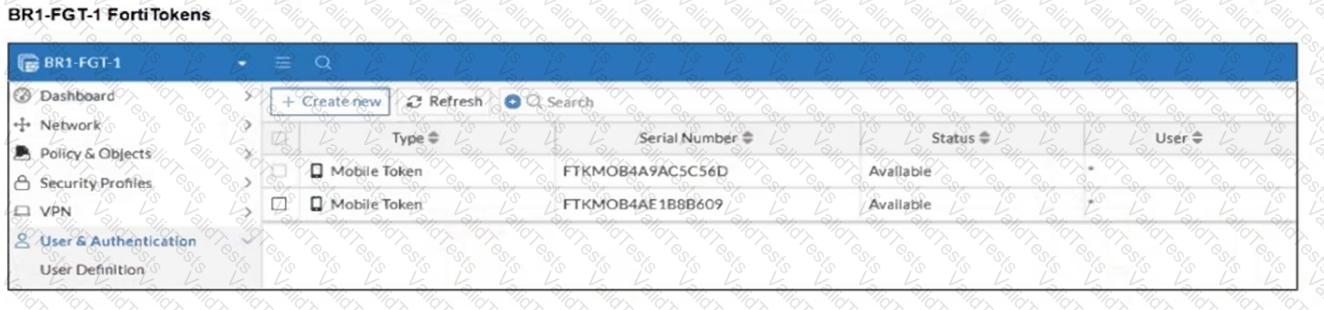
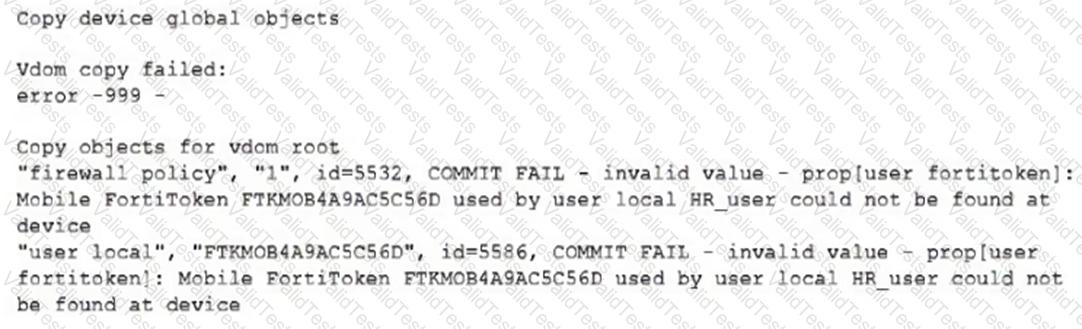
An administrator needs to push a FortiToken Mobile to assign it to HR_user in the HQ-NGFW-1.

However, when installing the policy package, they receive the following error message:
Question # 14

Why is the administratornotable to install the FortiToken on the HQ-NGFW-1 firewall?

Options:

A.

The administrator must use a user local meta field to assign FortiToken.

B.

The administrator must use a valid FortiToken that exists on HQ-NGFW-1.

C.

The administrator must use a metadata variable to assign the same FortiToken to multiple users in FortiManager.

D.

The administrator must use per-device mapping to assign the FortiToken to HQ-NGFW-1.

Expert Solution
Questions # 15:

Refer to the exhibit.

Question # 15

Which two statements about the output are true? (Choose two.)

Options:

A.

The latest revision history for the managed FortiGate does not match the device-level database.

B.

Configuration changes have been installed on FortiGate, updating policy and device-level database.

C.

The latest revision history for the managed FortiGate does match the FortiManager policy database.

D.

The system template default will override device-level database configurations.

Expert Solution
Questions # 16:

Company policy dictates that any time a change is made to a policy package on FortiManager an ADOM revision is created before the change installed, and that revision is held for a minimum of 90 days.

Over the past three months, each installed change has resulted in several unused policies and duplicate objects.

The FortiManager administrator plans to upgrade the FortiGate devices and then upgrade the FortiManager ADOM from version 7.4 to 7.6.

Which action can the administrator take to avoid slow ADOM upgrades?

Options:

A.

Check and repair the global configuration database before upgrading.

B.

Export firewall policies to Excel, delete them on the ADOM. then reimport them after upgradingthe ADOM.

C.

Find unused firmware templates, then delete them before upgrading.

D.

Limit ADOM revisions before upgrading.

Expert Solution
Questions # 17:

An administrator configures a new BGP peer in the FortiManager device-level database of FortiGate. They reinstall the policy package to the managed FortiGate device without any errors. However, when the administrator logs in to FortiGate, they do not see the BGP configuration changes.

What is the most likely reason why FortiManager did not push the BGP peer changes to FortiGate?

Options:

A.

The administrator must run a sanity check on FortiManager to make sure the database is not corrupted.

B.

Fortigate has a BGP template assigned on the FortiManager database.

C.

The administrator must use the Install Wizard and select Install device settings only to push BGP settings

D.

The FortiGate firmware version is different from the FortiManager ADOM version.

Expert Solution
Questions # 18:

While attempting to push a NetFlow configuration script through the FortiManager policy package: an administrator encounters an error stating that an object is unrecognized in line 4.

Question # 18

What must the administrator do to successfully apply the NetFlow configuration script and avoid the object unrecognized error?

Options:

A.

Make sure the user running the script has full access to the VDOM—AGEUSR.

B.

Run the script on the device database.

C.

Use metadata variables if they use VDOMs in the script.

D.

Create a normalized interface on the policy layer before running the script.

Expert Solution
Questions # 19:

Refer to Exhibits:

Question # 19

Question # 19

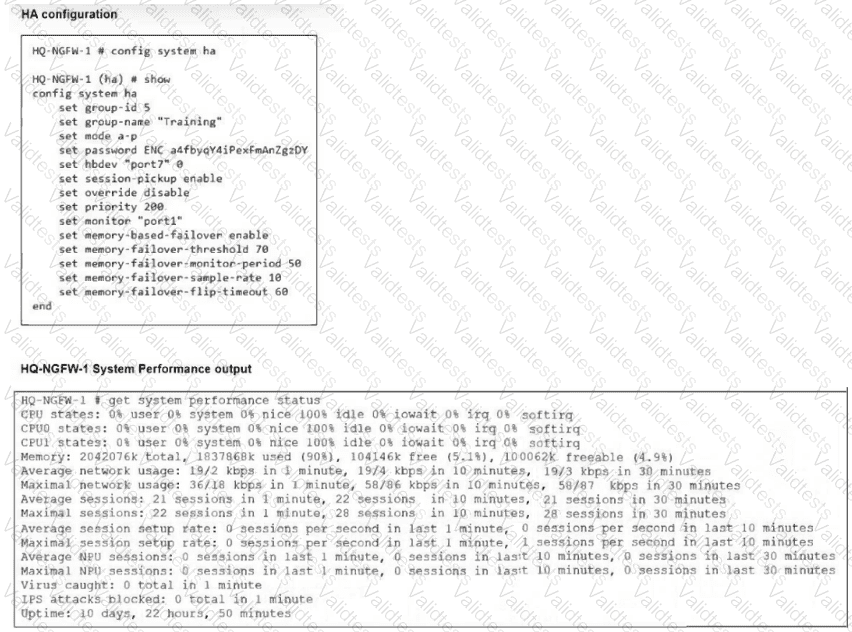
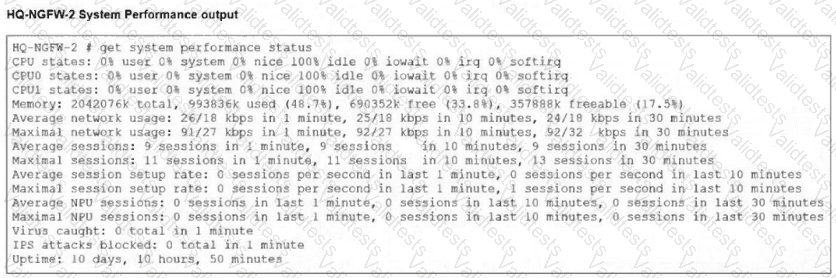
An administrator has observed the performance status outputs on an HA cluster for 55 seconds.

Which FortiGate is the primary?

Options:

A.

HQ-NGFW-2 with the parameter memory-failover-threshold setting

B.

HQ-NGFW-2 with the parameter priority setting

C.

HQ-NGFW-1 with the parameter memory-failover-flip-timeout setting

D.

HQ-NGFW-1 with the parameter override setting

Questions # 20:

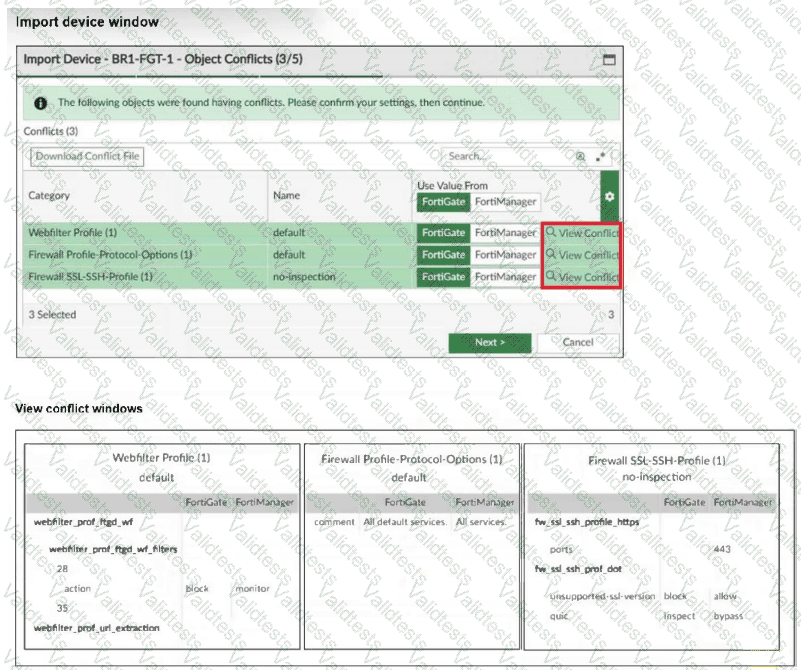
Refer to the exhibits.

Question # 20

An administrator added BR1-FGT-1 to FortiManager and started importing the policy package. During the process, they saw that they need to choose values from FortiGate or FortiManager.

Which conclusion is most clearly supported by the exhibits?

Options:

A.

BR1-FGT-1 does not support the SSL/SSH profile with HTTPS on port 443.

B.

The administrator must match the FortiOS firmware version with the FortiManager ADOM firmware version to resolve the conflict status.

C.

The default Firewall Profile-Protocol-Options object is the only profile that does not significantly affect any configuration changes on either FortiManager or FortiGate.

D.

FortiManager has a different FortiGuard database compared to FortiGate BR1-FGT-1 for the QUIC protocol.

Viewing page 2 out of 2 pages
Viewing questions 11-20 out of questions