Refer to the exhibits.
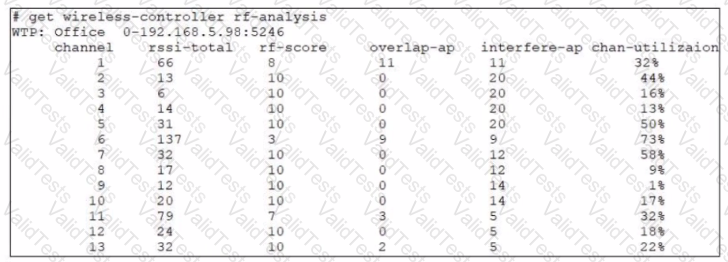
Exhibit.
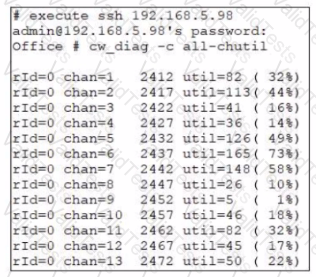
Examine the troubleshooting outputs shown in the exhibits
Users have been reporting issues with the speed of their wireless connection in a particular part of the wireless network The interface that is having issues is the 2 4 GHz interface that is currently configured on channel 6
The administrator of the wireless network has investigated and surveyed the local RF environment using the tools available at the AP and FortiGate
Which configuration would improve the wireless connection?
You are setting up an SSID (VAP) to perform RADlUS-authenticated dynamic VLAN allocation
Which three RADIUS attributes must be supplied by the RADIUS server to enable successful VLAN allocation'' (Choose three.)
An administrator is testing the connectivity for a new VLAN The devices in the VLAN are connected to a FortiSwitch device that is managed by FortiGate Quarantine is disabled on FortiGate
While testing the administrator noticed that devices can ping FortiGate and FortiGate can ping the devices The administrator also noticed that inter-VLAN communication works However intra-VLAN communication does not work
Which scenario is likely to cause this issue?
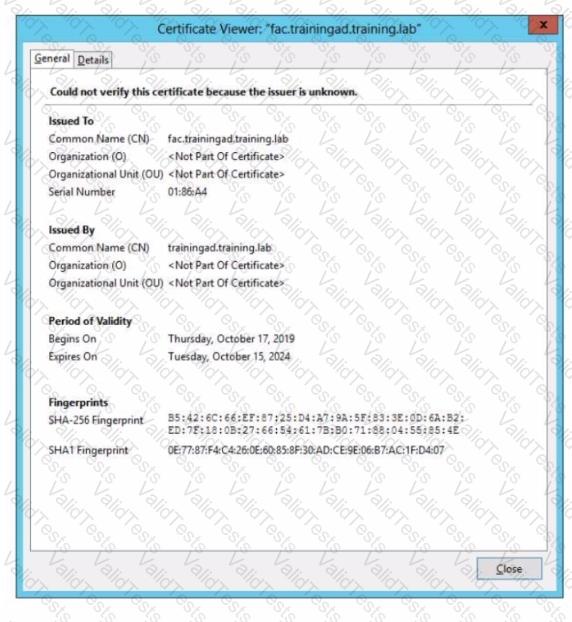
Wireless guest users are unable to authenticate because they are getting a certificate error while loading the captive portal login page. This URL string is the HTTPS POST URL guest wireless users see when attempting to access the network using the web browser

Which two settings are the likely causes of the issue? (Choose two.)
Which three FortiOS tools can you use to troubleshoot RADIUS authentication issues? (Choose three.)
Refer to the exhibits.
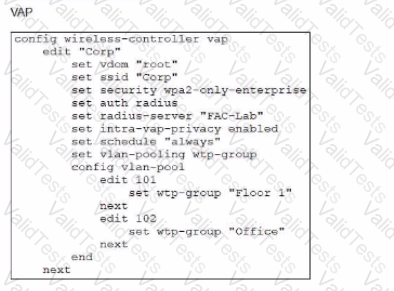
Examine the VAP configuration and the Wi-Fi zones table shown in the exhibits.
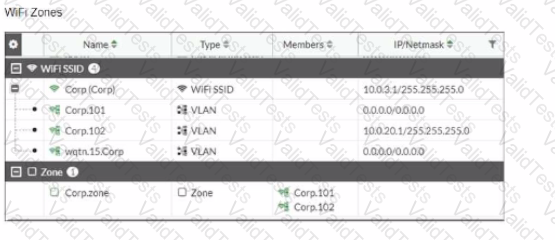
Which two statements describe the FortiGate behavior regarding assignment of VLANs to wireless clients? (Choose two.)
Which two pieces of information can the diagnose test authserver ldap command provide? (Choose two.)
Refer to the exhibit
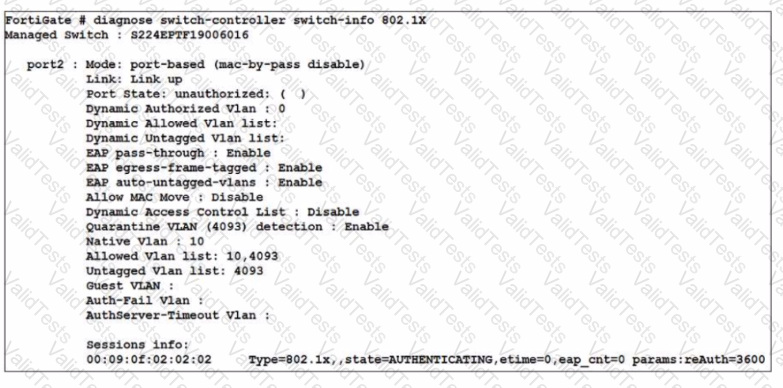
A device connected to port2 on FortiSwitch cannot access the network The port is assigned a security policy to enforce 802 1X authentication While troubleshooting the issue, the administrator obtains the debug output shown in the exhibit
Which two scenarios are likely to cause this issue? (Choose two.)


