What information is available in the Client Context View in HPE Aruba Networking Central?
Troubleshooting insights related to connectivity
Inventory information for network printers
Device cost
Audit logs of network changes
Comprehensive and Detailed Explanation
HPE Press guide context | PDF page 1002 | HPE Press, Aruba Certified Associate – Campus Access Official Certification Study Guide
Technical Deep Dive — Original Chat Wording
The Client Context View provides a detailed perspective on the network connectivity and operational state of an individual endpoint.
This is particularly valuable when a wireless or wired client experiences intermittent connectivity or authentication failures.
The view can present information such as client identity, IP and MAC addresses, connected infrastructure, network association, and relevant connectivity measurements.
For wireless clients, administrators can investigate association behavior, authentication results, radio conditions, and connection quality.
For example, a client may repeatedly fail to connect because of an authentication problem.
The Client Context View and associated troubleshooting functions can help identify whether the problem occurs during wireless association, authentication, IP address assignment, or subsequent network access.
This helps administrators distinguish infrastructure failures from endpoint-specific conditions.
The interface may also provide access to client events, alerts, and historical information, depending on supported features and software versions.
Network-printer inventory is a device-management activity rather than the primary purpose of a client-specific troubleshooting context.
Device cost is not a core client-connectivity metric.
Administrative configuration audit logs are available through audit-related functions and concern management actions rather than ordinary client connectivity.
Therefore, Option A (Troubleshooting insights related to connectivity) is correct.
What can be viewed by using the inventory and Subscriptions card in HPE Aruba Networking Central?
The client connection performance metrics
The health status of all connected devices
The types of devices in the inventory
The device firmware versions in use
Comprehensive and Detailed Explanation
HPE Press guide context | PDF page 575 | HPE Press, Aruba Certified Associate – Campus Access Official Certification Study Guide
Technical Deep Dive — Original Chat Wording
The Inventory and Subscriptions card provides a consolidated overview of device registration and management-subscription usage.
It helps administrators understand the distribution of network infrastructure across the managed environment.
One of its functions is displaying the total number of registered devices organized by device type.
For example, a campus network may contain access points, switches, and gateways.
The card summarizes these categories so administrators can quickly assess the composition of their managed infrastructure.
Selecting a device-type count can open the Device Inventory with the corresponding filter applied.
The card also presents subscription-related information, including available subscriptions, devices without subscriptions, and subscriptions approaching expiration.
This helps organizations identify outstanding onboarding tasks and potential licensing issues.
The card does not primarily provide client throughput measurements or wireless connection-quality statistics.
Those measurements belong to client monitoring and performance-analysis functions.
Similarly, infrastructure health is presented through the Device Health card.
Detailed firmware-version information is normally available through device-specific inventory or firmware-management views.
The Inventory and Subscriptions card therefore focuses on infrastructure registration, device classification, and management entitlements.
Therefore, Option C (The types of devices in the inventory) is correct.
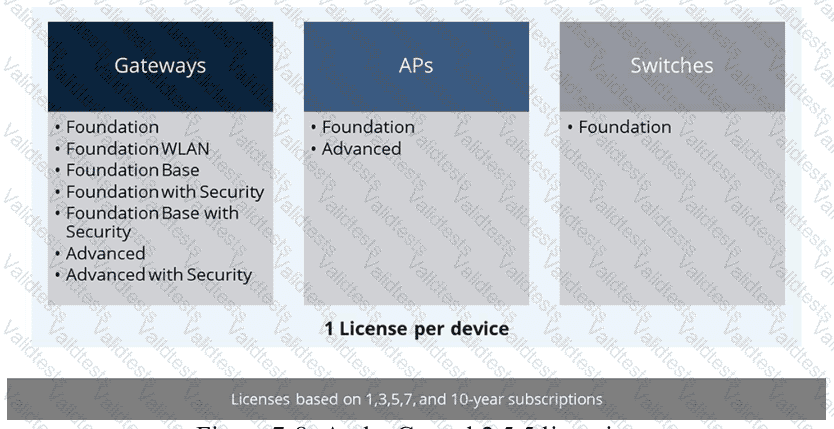
HPE Press study-guide figure / related learning illustration · Q163 Fig 7-8 Subscriptions
Which logical construct enables a WLAN to use disparate and geographically dispersed network infrastructure through a common set of services?
Wireless distribution system
Underlay network
Basic Service Set
Overlay network
Comprehensive and Detailed Explanation
HPE Press guide context | PDF page 770 | HPE Press, Aruba Certified Associate – Campus Access Official Certification Study Guide
Technical Deep Dive — Reconstructed (Original Chat Text Not Recoverable)
An overlay provides logical connectivity and shared network services independent of the geographical layout and physical underlay. Tunnels or encapsulation can transport segments between dispersed sites. A BSS represents one wireless AP radio cell, while an underlay supplies physical IP reachability rather than the distributed logical service itself.
The selected answer corresponds to D: Overlay network. This matches the mechanism or management behavior described in the scenario rather than merely a related network feature.
Operational workflows should preserve consistent inventory, authorization, configuration history, and monitoring so that administrators can locate and manage devices predictably.
Consistent RBAC, accurate inventories, and retained audit records simplify support handovers and reduce uncertainty during incident investigations.
When reviewing alternatives, identify which one directly addresses the stated requirement, rather than selecting a related capability that is useful elsewhere but does not fulfill the requested task.
The wrong choices may describe real technologies, but they perform different functions, apply to another layer, or omit a required prerequisite. Select the answer that resolves the exact scenario, not a nearby administrative task.
When searching for devices in Floor Plan Manager, which fields are available as filters?
Choose two
Site name
Device name
Floor name
Device type
Device model
Comprehensive and Detailed Explanation
HPE Press guide context | PDF page 667 | HPE Press, Aruba Certified Associate – Campus Access Official Certification Study Guide
Technical Deep Dive — Original Chat Wording
HPE Aruba Networking Central Floor Plan Manager allows administrators to organize and position access points within site and building floor plans.
In large deployments, the list of available devices may contain many entries.
Filtering makes it easier to identify the equipment that should be assigned to a particular floor.
The interface provides two relevant structured filtering criteria: device type and device model.
A device-type filter narrows the available devices according to their infrastructure category.
A device-model filter further restricts the results to supported hardware models.
For example, an administrator may select access points and then choose a specific AP model to identify the devices being installed on a floor.
The device-assignment workflow also includes a search field.
The search function can locate devices using information such as name, model, MAC address, or serial number.
However, a free-text search field is distinct from the predefined filtering categories described by the question.
Site selection establishes the location context before opening the floor-assignment workflow.
Floor selection determines the destination floor rather than serving as the device-type filter.
The filtering functionality helps reduce assignment mistakes and improves efficiency when preparing large physical deployments.
Therefore, Options D and E are correct.
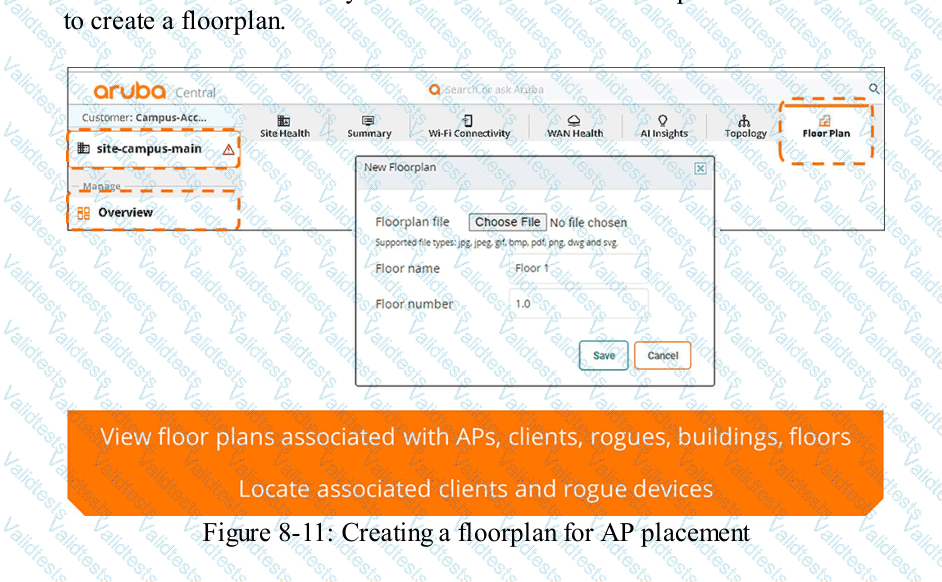
HPE Press study-guide figure / related learning illustration · Q178 Fig 8-11 Floorplan
What does a wireless client do first when its countdown timer reaches zero and it obtains a Transmit Opportunity (TXOP)?
It sends a reassociation request frame to the AP and sends its Data Frames.
It immediately sends its Data Frames and receives an ACK from the AP.
It sends a CTS-to-self announcement to the AP and all other clients.
It sends a CTS-to-self announcement to the ESP gateway.
Comprehensive and Detailed Explanation
HPE Press guide context | PDF page 744 | HPE Press, Aruba Certified Associate – Campus Access Official Certification Study Guide
Technical Deep Dive — Reconstructed (Original Chat Text Not Recoverable)
In CSMA/CA, a station decrements its contention backoff while the medium is idle. When the counter reaches zero, it acquires a transmit opportunity and can send its queued frame, subject to any configured RTS/CTS protection. The receiving AP acknowledges successfully received unicast frames. Reassociation and CTS-to-self are not mandatory first actions.
The selected answer corresponds to B: It immediately sends its Data Frames and receives an ACK from the AP.. This matches the mechanism or management behavior described in the scenario rather than merely a related network feature.
A disciplined investigation compares the observed symptom with expected behavior, tests the most likely failure stage, and verifies recovery rather than assuming that a single command has resolved the problem.
Collecting interface counters, event timestamps, configuration history, and service-test results helps determine whether a symptom originates locally or depends on another device.
The answer should be validated against both the control-plane state and the forwarding or management outcome. A successful individual command alone is not proof that the end-to-end requirement is satisfied.
The noise floor is measured at .000000001 milliwatts, and the receiver’s signal strength is -65dBm.
What is the Signal to Noise Ratio?
45 dBm
25 dBm
15 dBm
35 dBm
Comprehensive and Detailed Explanation
HPE Press guide context | PDF page 717 | HPE Press, Aruba Certified Associate – Campus Access Official Certification Study Guide
Technical Deep Dive — Reconstructed (Original Chat Text Not Recoverable)
Noise power of 0.000000001 mW is -90 dBm. With received signal -65 dBm, SNR is -65 - (-90) = 25 dB, which is dimensionless in decibels, not dBm. The offered answer '25 dBm' uses the wrong unit; numeric 25 is correct.
The selected answer corresponds to B: 25 dBm. This matches the mechanism or management behavior described in the scenario rather than merely a related network feature.
Optimization should consider both immediate performance and its tradeoffs in RF capacity, airtime, reliability, security, and operational overhead.
Use measurements rather than assumptions: compare the RF or switch metrics before and after making a controlled change.
When reviewing alternatives, identify which one directly addresses the stated requirement, rather than selecting a related capability that is useful elsewhere but does not fulfill the requested task.
The wrong choices may describe real technologies, but they perform different functions, apply to another layer, or omit a required prerequisite. Select the answer that resolves the exact scenario, not a nearby administrative task.
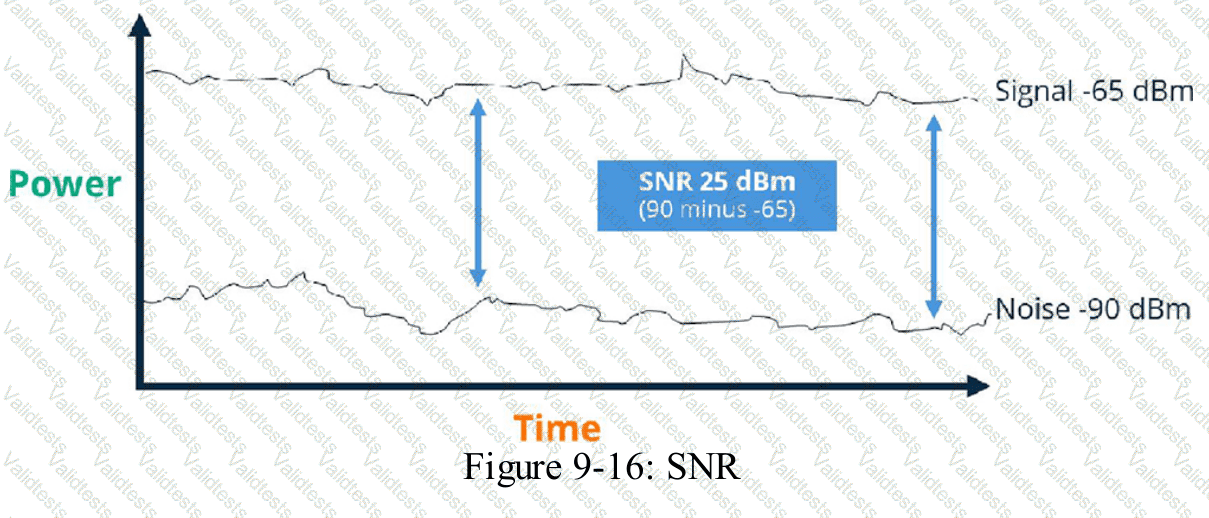
HPE Press study-guide figure / related learning illustration · Fig 9-16 SNR
What is the correct sequence for the TCP three-way handshake?
Drag & Drop
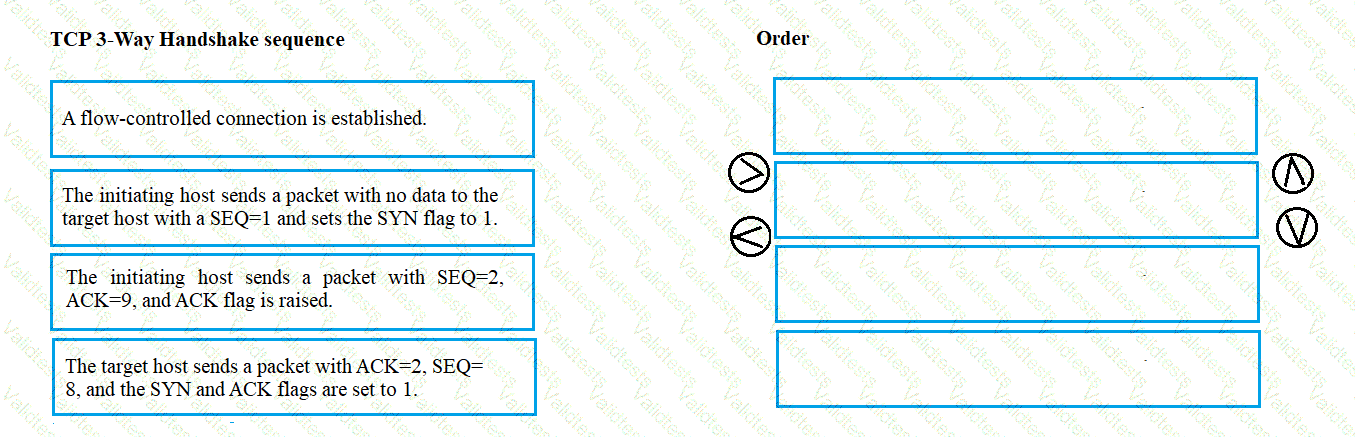
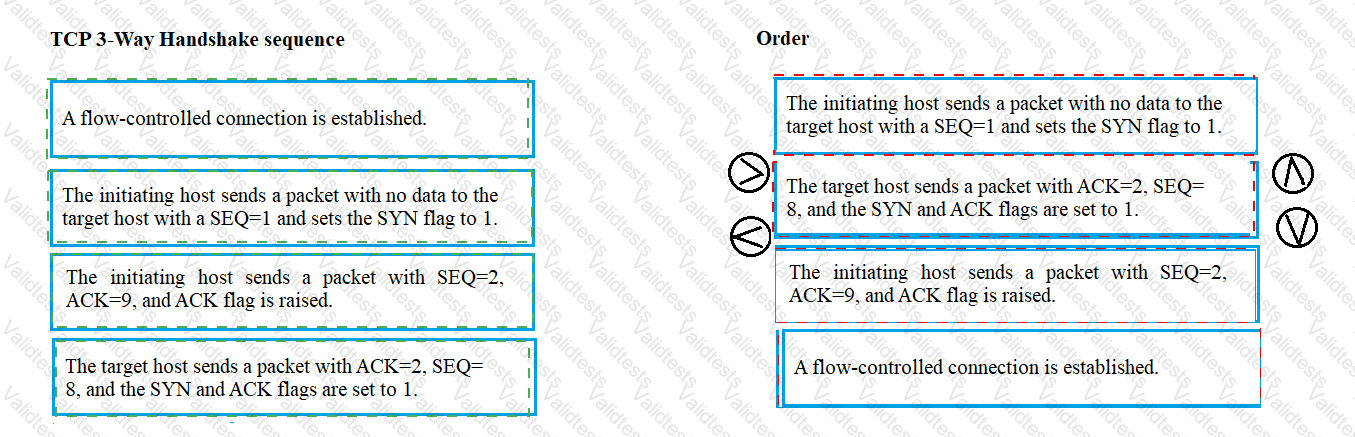
SYN → SYN-ACK → ACK
Exhibit item
Correct match
Step 1
Client sends SYN
Step 2
Server sends SYN-ACK
Step 3
Client sends ACK
Comprehensive and Detailed Explanation
HPE Press guide context | PDF page 62 | HPE Press, Aruba Certified Associate – Campus Access Official Certification Study Guide
Technical Deep Dive — Reconstructed (Original Chat Text Not Recoverable)
TCP establishes a normal reliable connection with SYN from the initiator, SYN-ACK from the responder, and ACK from the initiator. The exchange synchronizes initial sequence numbers and confirms bidirectional communication. Subsequent data transfer begins after the connection is established.
The exhibit is a matching question: each original item must be paired with the applicable protocol, medium, security function, or address classification. The answer table below records the intended correspondence without changing the source exhibit.
Operational workflows should preserve consistent inventory, authorization, configuration history, and monitoring so that administrators can locate and manage devices predictably.
For example, a cloud-managed infrastructure device may be registered successfully but still require the correct subscription, site, group, and configuration scope.
In production, the decision should be documented and checked against the supported software release and platform model, because interface names, licensing tiers, and management workflows can change across Central and AOS-CX generations.
For practical use, confirm the prerequisite conditions first, then verify the resulting operational state. This separates an intended configuration from a working network service and avoids accepting a misleading result.
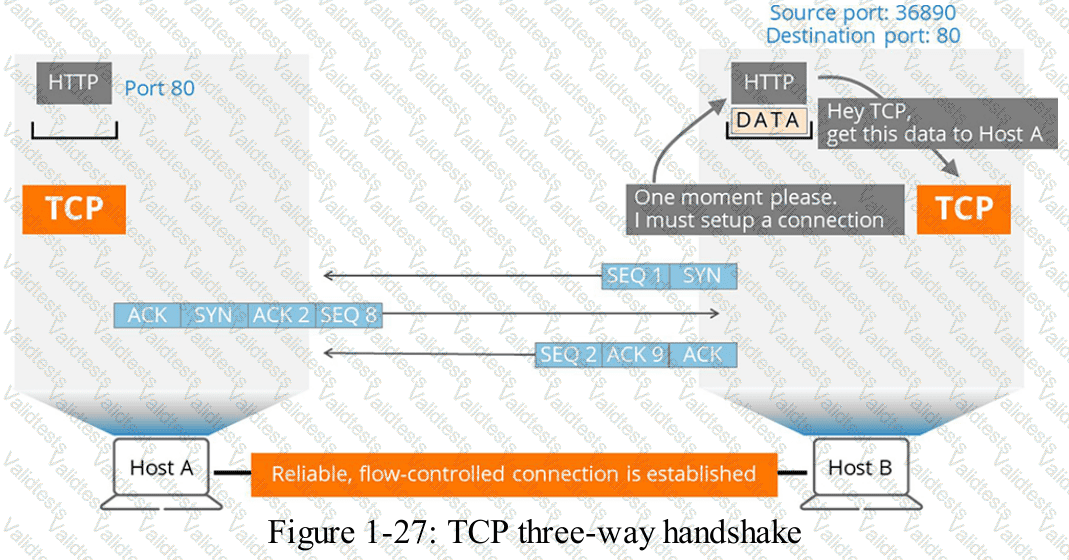
HPE Press study-guide figure / related learning illustration · Q75 TCP 3way
What is the purpose of deferring an alert in a networked system?
To permanently remove notifications for an issue that has already been resolved
To temporarily prevent notifications for an issue that is not currently critical
To change notification settings so only urgent alerts are reported to administrators
To stop all notifications for a certain period regardless of the issue's importance
Comprehensive and Detailed Explanation
HPE Press guide context | PDF page 1028 | HPE Press, Aruba Certified Associate – Campus Access Official Certification Study Guide
Technical Deep Dive — Original Chat Wording
Alert deferral is an operational technique used to temporarily postpone or suppress notifications associated with an issue that does not require immediate attention.
It helps network administrators prioritize critical incidents while avoiding unnecessary interruption from lower-priority conditions.
For example, a technician may already be investigating a known noncritical alert during a planned maintenance period.
Repeated notifications about that same condition may provide little additional value.
Deferring the alert allows the administrator to manage the notification workload while retaining awareness of the underlying problem.
A deferred alert should remain subject to the organization's incident-management procedures and should be reviewed again when the deferral period ends.
This is different from permanently deleting an alert or declaring that the issue has been resolved.
It is also distinct from changing the global notification policy to deliver only urgent events.
Deferral should normally target specific known conditions rather than indiscriminately suppressing every alert.
Suppressing all notifications could prevent administrators from learning about unrelated critical failures.
The HPE Press guide directly documents alert acknowledgment rather than a separate deferral operation. The distinction between deferral and acknowledgment is therefore part of the operational interpretation of this question.
Therefore, Option B is correct.
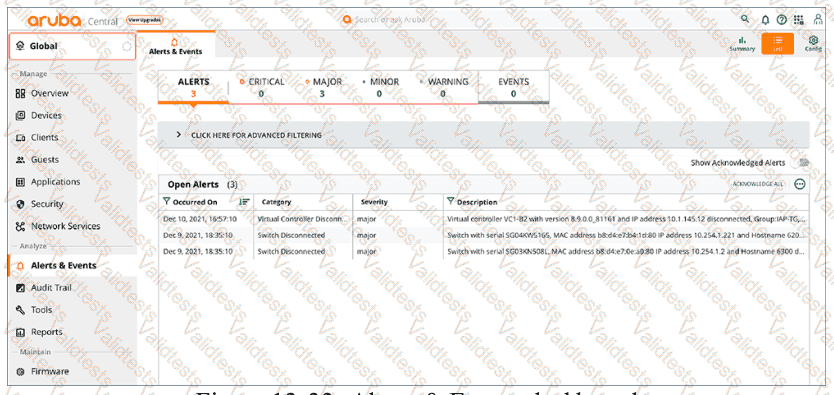
HPE Press study-guide figure / related learning illustration · Q154 Fig 13-33 Alerts
What type of information can be found in a device's view to assist with physical-layer troubleshooting?
Logs and error reports for diagnostic purposes.
VLAN configurations and interface settings.
CPU and memory usage statistics.
Current uptime and alert status.
Comprehensive and Detailed Explanation
HPE Press guide context | PDF page 1002 | HPE Press, Aruba Certified Associate – Campus Access Official Certification Study Guide
Technical Deep Dive — Original Chat Wording
Physical-layer troubleshooting focuses on the transmission medium and the hardware responsible for establishing communication links.
Typical problems include defective copper cables, damaged fiber connections, transceiver failures, optical signal problems, and interface errors.
Device-specific diagnostic information helps administrators identify these conditions.
Logs and error reports are particularly valuable because they can reveal events such as repeated interface transitions, link negotiation failures, and hardware faults.
For Ethernet interfaces, relevant counters may include CRC errors, frame errors, and other indicators of transmission problems.
An increasing CRC error count can indicate corrupted frames caused by cabling faults, electrical interference, or other physical-layer conditions.
HPE Aruba Networking Central provides troubleshooting views containing device events and collected diagnostic information.
Its official documentation also describes interface error views that include CRC errors, error frames, and collision measurements.
Administrators can correlate these measurements with device logs to identify when a problem began and which interface is affected.
VLAN and interface configuration information can also be useful during broader troubleshooting, but VLAN membership primarily concerns Layer 2 configuration rather than direct physical error diagnosis.
CPU and memory metrics address system resource utilization.
Uptime and alert status provide useful operational context without necessarily identifying the physical fault.
Therefore, Option A (Logs and error reports for diagnostic purposes) is the best answer.
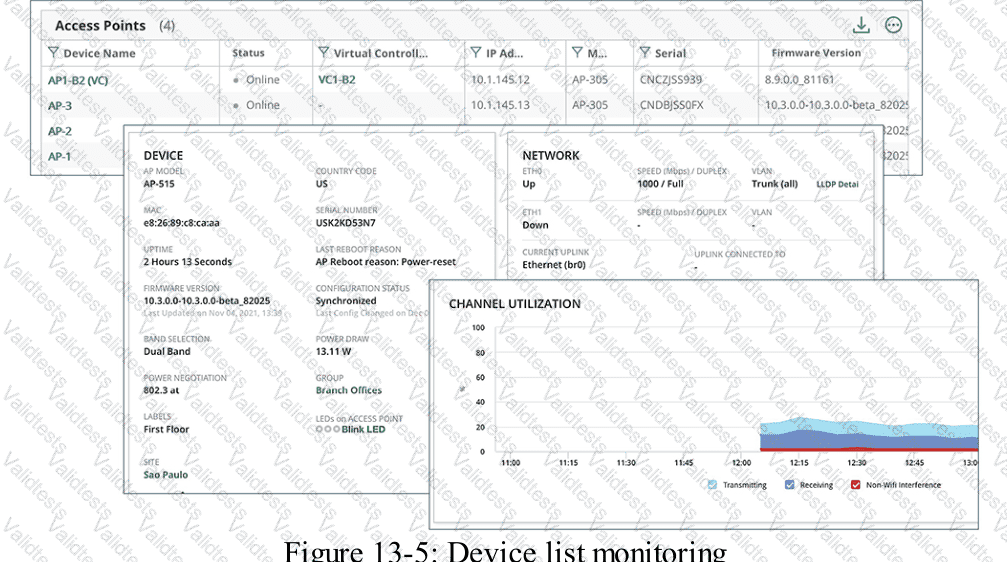
HPE Press study-guide figure / related learning illustration · Q113 Fig 13-5 Device List
What is one reason to arrange devices into device groups in HPE Aruba Networking Central?
Reduce costs
Simplify management
Decrease security
Enhance performance
Comprehensive and Detailed Explanation
HPE Press guide context | PDF page 589 | HPE Press, Aruba Certified Associate – Campus Access Official Certification Study Guide
Technical Deep Dive — Original Chat Wording
HPE Aruba Networking Central uses device groups to organize infrastructure and simplify centralized configuration management.
A group allows administrators to apply common configuration settings to multiple supported devices rather than configuring each device independently.
For example, an organization may operate 50 branch offices with similar access-switch configurations.
By assigning compatible switches to a common management group, administrators can maintain standardized VLANs, interface policies, and other supported network settings.
Group-based management reduces repetitive work and helps prevent configuration inconsistencies.
The HPE Press guide describes UI-based and template-based configuration methods.
UI-based configuration uses graphical management workflows, while template-based configuration allows reusable CLI configuration templates and device-specific variables.
A group can also support different configuration methods for different device types, depending on the management architecture.
Device groups help administrators organize infrastructure according to functional or operational requirements.
They also provide useful management scopes for configuration, monitoring, reporting, and related workflows.
Grouping devices does not inherently improve network throughput or reduce hardware costs.
However, it can reduce administrative effort and improve configuration consistency.
Similarly, device grouping does not weaken security by design. Appropriate group-level security policies can improve the consistency of security controls.
Therefore, Option B (Simplify management) is correct.
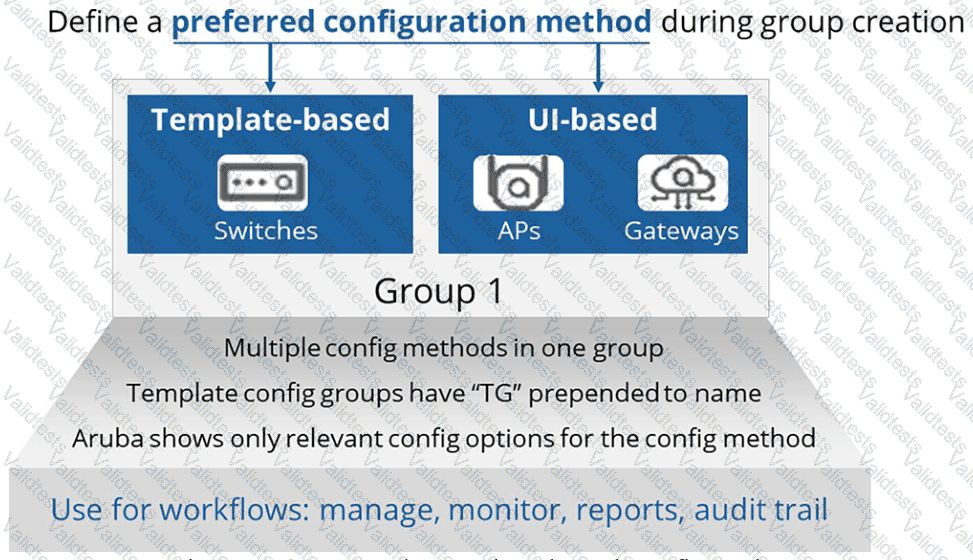
HPE Press study-guide figure / related learning illustration · Q146 Fig 7-21 Groups


