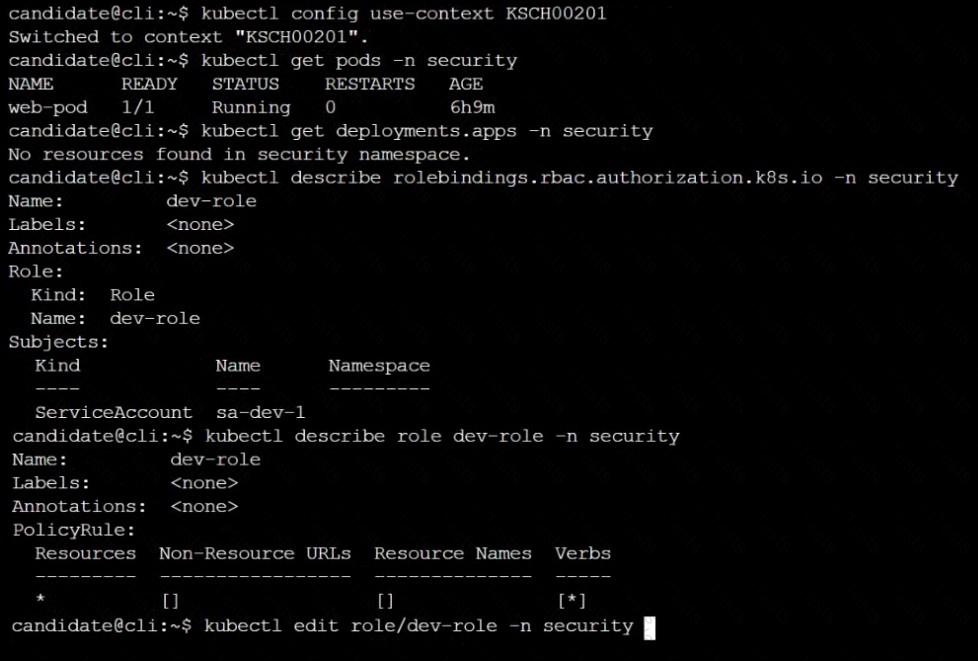
Given an existing Pod named nginx-pod running in the namespace test-system, fetch the service-account-name used and put the content in /candidate/KSC00124.txt
Create a new Role named dev-test-role in the namespace test-system, which can perform update operations, on resources of type namespaces.
Create a new RoleBinding named dev-test-role-binding, which binds the newly created Role to the Pod's ServiceAccount ( found in the Nginx pod running in namespace test-system).
Cluster: dev
Master node: master1
Worker node: worker1
You can switch the cluster/configuration context using the following command:
[desk@cli] $ kubectl config use-context dev
Task:
Retrieve the content of the existing secret named adam in the safe namespace.
Store the username field in a file names /home/cert-masters/username.txt, and the password field in a file named /home/cert-masters/password.txt.
1. You must create both files; they don't exist yet.
2. Do not use/modify the created files in the following steps, create new temporary files if needed.
Create a new secret names newsecret in the safe namespace, with the following content:
Username: dbadmin
Password: moresecurepas
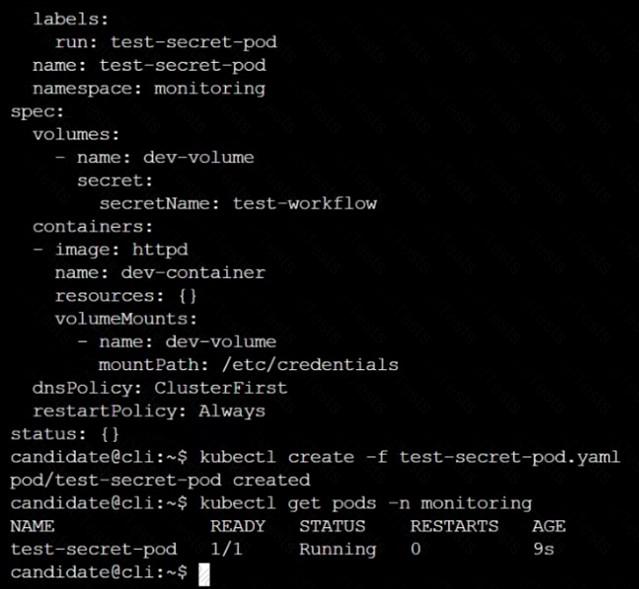
Finally, create a new Pod that has access to the secret newsecret via a volume:
Namespace:safe
Pod name:mysecret-pod
Container name:db-container
Image:redis
Volume name:secret-vol
Mount path:/etc/mysecret
You must complete this task on the following cluster/nodes:
Cluster: trace
Master node: master
Worker node: worker1
You can switch the cluster/configuration context using the following command:
[desk@cli] $ kubectl config use-context trace
Given: You may use Sysdig or Falco documentation.
Task:
Use detection tools to detect anomalies like processes spawning and executing something weird frequently in the single container belonging to Pod tomcat.
Two tools are available to use:
1. falco
2. sysdig
Tools are pre-installed on the worker1 node only.
Analyse the container’s behaviour for at least 40 seconds, using filters that detect newly spawning and executing processes.
Store an incident file at /home/cert_masters/report, in the following format:
[timestamp],[uid],[processName]
Note: Make sure to store incident file on the cluster's worker node, don't move it to master node.
Analyze and edit the given Dockerfile
FROM ubuntu:latest
RUN apt-get update -y
RUN apt-install nginx -y
COPY entrypoint.sh /
ENTRYPOINT ["/entrypoint.sh"]
USER ROOT
Fixing two instructions present in the file being prominent security best practice issues
Analyze and edit the deployment manifest file
apiVersion: v1
kind: Pod
metadata:
name: security-context-demo-2
spec:
securityContext:
runAsUser: 1000
containers:
- name: sec-ctx-demo-2
image: gcr.io/google-samples/node-hello:1.0
securityContext:
runAsUser: 0
privileged: True
allowPrivilegeEscalation: false
Fixing two fields present in the file being prominent security best practice issues
Don't add or remove configuration settings; only modify the existing configuration settings
Whenever you need an unprivileged user for any of the tasks, use user test-user with the user id 5487
Context
You must fully integrate a container image scanner into the kubeadm provisioned cluster.
Task
Given an incomplete configuration located at /etc/kubernetes/bouncer and a functional container image scanner
with an HTTPS endpoint at https://smooth-yak.local/review, perform the following tasks to implement a validating admission controller.
First, re-configure the API server to enable all admission plugin(s) to support the provided AdmissionConfiguration.
Next, re-configure the ImagePolicyWebhook configuration to deny images on backend failure.
Next, complete the backend configuration to point to the container image scanner's endpoint at https://smooth-yak.local/review.
Finally, to test the configuration, deploy the test resource defined in /home/candidate/vulnerable.yaml which is using an image that should be denied.
You may delete and re-create the resource as often as needed.
The container image scanner's log file is located at /var/log/nginx/access_log.
Create a RuntimeClass named gvisor-rc using the prepared runtime handler named runsc.
Create a Pods of image Nginx in the Namespace server to run on the gVisor runtime class
Documentation
Deployment, Pod Security Admission, Pod Security Standards
You must connect to the correct host . Failure to do so may result in a zero score.
[candidate@base] $ ssh cks000036
Context
For compliance, all user namespaces enforce the restricted Pod Security Standard .
Task
The confidential namespace contains a Deployment that is not compliant with the restricted Pod Security Standard . Thus, its Pods can not be scheduled.
Modify the Deployment to be compliant and verify that the Pods are running.
The Deployment's manifest file can be found at /home/candidate/nginx-unprivileged.yaml.
Documentation Deployment, Pod, Namespace
You must connect to the correct host . Failure to do so may result in a zero score.
[candidate@base] $ ssh cks000028
Context
You must update an existing Pod to ensure the immutability of its containers.
Task
Modify the existing Deployment named lamp-deployment, running in namespace lamp, so that its containers:
. run with user ID 20000
. use a read-only root filesystem
. forbid privilege escalation
The Deployment's manifest file con be found at /home/candidate/finer-sunbeam/lamp-deployment.yaml.
Documentation Secrets, TLS Secrets, Volumes
You must connect to the correct host . Failure to do so may result in a zero score.
[candidate@base] $ ssh cks000m40
Path
Key
Context
You must complete securing access to a web server using SSL files stored in a TLS Secret .
Task
Create a TLS Secret named clever-cactus in the clever-cactus namespace for an existing Deployment named clever-cactus.
Use the following SSL files:
File
Certificate /home/candidate/clever-cactus/web.k8s.local.crt
/home/candidate/clever-cactus/web.k8s.local.key
The Deployment is already configured to use the TLS Secret.
Do not modify the existing Deployment.
Failure to do so may result in a reduced score.
Documentation Upgrading kubeadm clusters
You must connect to the correct host . Failure to do so may result in a zero score.
[candidate@base] $ ssh cks000034
Context
The kubeadm provisioned cluster was recently upgraded, leaving one node on a slightly older version due to workload compatibility concerns.
Task
Upgrade the cluster node compute-0 to match the version of the control plane node.
Use a command like the following to connect to the compute node:
[candidate@cks000034] $ ssh compute-0
Do not modify any running workloads in the cluster.
Do not forget to exit from the compute node once you have completed your tasks:
[candidate@icompute-e] $ exit


 Text
Description automatically generated
Text
Description automatically generated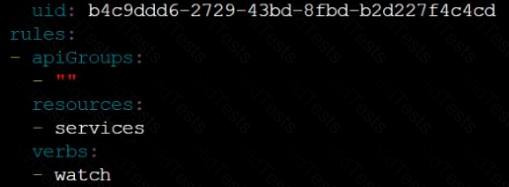 Text
Description automatically generated
Text
Description automatically generated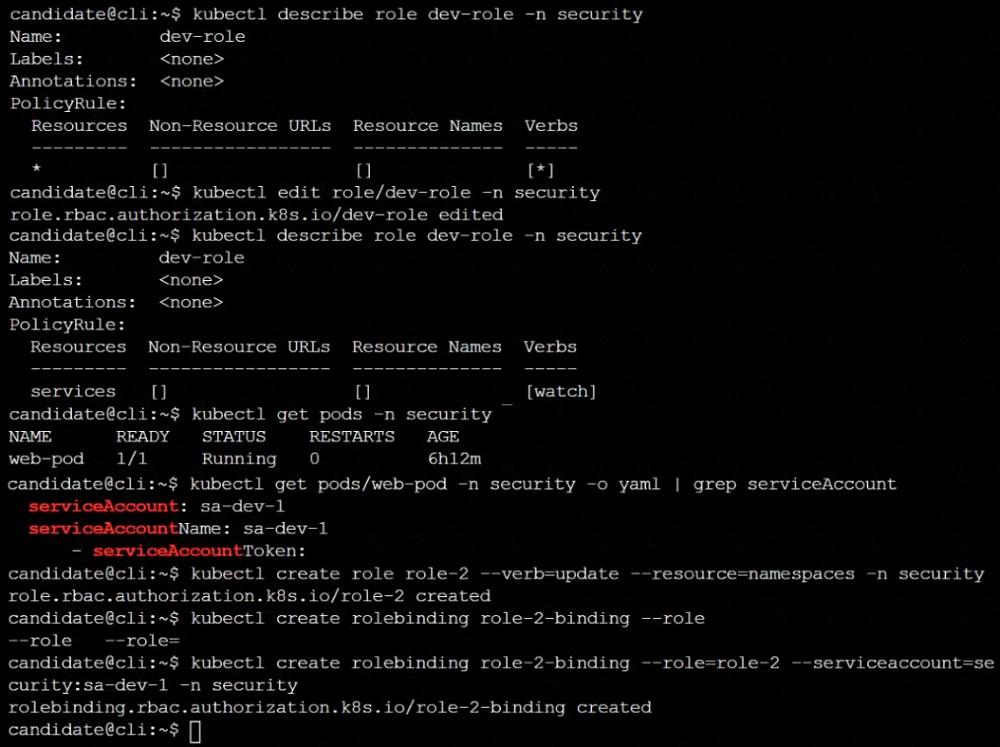 Text
Description automatically generated
Text
Description automatically generated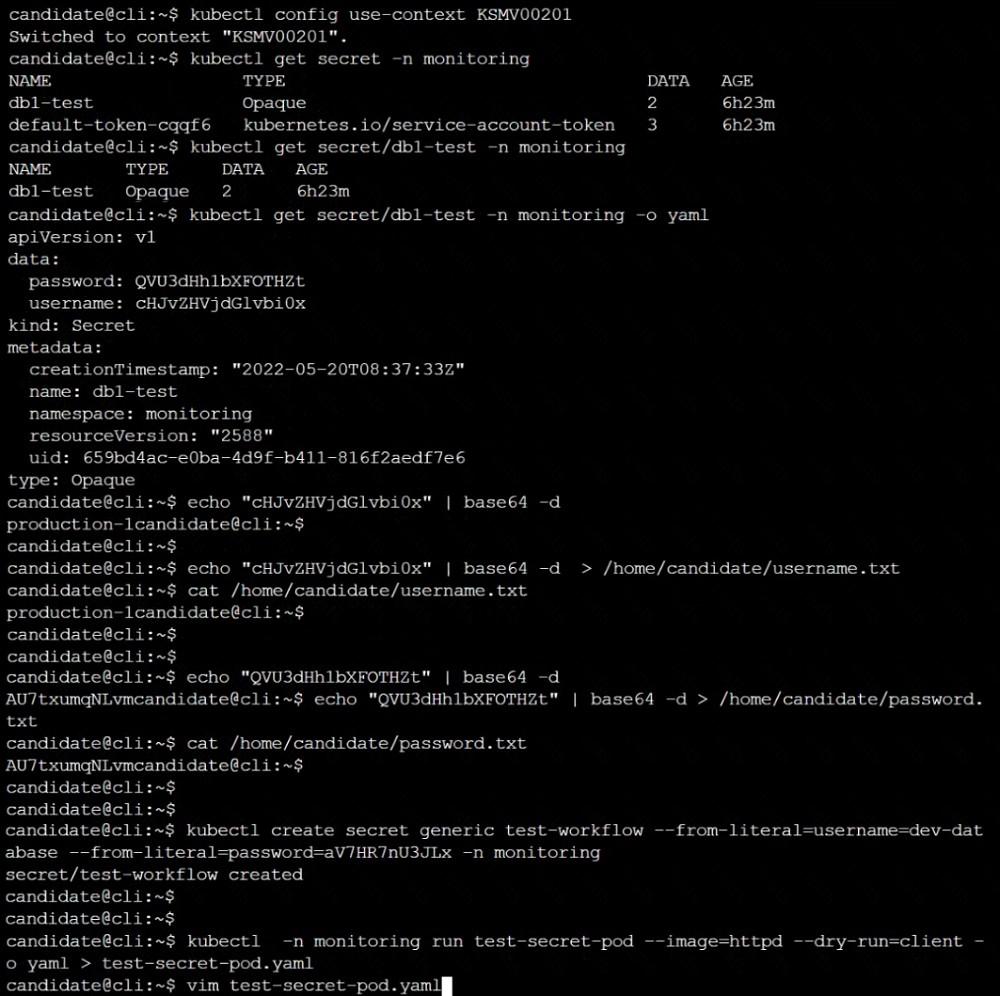 Text
Description automatically generated
Text
Description automatically generated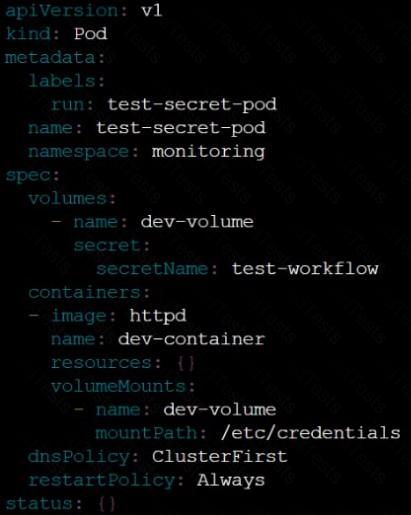 Text
Description automatically generated
Text
Description automatically generated
 Text
Description automatically generated
Text
Description automatically generated