You are evaluating the technical requirements tor Cluster2.
What is the minimum number of Azure Site Recovery Providers that you should install?
For each of the following statements, select Yes if the statement is true. Otherwise, select No.
NOTE: Each correct selection is worth one point.

Your network contains an Active Directory Domain Services (AD DS) domain. The domain contains two Windows Server Failover Cluster (WSFQ instances named Cluster1 and Ckister2. Cluster! hosts Hyper-V virtual machines. Cluster2 does NOT have any high availability roles configured.
You need to create a Storage Spaces Direct cluster in Cluster2 that will store the virtual machine hard disk files for Cluster1.
Which role should you configure for Cluster2? To answer, select the appropriate options in the answer area.
NOTE: Each correct selection is worth one point.
Note: This question is part of a series of questions that present the same scenario. Each question in the series contains a unique solution that might meet the stated goals. Some question sets might have more than one correct solution, while others might not have a correct solution.
After you answer a question in this section, you will NOT be able to return to it. As a result, these questions will not appear in the review screen.
You have a server named Server1 that runs Windows Server.
You need to ensure that only specific applications can modify the data in protected folders on Server1.
Solution: From Virus & threat protection, you configure Controlled folder access.
Does this meet the goal?
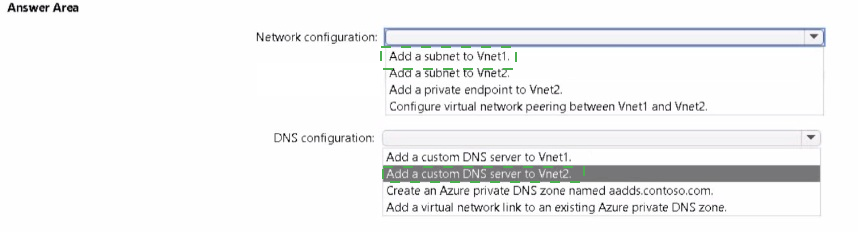
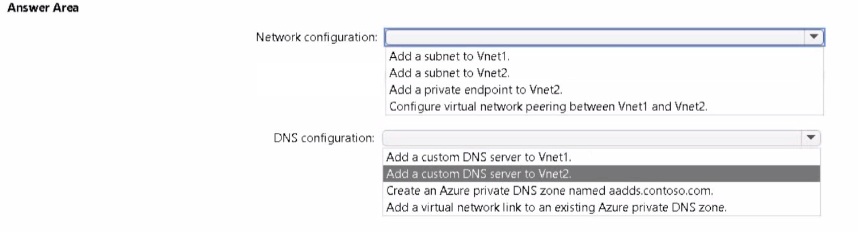
You have an Azure Active Directory Domain Services (Azure AD DS) domain named aadds.contoso.com.
You have an Azure virtual network named Vnet1. Vnet1 contains two virtual machines named VM1 and VM2 that run Windows Server. VMI and VM2 are joined to aadds.contoso.com.
You create a new Azure virtual network named Vnet2. You add a new server named VM3 to Vnet2.
When you attempt to join VM3 to aadds.contoso.com, you get an error message that the domain cannot be found.
You need to ensure that you can join VM3 toaadds.contoso.com.
You have a Site-to-Site VPN between an on-premises network and an Azure VPN gateway. BGP is disabled for the Site-to-Site VPN.
You have an Azure virtual network named Vnet1 that contains a subnet named Subnet1. Subnet1 contains a virtual machine named Server1.
You can connect to Server1 from the on-premises network.
You extend the address space of Vnet1. You add a subnet named Subnet2 to Vnet1. Subnet2 uses the extended address space. You deploy an Azure virtual machine named Server2 to Subnet2.
You cannot connect to Server2 from the on-premises network. Server1 can connect to Server2.
You need to ensure that you can connect to Subnet2 from the on-premises network.
What should you do?
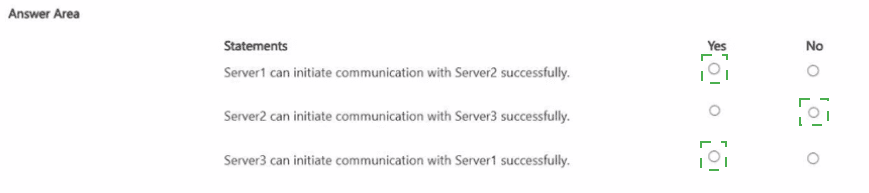
Your network contains an on-premises Active Directory Domain Services (AD DS) domain. The domain contains the servers shown in the following table.
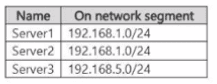
For each server. Windows Defender Firewall is configured to allow only communication between servers on the same segment. Server! has the following connection security rule:
• Name: Rule1
• Rule type: Isolation
• Requirement: Require authentication for inbound connections and request authentication for outbound connections
• Authentication method: Computer (Kerberos V5)
• Profile: Domain. Private. Public
Server2 does not have any connection security rules.
Server3 has the following connection security rule:
• Name: Rute3
• Rule type: Server-to-server
• Endpoints:
o Computers in Endpoint 1:192.168.50/24
o Computers in Endpoint 2: 192.168.1.0/24
• Requirement Request authentication (or inbound and outbound connections
• Authentication method: Computer (Kerberos V5)
• Profile: Domain. Private. Public
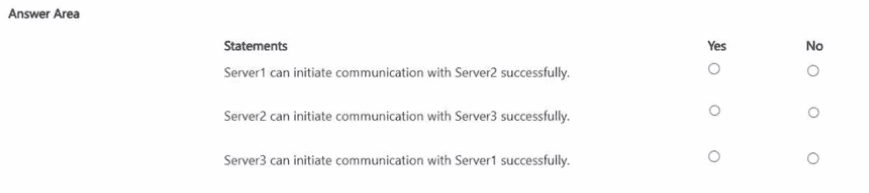
For each of the following statements, select Yes if the statement is true. Otherwise, select No.
NOTE: Each correct selection is worth one point.
Note: This question is part of a series of questions that present the same scenario. Each question in the series contains a unique solution that might meet the stated goals. Some question sets might have more than one correct solution, while others might not have a correct solution.
After you answer a question in this section, you will NOT be able to return to it. As a result, these questions will not appear in the review screen.
You have a failover cluster named Cluster1 that hosts an application named App1.
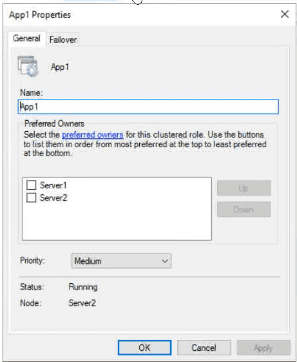
The General tab in App1 Properties is shown in the General exhibit. (Click the General tab.)
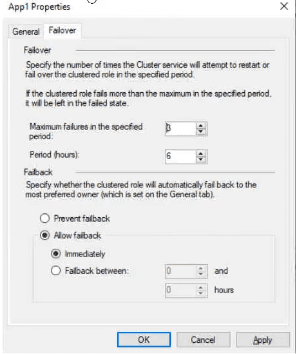
The Failover tab in App1 Properties is shown in the Failover exhibit. (Click the Failover tab.)
Server1 shuts down unexpectedly.
You need to ensure that when you start Server1, App1 continues to run on Server2.
Solution: You increase Maximum failures in the specified period for the App1 cluster role.
Does this meet the goal?
Your on-premises datacenter contains a server named Server1 that runs Windows Server. You install the System Insights feature on Server1.
You discover that some of the System Insights capabilities are NOT installed.
Which two capabilities should be installed manually on Server1? Each correct answer presents part of the solution. NOTE: Each correct selection is worth one point.
You have 100 Azure virtual machines that run Windows Server. The virtual machines are onboarded to Microsoft Defender for Cloud.
You need to shut down a virtual machine automatically if Microsoft Defender for Cloud generates the "Antimalware disabled in the virtual machine" alert for the virtual machine.
What should you use in Microsoft Defender for Cloud?



 Text
Description automatically generated
Text
Description automatically generated