What is the recommended procedure for upgrading a major TMOS release on a BIG-IP platform?
-- Exhibit –
-- Exhibit --
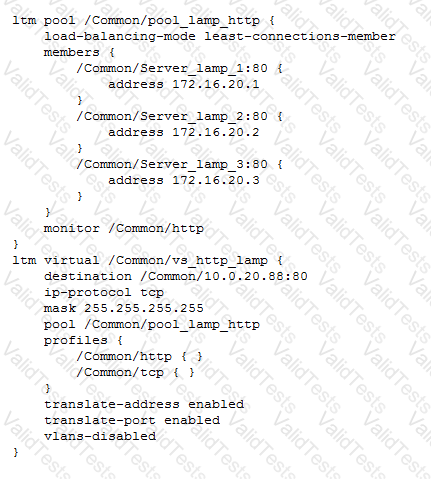
Refer to the exhibit.
Users report that a web application works incorrectly. Sometimes contextual data displayed on the web pages is accurate; other times it is inaccurate.
The LTM administrator looks at the connection table with a filter on one of the client IP addresses currently connected using the command "tmsh show sys connection cs-client-addr 10.0.20.1"
with the following results:
10.0.20.1:60048 10.0.20.88:80 10.0.20.1:60048 172.16.20.1:80 tcp 3 (tmm: 0)
10.0.20.1:60050 10.0.20.88:80 10.0.20.1:60050 172.16.20.3:80 tcp 3 (tmm: 0)
10.0.20.1:60047 10.0.20.88:80 10.0.20.1:60047 172.16.20.2:80 tcp 3 (tmm: 0)
10.0.20.1:60049 10.0.20.88:80 10.0.20.1:60049 172.16.20.1:80 tcp 3 (tmm: 0)
What is the solution to the problem?
An LTM Specialist configures two LTM devices in a high-availability pair with trusts established and device groups configured properly using network failover. After several months, the LTM Specialist notices that changes made to one LTM device do NOT cause the synchronization status to update to "changes pending," and this device does NOT synchronize with the device group.
Which two steps should the LTM Specialist take to identify the issue? (Choose two.)
-- Exhibit –
-- Exhibit --
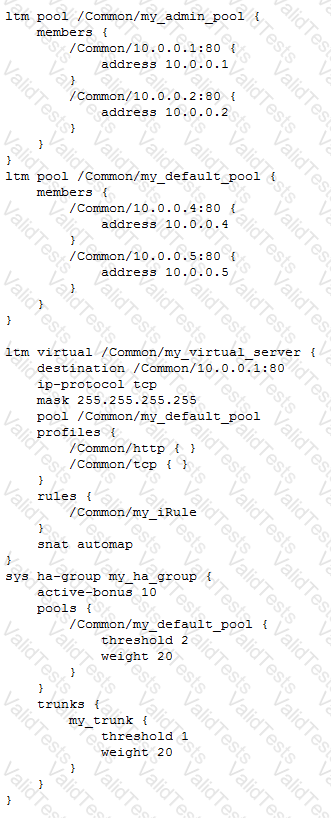
Refer to the exhibit.
A pair of LTM devices is configured for HA.
What happens if the pool member server with IP address 10.0.0.4 becomes totally unresponsive to the active LTM device, but is still responsive to the standby LTM device?
-- Exhibit –
-- Exhibit --
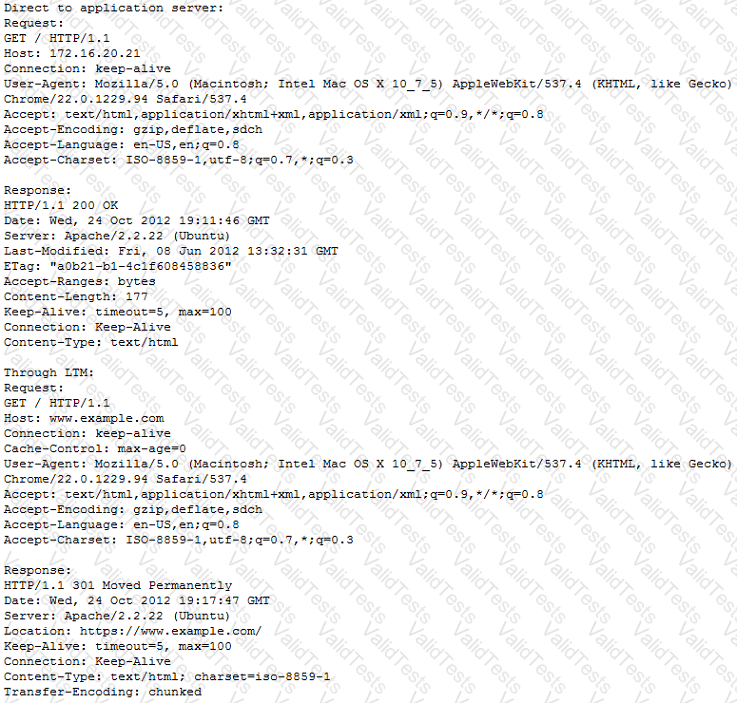
Refer to the exhibits.
An LTM Specialist configures a virtual server for an internal application to perform client-side encryption while allowing the server-side traffic to be unencrypted. Application users report that images are NOT loading through the virtual server; however, images load when going directly to the server.
What should the LTM Specialist configure to allow the images to load through the virtual server?
-- Exhibit --
-- Exhibit --
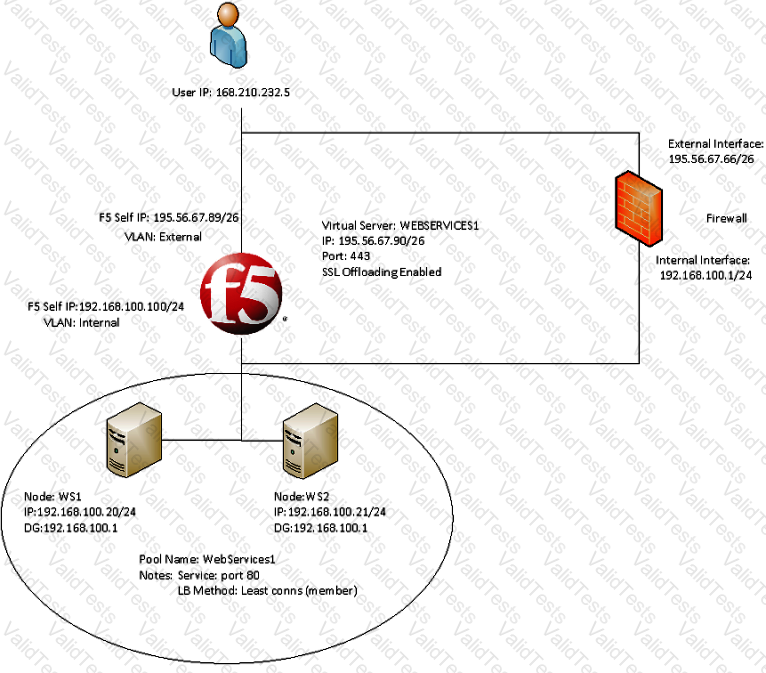
Refer to the exhibit.
A company uses a complex piece of client software that connects to one or more virtual servers (VS) hosted on an LTM device. The client software is experiencing issues. An LTM Specialist must determine the cause of the problem.
The LTM Specialist is seeing a client source IP of 168.210.232.5 in the tcpdump. However, the client source IP is actually 10.123.17.12.
Why does the IP address of 10.123.17.12 fail to appear in the tcpdump?
The LTM Specialist is writing a custom HTTP monitor for a web application and has viewed the content by accessing the site directly via their browser. The monitor continually fails. The monitor configuration is:
ltm monitor http /Common/exampleComMonitor {
defaults-from /Common/http
destination *:*
interval 5
recv "Recent Searches"
send "GET /app/feed/current\?uid=20145 HTTP/1.1\\r\\nHost: www.example.com\\r\\nAccept-EncodinG. gzip, deflate\\r\\nConnection: close\\r\\n\\r\\n"
time-until-up 0
timeout 16
}
A trace shows the following request and response:
Request:
GET /app/feed/current?uid=20145 HTTP/1.1
Host www.example.com
Accept-Encoding gzip, deflate
Connection: close
Response:
HTTP/1.1 302 Moved Temporarily
Date Wed, 17 Oct 2012 18:45:52 GMT
Server Apache
Location https://example.com/login.jsp
Content-Encoding gzip
Content-Type text/html;charset=UTF-8
Set-CookiE. JSESSIONID=261EFFBDA8EC3036FBCC22D991AC6835; Path=/app/feed/current?uid=20145
What is the problem?
An LTM device supports two power supplies. The value of the BigDB key "platform.powersupplymonitor" is equal to enable.
Where would the error message be visible if one of the power supplies fails or is NOT plugged in?
-- Exhibit –

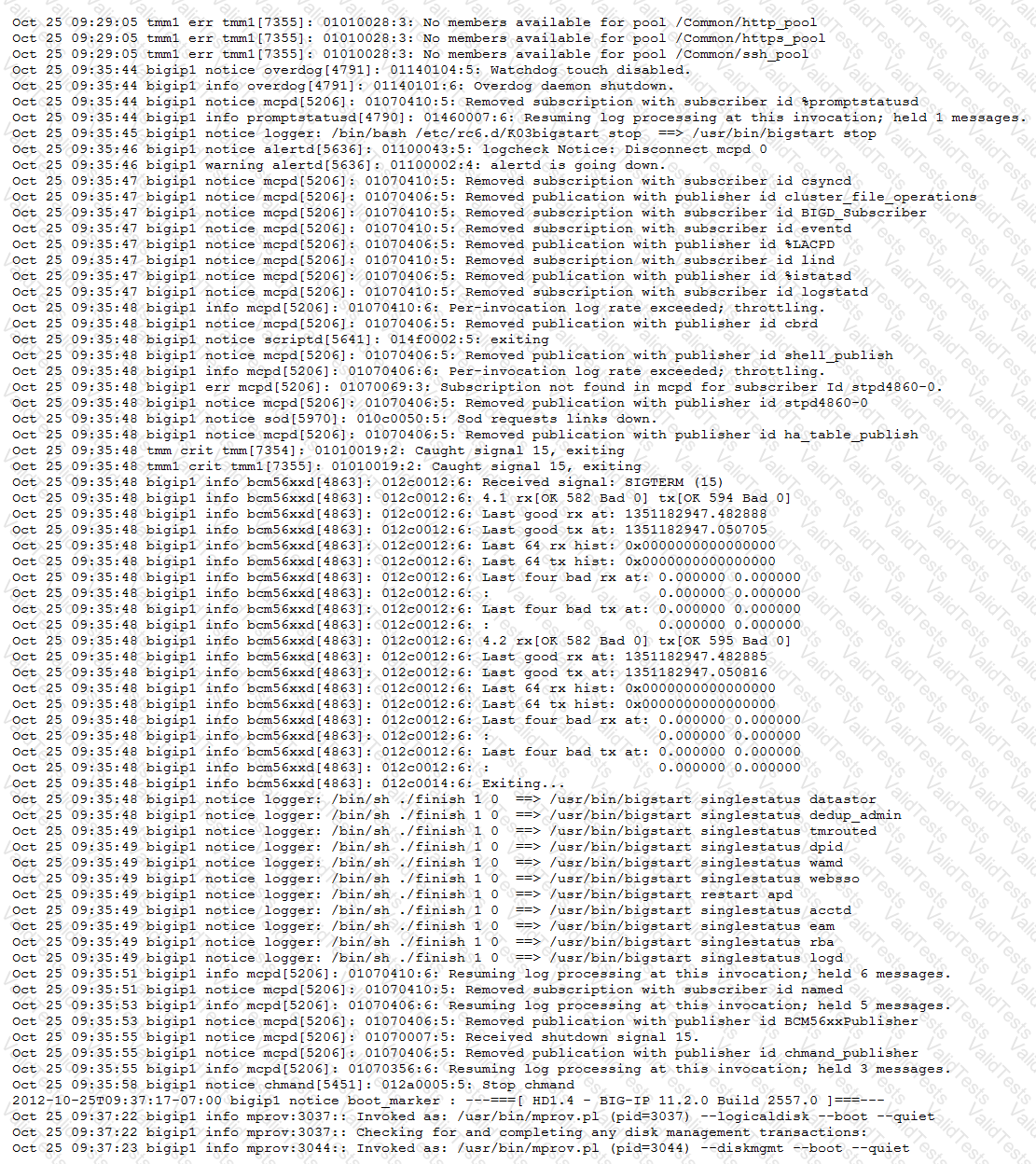
-- Exhibit --
Refer to the exhibits.
An LTM Specialist uses the information in the logs to determine the cause of a failover event in a high-availability (HA) pair.
What caused the failover?
There are three servers in the pool: 172.16.20.1, 172.16.20.2, and 172.16.20.3, with the virtual IP address 10.0.20.88.
A user CANNOT connect to an HTTP application. To understand the problem and find a solution, the LTM Specialist runs two concurrent traces on the LTM device, with the following results:
Trace on client side:
tcpdump: verbose output suppressed, use -v or -vv for full protocol decode
listening on 0.0, link-type EN10MB (Ethernet), capture size 96 bytes
22:22:07.423759 IP 172.16.20.100.53875 > 10.0.20.88.80: S 998346084:998346084(0) win 5840
22:22:07.424056 IP 10.0.20.88.80 > 172.16.20.100.53875: S 4671780:4671780(0) ack 998346085 win 4380
22:22:07.424776 IP 172.16.20.100.53875 > 10.0.20.88.80: . ack 1 win 365
22:22:07.424790 IP 172.16.20.100.53875 > 10.0.20.88.80: P 1:149(148) ack 1 win 365
22:22:07.424891 IP 10.0.20.88.80 > 172.16.20.100.53875: . ack 149 win 4528
22:22:12.024850 IP 10.0.20.88.80 > 172.16.20.100.53875: R 1:1(0) ack 149 win 4528
6 packets captured
6 packets received by filter
0 packets dropped by kernel
Trace on server side:
tcpdump: verbose output suppressed, use -v or -vv for full protocol decode
listening on internal, link-type EN10MB (Ethernet), capture size 96 bytes
22:22:07.424881 IP 172.16.20.100.53875 > 172.16.20.2.80: S 51116678:51116678(0) win 4380
22:22:08.424893 IP 172.16.20.100.53875 > 172.16.20.2.80: S 51116678:51116678(0) win 4380
22:22:09.625082 IP 172.16.20.100.53875 > 172.16.20.2.80: S 51116678:51116678(0) win 4380
22:22:10.825194 IP 172.16.20.100.53875 > 172.16.20.2.80: S 51116678:51116678(0) win 4380
4 packets captured
4 packets received by filter
0 packets dropped by kernel
What should the LTM Specialist do to solve the problem?


