An LTM device has a virtual server configured as a Performance Layer 4 virtual listening on 0.0.0.0:0 to perform routing of packets to an upstream router. The client machine at IP address 192.168.0.4 is attempting to contact a host upstream of the LTM device on IP address 10.0.0.99.
The network flow is asymmetrical, and the following TCP capture displays:
# tcpdump -nnni 0.0 'host 192.168.0.4 and host 10.0.0.99'
tcpdump: verbose output suppressed, use -v or -vv for full protocol decode
listening on 0.0, link-type EN10MB (Ethernet), capture size 96 bytes
05:07:55.499954 IP 192.168.0.4.35345 > 10.0.0.99.443: S 3205656213:3205656213(0) ack 3267995082 win 1480
05:07:55.499983 IP 10.0.0.99.443 > 192.168.0.4.35345: R 1:1(0) ack 1 win 0
05:07:56.499960 IP 192.168.0.4.35345 > 10.0.0.99.443: S 3205656213:3205656213(0) ack 3267995082 win 1480
05:07:56.499990 IP 10.0.0.99.443 > 192.168.0.4.35345: R 1:1(0) ack 1 win 0
4 packets captured
Which option within the fastL4 profile needs to be enabled by the LTM Specialist to prevent the LTM device from rejecting the flow?
-- Exhibit –
-- Exhibit --
Refer to the exhibit.
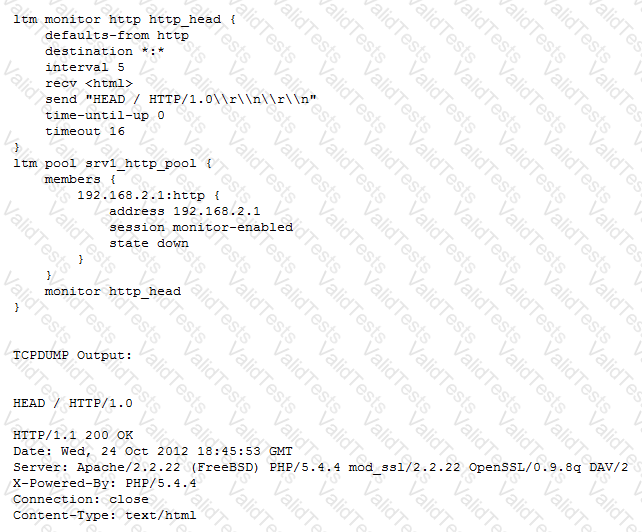
An LTM Specialist is troubleshooting a new HTTP monitor on a pool. The pool member is functioning correctly when accessed directly through a browser, although the monitor is marking the member as down. As part of the troubleshooting, the LTM Specialist has captured the monitor traffic via tcpdump.
How should the LTM Specialist resolve this issue?
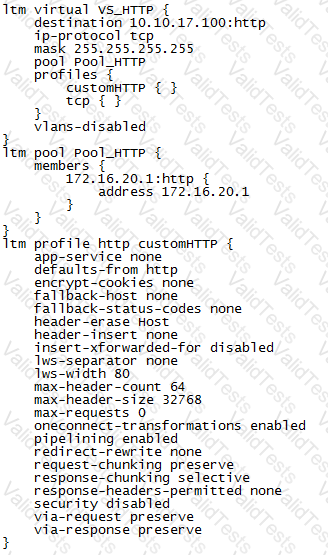
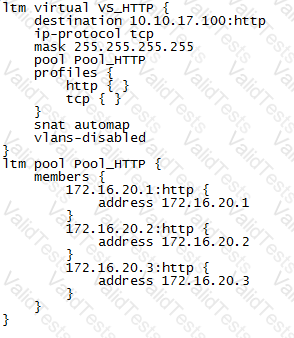
An LTM Specialist is troubleshooting an issue with a new virtual server. When connecting through the virtual server, clients receive the message "The connection was reset" in the browser, although connections directly to the pool member show the application is functioning correctly.
ltm pool srv1_https_pool {
members {
192.168.2.1:https{
address 192.168.2.1
}
}
}
ltm virtual https_example_vs {
destination 192.168.1.155:https
ip-protocol tcp
mask 255.255.255.255
pool srv1_https_pool
profiles {
http { }
tcp { }
}
snat automap
vlans-disabled
}
How should the LTM Specialist resolve this issue?
An LTM Specialist troubleshooting an issue looks at the following /var/log/ltm entries:
Oct 2 04:52:42 slot1/tmm7 crit tmm7[21734]: 01010201:2: Inet port exhaustion on 10.143.109.5 to 10.143.147.150:53 (proto 17)
Oct 2 05:37:16 slot1/tmm7 crit tmm7[21734]: 01010201:2: Inet port exhaustion on 10.143.109.5 to 10.143.147.150:53 (proto 17)
Oct 2 05:57:32 slot1/tmm2 crit tmm2[21729]: 01010201:2: Inet port exhaustion on 10.143.109.5 to 10.143.147.150:53 (proto 17)
Oct 2 06:30:03 slot1/tmm7 crit tmm7[21734]: 01010201:2: Inet port exhaustion on 10.143.109.5 to 10.143.147.150:53 (proto 17)
Oct 2 06:37:44 slot1/tmm2 crit tmm2[21729]: 01010201:2: Inet port exhaustion on 10.143.109.5 to 10.143.147.150:53 (proto 17)
Oct 2 06:47:05 slot1/tmm5 crit tmm5[21732]: 01010201:2: Inet port exhaustion on 10.143.109.5 to 10.143.147.150:53 (proto 17)
Which configuration item should the LTM Specialist review to fix the issue?
-- Exhibit –


-- Exhibit --
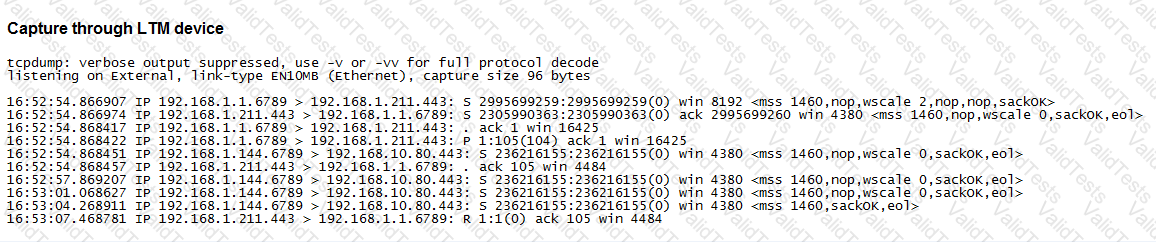
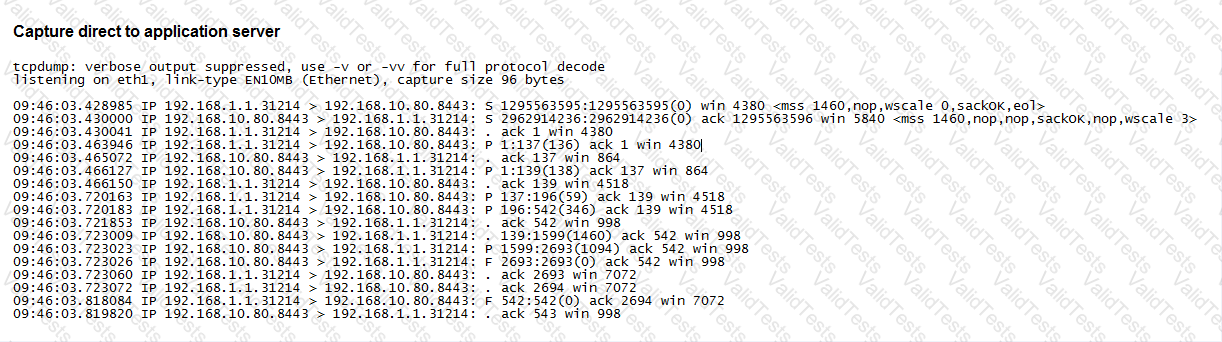
Refer to the exhibits.
An LTM Specialist is troubleshooting an application configured on an LTM device on a one-armed configuration. The application is NOT working through the LTM device but does work when accessed directly via the application servers. The virtual server 192.168.1.211:443 is configured to SNAT using the address 192.168.1.144 and references a pool with the member 192.168.10.80:443. No Client or Server SSL profiles are associated. The LTM Specialist has collected two traffic captures to help determine the issue.
What is the problem with the configuration on the LTM device?
A new web application is hosted at www.example.net, but some clients are still pointing to the legacy web application at www.example.com.
Which iRule will allow clients referencing www.example.com to access the new application?
An LTM Specialist is troubleshooting an issue with a new virtual server. When connecting through the virtual server, clients receive the message "Unable to connect" in the browser, although connections directly to the pool member show the application is functioning correctly. The LTM device configuration is:
ltm virtual /Common/vs_https {
destination /Common/10.10.1.110:443
ip-protocol udp
mask 255.255.255.255
pool /Common/pool_https
profiles {
/Common/udp { }
}
translate-address enabled
translate-port enabled
vlans-disabled
}
ltm pool /Common/pool_https {
members {
/Common/172.16.20.1:443 {
address 172.16.20.1
}
}
}
What issue is the LTM Specialist experiencing?


