Determine the complexity of the data and/or transactions identified in the following scenario:
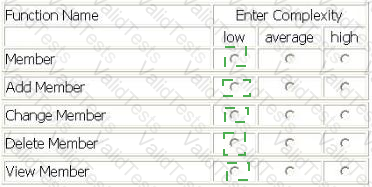
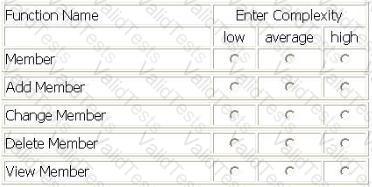
The Library Information System (LIS) user Adds new member information by entering the member code, the member name, the telephone number, the address and the starting membership date. Information is stored and maintained in the Member logical file.
The LIS user Changes some member information or Deletes it, by entering the member code. The LIS retrieves all the information related to the member code and displays it on the screen. Then, the LIS user Changes all the data displayed, with the exception of the member code, or completely Deletes the member information. If the member code is not found in the Member logical file, then an error message is displayed to the user.
The LIS user Views member information by entering the member code and/or the member name on the screen. All the member data is retrieved and displayed in the search results. If the member code and/or the member name is not found in the Member logical file, then an error message is displayed to the user.
All functions are activated by pressing the OK button.
Determine the complexity for the following functions:
Select the complexity for each function:
A Corporate Finance application is being developed.
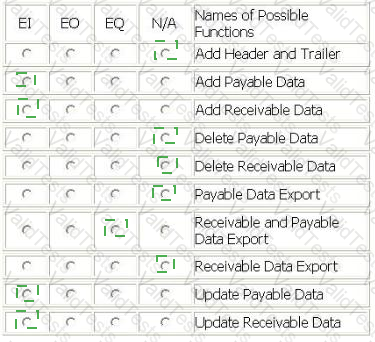
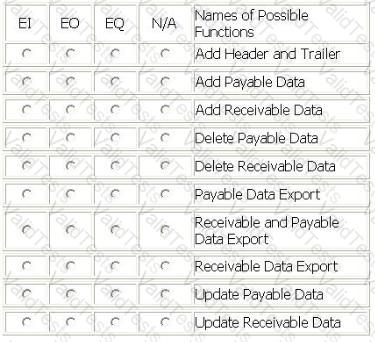
The application adds or updates the Receivable logical file and the Payable logical file. The user requires that this information is sent to the Accounts application to keep accounting records consistent. The combined receivable and payable data is sent to the Accounts application daily at 8:00 PM.
When implementing a solution to send the receivable and payable information, it was decided to include a header and trailer record with the accounts information. These records are used by the Corporate Finance user to ensure that everything was technically correct when transmitting the file.
From the Names of Possible Functions listed identify the transactional functions for the Corporate Finance application. Select N/A if a Name of Possible Function does not apply.
Identify the functions used:
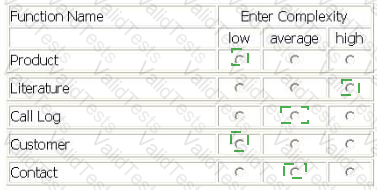
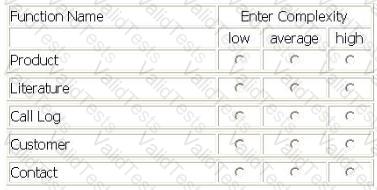
A Call Center (CC) application is being enhanced to track two new pieces of Information. The CC will reference the two new DETs in five modified data functions.
Productlogical file prior to the enhancement had 2 RETs and 25 DETs, the CC application had previously referenced 12 of those DETs.
Literaturelogical file previously referenced 5 RETs and 19 DETs. The two new DETs are being added to another RET NOT previously referenced.
Call Log logical file prior to the enhancement had 2 RETs and 19 DETs, the CC previously referenced all the DETs.
Customerlogical file prior to the enhancement had 1 RET and 36 DETs, the CC previously referenced only 25 of the DETs.
Contactlogical file prior to the enhancement had 1 RET and 68 DETs, the CC previously referenced all DETs.
Determine the complexity of the following functions:
Select the complexity for each function:
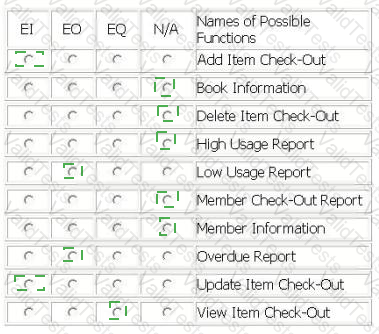
ITEM CHECK-OUT SCREEN
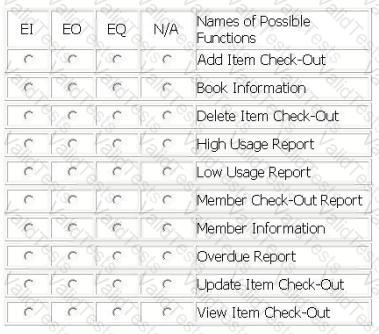
Library employees use the Item Check-Out screen when a member is ready check out the book(s) and/or magazine(s) he wishes to borrow. The library employee enters the member id number, and when the employee exits the member id attribute, if the member id is valid, the member name is retrieved from the Member Information logical file and displayed in the member name attribute. The library employee enters the item type (b for book, m for magazine) and the item code; the item title is retrieved from the Book Information logical file and displayed in the item title attribute. The library employee then enters the lending date and the due date, and presses the Add button. The information is stored in the Check-Out logical file.
Library employees use the Item Check-Out screen to update the due date of a book or magazine if a member requests additional lending time. The employee enters the member id number, and when the employee exits the member id attribute, if the member id is valid, the member name is retrieved from the Member Information logical file and displayed in the member name attribute, the library employee enters the item type (b for book, m for magazine) and the item code; the item title is retrieved from the Book Information logical file and displayed in the item title attribute and the lending date and due date are retrieved from the Check-Out logical file. The library employee then updates the due date, and presses the Update button. The new due date is stored in the Check-Out logical file.
The head librarian receives two reports from the Library Check-Out application. The first report is the Overdue Report which is a list of overdue items categorized into < 30 days overdue, 30 - 90 days overdue and > 90 days overdue.
The second report is the Low Usage Report that calculates which fiction books have not been checked out in the last 24 months and lists the title of those books. This report is run on demand. A High Usage Report with the number of times an item has been checked out has been put on hold and will not be released.
A proposed Member Check-Out Report with a list of books checked-out and recommended titles will not be developed until privacy issues have been resolved.
From the Names of Possible Functions listed identify the transactional functions for the current Library Check-Out application. Select N/A if a Name of Possible Function does not apply.
Identify the functions used:
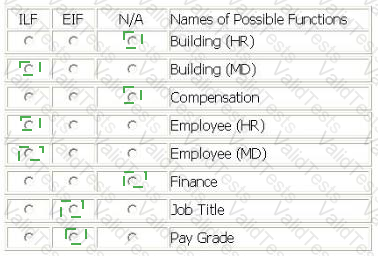
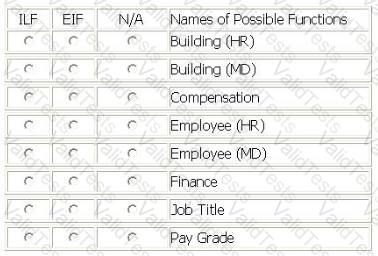
An enhancement project involves both the Human Resource (HR) application and the Mail Distribution (MD) application.
The HR application maintains all data elements in the Employee logical file. The users of the HR application require validations for employee pay grade and employee job title in the Employee logical file. The employee pay grade will be validated against the Pay Grade logical file which is maintained by the Finance application. The employee job title will be validated against the Job Title logical file which is maintained by the Compensation application.
The MD application maintains two data elements in the Employee logical file. The users of the MD application require additional validations for building and floor within the employee mailing address. The building and floor will be validated against the Building logical file which is a new file being developed by this project.
The users will use the MD application to maintain the Building logical file. The users of the MD application also maintain building and floor in the Employee logical file.
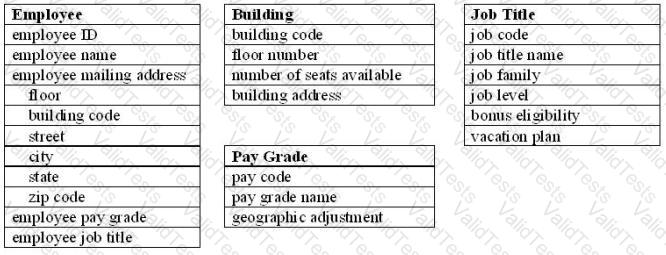
From the Names of Possible Functions listed identify the data functions for the HR application and the MD application. Select N/A if a Name of Possible Function does not apply.
Identify the data functions used:
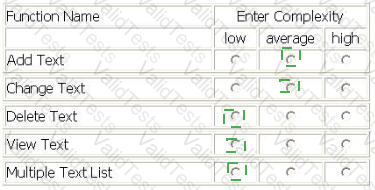
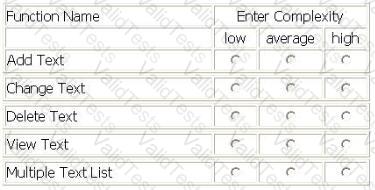
LIBRARY INFORMATION SYSTEM (LIS) - REGISTER A TEXT
The LIS user Adds data related to a new text in the Library, by entering ISBN code, title, author, publisher, series, typology, publishing date and acquisition date on the screen and pressing the OK button. All data entered is maintained in the Text logical file. The ISBN code and the publisher are validated against the Publishers Guide logical file.
The LIS user Views data related to an existing text in the Library by entering the ISBN code, title, author or publisher on a selection screen.
If only one text matches the selection criteria, the View Text screen is displayed. ISBN code, title, author, publisher, series, typology, publishing date and acquisition date are displayed.
If a record in the Text logical file does not match the criteria entered, an error message is displayed to the user.
If more than one record matches the criteria, the Multiple Text List List is displayed. For each of the texts that matches the criteria the following attributes are shown: ISBN code, title, author, publishing date and the percentage match to the criteria. The LIS user can display the View Text screen by selecting a single text and pressing the OK button.
The LIS user Changes Text text data by changing any values on the View Text screen with the exception of the ISBN code and pressing the Change button. If the publisher is changed it is validated against the Publishers Guide logical file.
The user Deletes text data from the Text logical file by entering on the screen the ISBN code of the text and pressing the Delete button.
Determine the complexity of the following functions:
Select the complexity for each function:
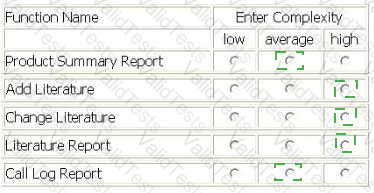
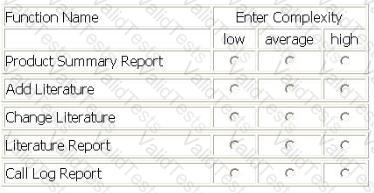
A Call Center (CC) application is being enhanced to maintain and display 2 new pieces of information. The CC will add the 2 new DETs to all 5 of the modified transactional functions.
The Product Summary Report had 2 FTRs and 12 DETs.
Add Literature and Change Literature had 4 FTRs and 19 DETs.
The Literature Report (no calculations or derived data) had 4 FTRs and 19 DETs.
The Call Log Report (no calculations or derived data) had 1 FTRs and 19 DETs.
What is the complexity of the transactional functions after the enhancement?
Select the complexity for each function:
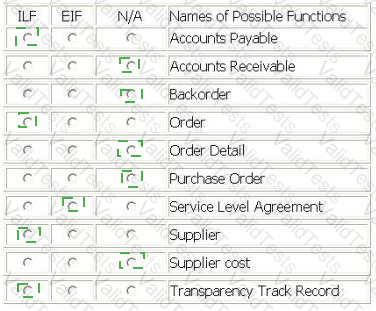
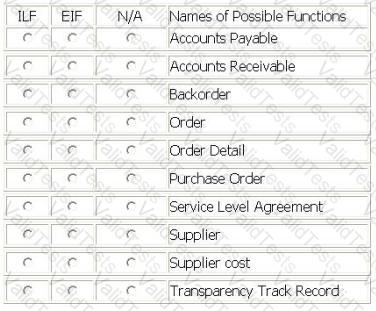
The Procurement application requires the ability to maintain information on each new supplier. The information that must be maintained on the Supplier logical file includes:
Supplier id
Supplier name
Supplier mailing address
Supplier skill
As a result of creating a new supplier record, the supplier's annual costs should be automatically calculated and saved with the other supplier information.
Orders are maintained in the Order logical file by the Procurement application. The Accounts Payable logical file is updated for each order. Line items for each order are stored in the Order Detail subgroup of the order logical file.
Backorders and delivery errors are tracked by the Procurement application on the Transparency Track Record logical file. This file is compared to each supplier's values in the Service Level Agreement logical file which is maintained by the Contract application. The Procurement application produces a report for the Legal Office of suppliers that are performing outside of their Service Level Agreement.
From the Names of Possible Functions listed identify the data functions for the Procurement application. Select N/A if a Name of Possible Function does not apply.
Identify the functions used.
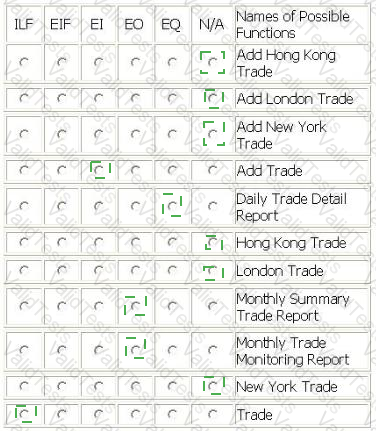
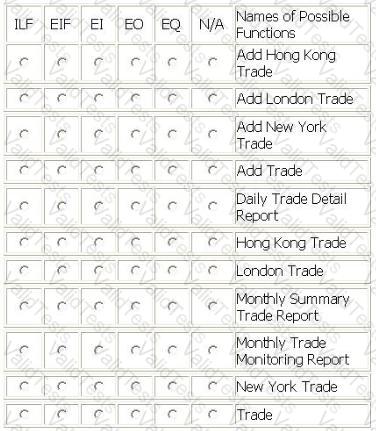
The Foreign Exchange System (FXS) allows banking operations to monitor trades processed from different foreign exchange trading systems which are located in London, New York and Hong Kong.
The Trade logical file is maintained using a series of batch jobs which copy each of the three foreign exchange data sets into FXS usable format. Once processed, the Add Trade batch function loads the data Into the Trade logical file and adds a date/time stamp.
A Daily Trade Detail report is produced listing all trades monitored. This report is sorted by trading location.
Two monthly reports are produced. A Monthly Summary Trade report is produced that contains summary trade numbers by trading location. A Monthly Trade Monitoring report is produced that lists all trades monitored, is sorted by trade date and contains a consolidated trade value.
From the Names of Possible Functions listed identify the base functional components for the FXS application. Select N/A if a Name of Possible Function Type does not apply.
Identify the functions used:
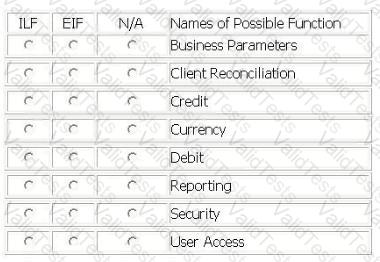
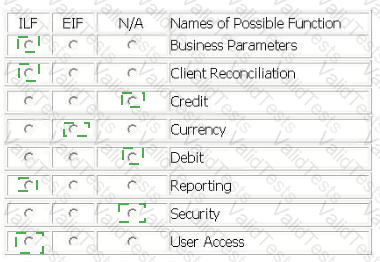
The Account Reconciliation Application (ARA) is used by banking operations to match credit (in) and debit (out) transactions within client accounts. Both credit and debit transactions are received from several other applications and stored as the Client Reconciliation logical file. ARA is capable of automatically matching transactions based on the Business Parameters logical file which is maintained by users in the ARA.
Access permissions in the User Access logical file are maintained by users in the ARA, and contain online user account permissions and approval levels.
The users can maintain their own report forms in the Reporting logical file. All reports use the Currency logical file, which is maintained by an external application, to convert the local payment currency to Euros.
From the Names of Possible Functions listed identify the data functions for the ARA. Select N/A if a Name of Possible Function does not apply.
Identify the functions used: