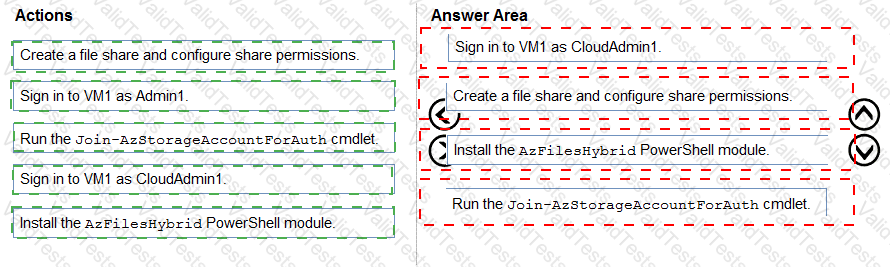
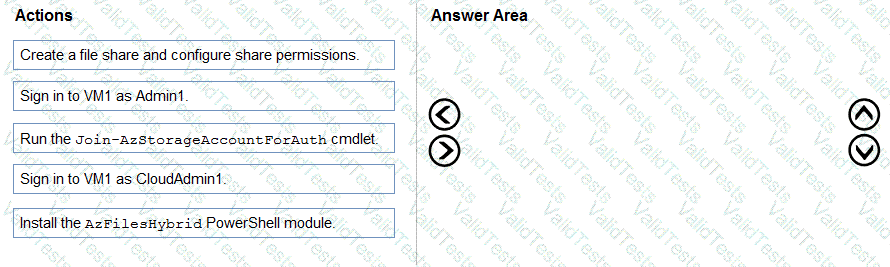
You need to ensure that you can implement user profile shares for the Boston office users. The solution must meet the user profile requirements.
Which four actions should you perform in sequence? To answer, move the appropriate actions from the list of actions to the answer area and arrange them in the correct order.
You need to recommend a DNS infrastructure that meet the performance requirements. What should you recommend? To answer, select the appropriate options in the answer area. NOTE: Each correct selection is worth one point.

You have an Azure Virtual Desktop deployment.
You need to monitor the deployment by using the Azure Virtual Desktop Insights solution in Azure Monitor.
What should you use as the Diagnostic settings destination for the host pool?
You have an Azure Virtual Desktop deployment that contains the resources shown in the following table.

You create the resources shown in the following table.

You need to meet following requirements:
• Back up the FSLogix profile containers used by HostPool1.
• Backup the data disks in HostPool2.
To which resources can you back up the profile containers and the data disks? To answer, select the appropriate options in the answer area.
NOTE: Each correct selection is worth one point.

You have a Windows Virtual Desktop host pool named Pool1 that runs Windows 10 Enterprise multi-session hosts.
You need to use Performance Monitor to troubleshoot a low frame quality issue that is affecting a current use session to Pool1.
What should you run to retrieve the user session ID?
You have an Azure Virtual Desktop deployment that contains a host pool. The pool has the following settings:
* Resource group: RG1
* Host pool name: Pool1
* Location: East US
* Host pool type: Pooled
The deployment contains the workspaces shown in the following table.

For Pool1, you plan to create a RemoteApp application group named AppGroup1.
In which workspaces can you register AppGroup1?
You have an Azure Virtual Desktop deployment that contains a host pool named Pooh.
Pool1 contains session hosts that run Windows 11 Enterprise and have Microsoft Teams installed.
Users connect to the session hosts by using client devices that run Windows 10 Enterprise.
You need to configure the session hosts and the client devices to meet the following requirements:
• Teams audio and video must be processed on the client devices.
• Hardware encoding must be enabled.
What should you do? To answer, drag the appropriate actions to the correct devices. Each action may be used once, more than once, or not at all. You may need to drag the split bar between panes or scroll to view content.
NOTE Each correct selection is worth one point.

You have a hybrid Azure Active Directory (Azure AD) tenant named contoso.com that contains the users shown in the following table.

You have an Azure Virtual Desktop host pool. All the session hosts have a folder named C:\Folder1.
You create an FSLogix Application Masking rule as shown in the following exhibit.

You create assignments for the Application Masking rule as shown in the following exhibit.

For each of the following statements, select Yes if the statement is true. Otherwise, select No.
NOTE: Each correct selection is worth one point.

Note: This question is part of a series of questions that present the same scenario. Each question in the series contains a unique solution that might meet the stated goals. Some question sets might have more than one correct solution, while others might not have a correct solution.
After you answer a question in this section, you will NOT be able to return to it. As a result, these questions will not appear in the review screen.
You have an Azure Virtual Desktop deployment
You need to ensure that users are signed out automatically when they disconnect from a session.
Solution: From the Local Group Policy Editor, you configure the Connections settings.
Does this meet the goal?
You have an Azure Virtual Desktop deployment.
You plan to use just-in-time (JIT) VM access to manage session host virtual machines.
You need to recommend license requirements for JIT VM access. Your solution must minimize costs.
Which license should you recommend?