You have a Microsoft 365 E5 subscription that contains a Microsoft Teams team named Confidential. You need to ensure that guest users cannot be added to the Confidential team.
How should you complete the PowerShell script? To answer, drag the appropriate values to the correct targets. Each value may be used once, more than once, or not at all. You may need to drag the split bar between panes or scroll to view content.

Your company has a Microsoft 365 subscription.
All users have computers that run Windows 10. The computers are joined to Azure Active Directory (Azure AD) and enrolled in Microsoft Intune. All the users are standard users.
The company plans to start using Microsoft Teams.
You need to deploy the Microsoft Teams client to the computers.
What should you use?
Your company has a custom Microsoft Teams app named App1.
You need to deploy App1. The solution must ensure that App1 appears as the first item on the app bar of the Microsoft Teams client.
Which four actions should you perform in sequence? To answer, move the actions from the list of actions to the answer area and arrange them in the correct order.

You have a Microsoft 365 E5 subscription that uses Microsoft Teams
Users report poor call quality.
You need to identify the source of the call quality issues and which locations are affected.
What should you do first?
Your company has a Microsoft 365 subscription.
The company deploys Microsoft Teams for 5,000 users.
You need to generate a report that contains the following information:
The number of active Microsoft Teams users during the last seven days.
The number of active team channels during the last seven days.
Which usage reports should you run?
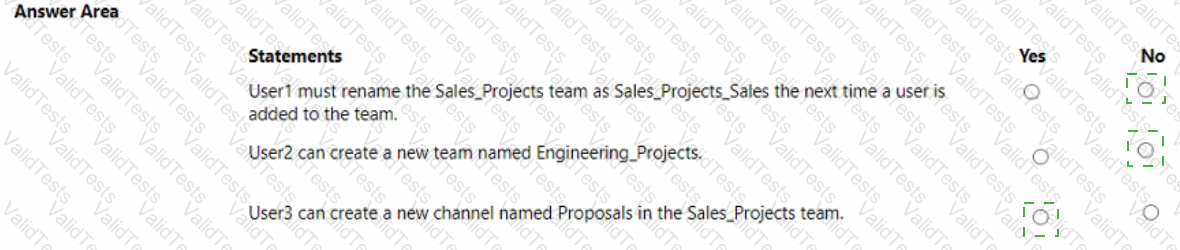
You have a Microsoft 365 subscription that uses Microsoft Teams.
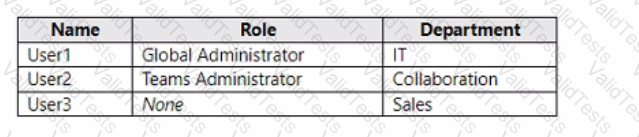
You have the users shown in the following table.
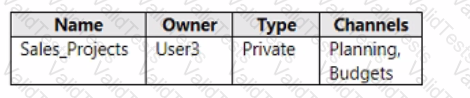
You have the team shown in the following table.
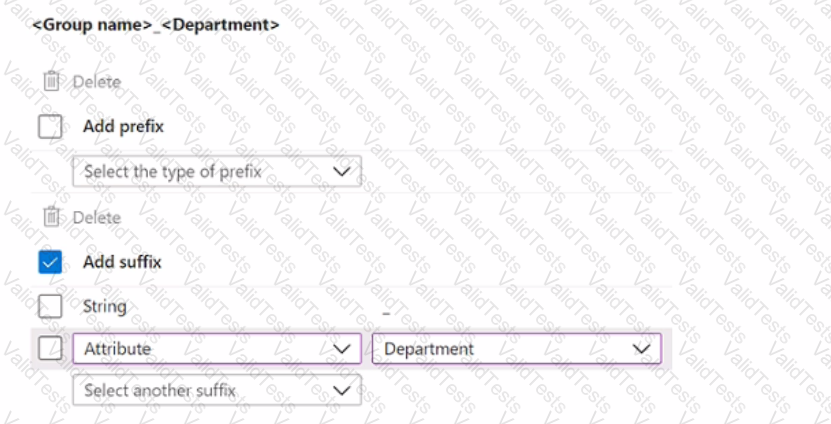
You create a new group naming policy as shown in the following exhibit.
Group naming policy
The Microsoft 365 groups naming policy allows you to add a specific prefix and/or suffix to the group name and alias of any Microsoft 365 group created by users. For example:
Current policy
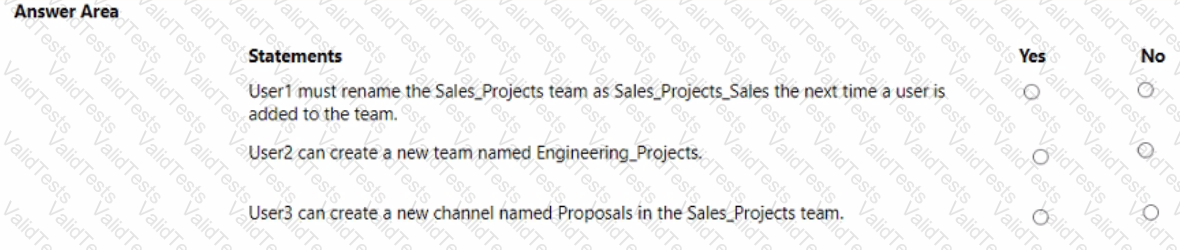
For each of the following statements, select Yes if the statement is true. Otherwise, select No.
NOTE: Each correct selection is worth one point.
You have a Microsoft 365 E5 subscription that uses Microsoft Teams.
You need to ensure that the users in your organization can communicate with external users who use Teams for personal use.
How should you complete the PowerShell cmdlets? To answer, drag the appropriate values to the correct targets. Each value may be used once, more than once, or not at all. You may need to drag the split bar between panes or scroll to view content.
NOTE: Each correct selection is worth one point.

Your company uses Teams.
You need to configure Teams to meet the following requirements:
• The Teams client must display the Avatars app for all users.
• The Games for Work app must be unavailable in the Teams client
• Users must be prevented from unpinning and rearranging apps in the Teams client
Which type of policy should you configure for each requirement? To answer, drag the appropriate policy types to the correct requirements. Each policy type may be used once, more than once, or not at all. You may need to drag the split bar between panes or scroll to view content.
NOTE: Each correct selection is worth one point.

Your company has a Microsoft Office 365 subscription.
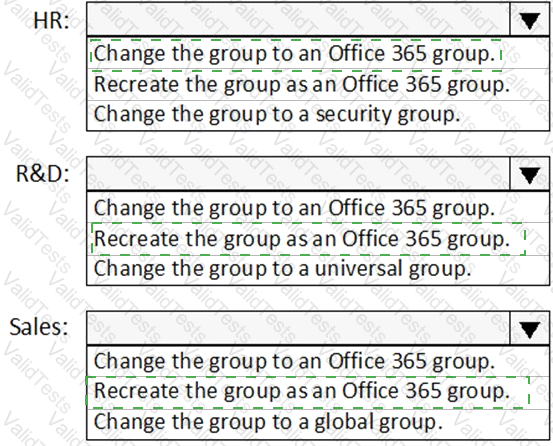
The company has three departments. Each department contains a group as shown in the following table.
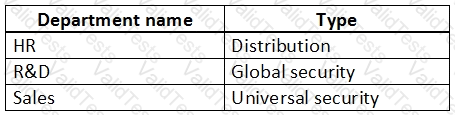
You plan to create a team for each group.
You need to ensure that a team can be created for each group. The solution must minimize administrative effort.
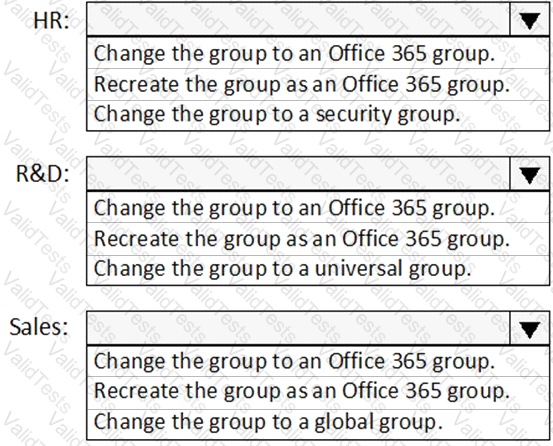
What should you do to each group? To answer, select the appropriate options in the answer area.
NOTE: Each correct selection is worth one point.
You have a Microsoft 365 subscription that uses Teams.
You have a meeting room that contains a Teams Rooms device and a Surface Hub.
You have the following configuration file for the Teams Rooms device.

For each of the following statements, select Yes if True. Otherwise select No. NOTE: Each correct selection is worth one point.