You need to implement the planned changes for the marketing department.
Which two actions should you perform? Each correct answer presents part of the solution.
NOTE: Each correct selection is worth one point.
You need to configure a policy for the IT department to meet the technical requirements for training videos.
How should you complete the PowerShell cmdlet? To answer, select the appropriate options in the answer area.
NOTE: Each correct selection is worth one point.

You need to resolve the issue reported by the project management department users.
What should you do?
You need to ensure that file sharing during Teams chats meets the technical requirements of the marketing department.
What should you do?
: 2 HOTSPOT
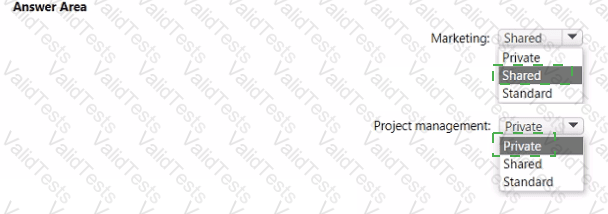
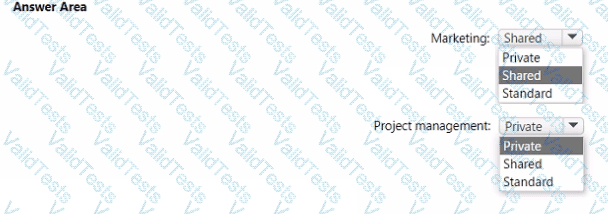
You need to implement the planned changes for the marketing department and the project management department. The solution must meet the technical requirements.
Which type of channel should you use for each department? To answer, select the appropriate options in the answer area.
NOTE: Each correct selection is worth one point
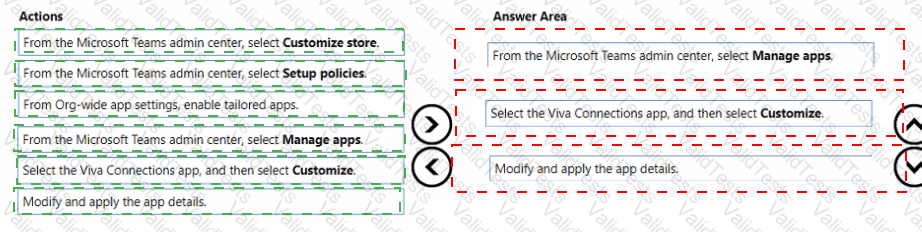
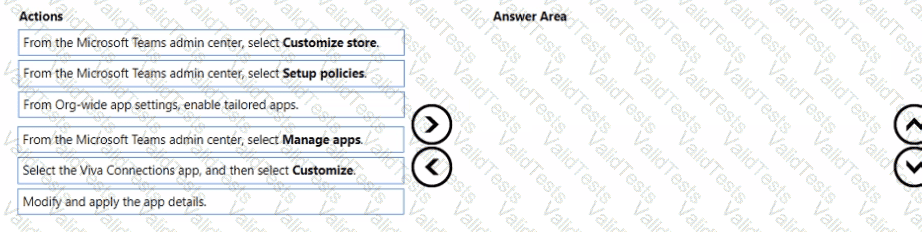
You need to implement the planned changes for Viva Connections.
Which three actions should you perform in sequence? To answer, move the appropriate actions from the list of actions to the answer area and arrange them in the correct order.
You have a Microsoft 365 subscription that uses Microsoft Teams and contains a user named User1.
Microsoft Teams has a default conferencing toll phone number of +1 323 705-3393. The default number is assigned to User1.
You need to change the conferencing toll phone number assigned to User1. The solution must meet the following requirements:
• Update the existing meeting invites of User1 to use the new conferencing toll phone number.
• Ensure that other users in your company continue to use the default number.
Which two actions should you perform? Each correct answer presents part of the solution, NOTE: Each correct selection is worth one point.
Note: This question is part of a series of questions that present the same scenario. Each question in the series contains a unique solution that might meet the stated goals. Some question sets might have more than one correct solution, while others might not have a correct solution.
After you answer a question in this section, you will NOT be able to return to it. As a result, these questions will not appear in the review screen.
Your company has a Microsoft 365 subscription.
You plan to configure the environment to allow external users to collaborate in Microsoft Teams by using guest access.
The company implements a new security policy that has the following requirements:
Only guest users from specific domains must be allowed to connect to collaborate by using Microsoft Teams.
Guest users must be prevented from inviting other guests.
You need to recommend a solution to meet the security policy requirements.
Solution: From the Azure Active Directory, you modify the External collaboration settings.
Does this meet the goal?
Your company uses Teams.
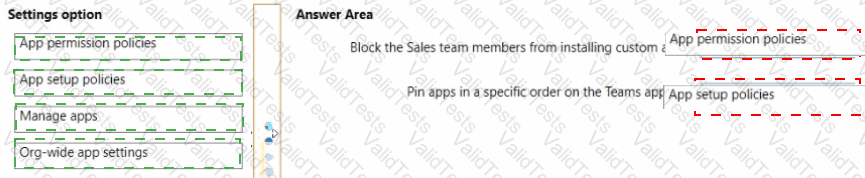
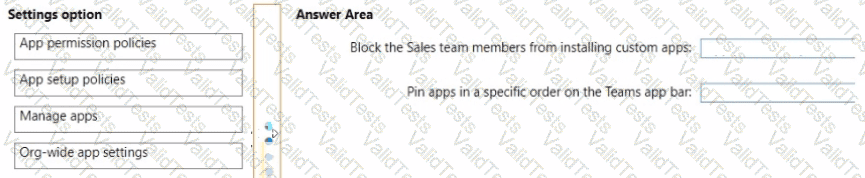
You need to configure Teams apps to meet the following requirements:
• Block members of a team named Sales from installing custom apps.
• Pin apps in a specific order on the Teams app bar.
Which settings should you configure to meet each requirement? To answer, drag the appropriate settings options to the correct requirements. Each settings option may be used once, more than once, or not at all. You may need to drag the split bar between panes or scroll to view content.
NOTE: Each correct selection is worth one point.
You have a Microsoft 365 E5 subscription that has Teams Premium licenses. The subscription contains an Azure Virtual Desktop deployment that has a session host named Host1.
You plan to install the Teams for virtual desktop infrastructure (VDl) client on Host1.
You need to identify which Teams features will be unavailable to Host1.
Which two features should you identify? Each correct answer presents a complete solution.
NOTE Each correct selection is worth one point