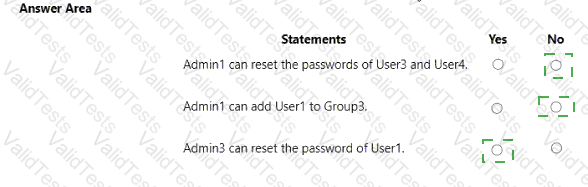
You have Microsoft Entra tenant that contains a group named Group3 and an administrative unit named Department1.
Department has the users shown in the Users exhibit. (Click the Users tab.)
Department1 has the groups shown in the Groups exhibit (Click the Groups tab.)
The User Administrator role assignments are shown in the Assignments exhibit. (Click the Assignments tab.)
The members of Group2 are shown in the Group2 exhibit. (Click the Group2 tab.)
For each of the following statements, select Yes if the statement is true. Otherwise, select No.
NOTE: Each correct selection is worth one point.
Note: This question is part of a series of questions that present the same scenario. Each question in the series contains a unique solution that might meet the stated goals. Some question sets might have more than one correct solution, while others might not have a correct solution.
After you answer a question in this section, you will NOT be able to return to it. As a result, these questions will not appear in the review screen.
You have an Azure Active Directory (Azure AD) tenant that syncs to an Active Directory forest.
You discover that when a user account is disabled in Active Directory, the disabled user can still authenticate to Azure AD for up to 30 minutes.
You need to ensure that when a user account is disabled in Active Directory, the user account is immediately prevented from authenticating to Azure AD.
Solution: You configure conditional access policies.
Does this meet the goal?
You have the Azure resources show in the following table.
To Which identities can you assign the Contributor role for RG1?
You have a Microsoft Entra tenant that contains two groups named Group! and Group2 and the users shown in the following table.
Group2 is a member of Group1.
You configure an access review that has the following settings:
• Name: Review 1
• Select what to review: Teams + Groups
• Review scope: Select Teams + groups
• Group: Group1
• Scope: Guest users only
• Select reviewers: Group owners(s)
For each of the following statements, select Yes if the statement is true. Otherwise, select No.
NOTE: Each correct selection is worth one point.
You have an Azure Active Directory (Azure AD) tenant named conto.so.com that has Azure AD Identity Protection enabled. You need to Implement a sign-in risk remediation policy without blocking access.
What should you do first?
You have a Microsoft 365 tenant.
The Azure Active Directory (Azure AD) tenant syncs to an on-premises Active Directory domain.
Users connect to the internet by using a hardware firewall at your company. The users authenticate to the
firewall by using their Active Directory credentials.
You plan to manage access to external applications by using Azure AD.
You need to use the firewall logs to create a list of unmanaged external applications and the users who access
them.
What should you use to gather the information?
You have a Microsoft 365 E5 subscription that contains a Microsoft SharePoint Online site named Site1. You need to be notified if a user downloads more than 50 files in one minute from Site1.
Which type of policy should you create in the Microsoft Defender for Cloud Apps portal?
Note: This question is part of a series of questions that present the same scenario. Each question in the series contains a unique solution that might meet the stated goals. Some question sets might have more than one correct solution, while others might not have a correct solution.
After you answer a question in this section, you will NOT be able to return to it. As a result, these questions will not appear in the review screen.
You have a Microsoft 365 tenant.
You have 100 IT administrators who are organized into 10 departments.
You create the access review shown in the exhibit. (Click theExhibittab.)
You discover that all access review requests are received by Megan Bowen.
You need to ensure that the manager of each department receives the access reviews of their respective department.
Solution: You add each manager as a fallback reviewer.
Does this meet the goal?
You have an Azure Active Directory (Azure AD) tenant.
You need to review the Azure AD sign-in logs to investigate sign-ins that occurred in the past.
For how long does Azure AD store events in the sign-in logs?
Your on-premises network contains an Active Directory domain that uses Azure AD Connect to sync with an Azure AD tenant. You need to configure Azure AD Connect to meet the following requirements:
• User sign-ins to Azure AD must be authenticated by an Active Directory domain controller.
• Active Directory domain users must be able to use Azure AD self-service password reset (SSPR).
What should you use for each requirement? To answer, select the appropriate options in the answer area.
NOTE: Each correct selection is worth one point.