Pre-Summer Special Limited Time 70% Discount Offer - Ends in 0d 00h 00m 00s - Coupon code: validbest

Pass the UiPath Certified Professional - Developer Track UiPath-ADPv1 Questions and answers with ValidTests

Exam UiPath-ADPv1 All Questions
Exam UiPath-ADPv1 Premium Access

View all detail and faqs for the UiPath-ADPv1 exam

Viewing page 4 out of 7 pages
Viewing questions 31-40 out of questions
Questions # 31:

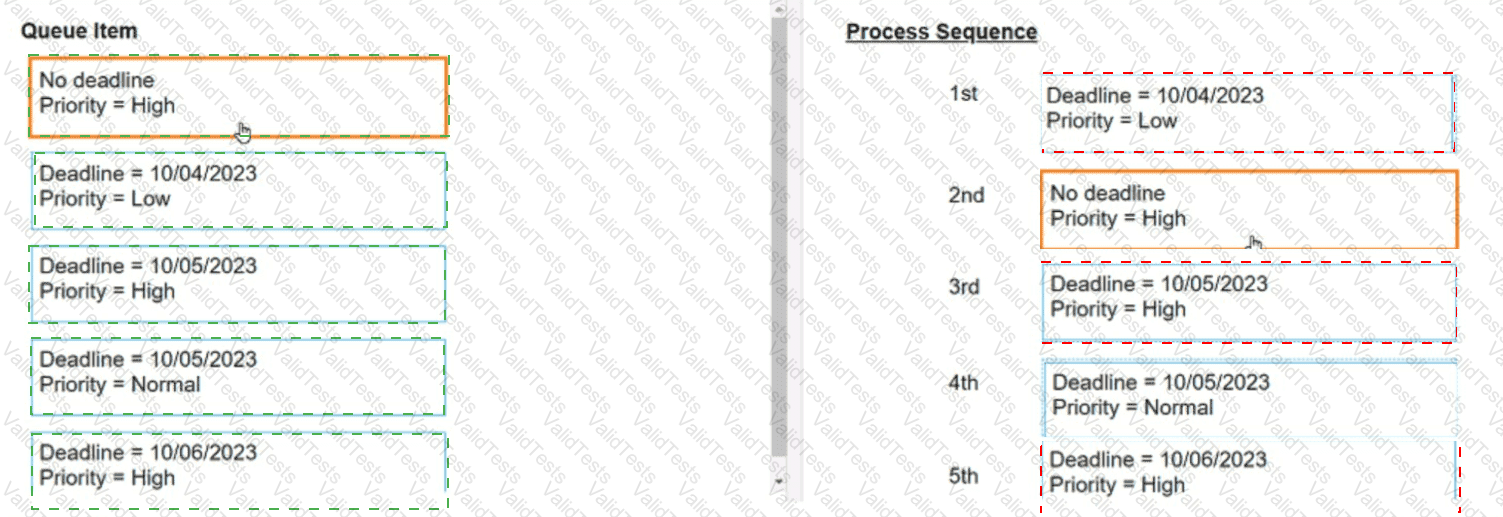
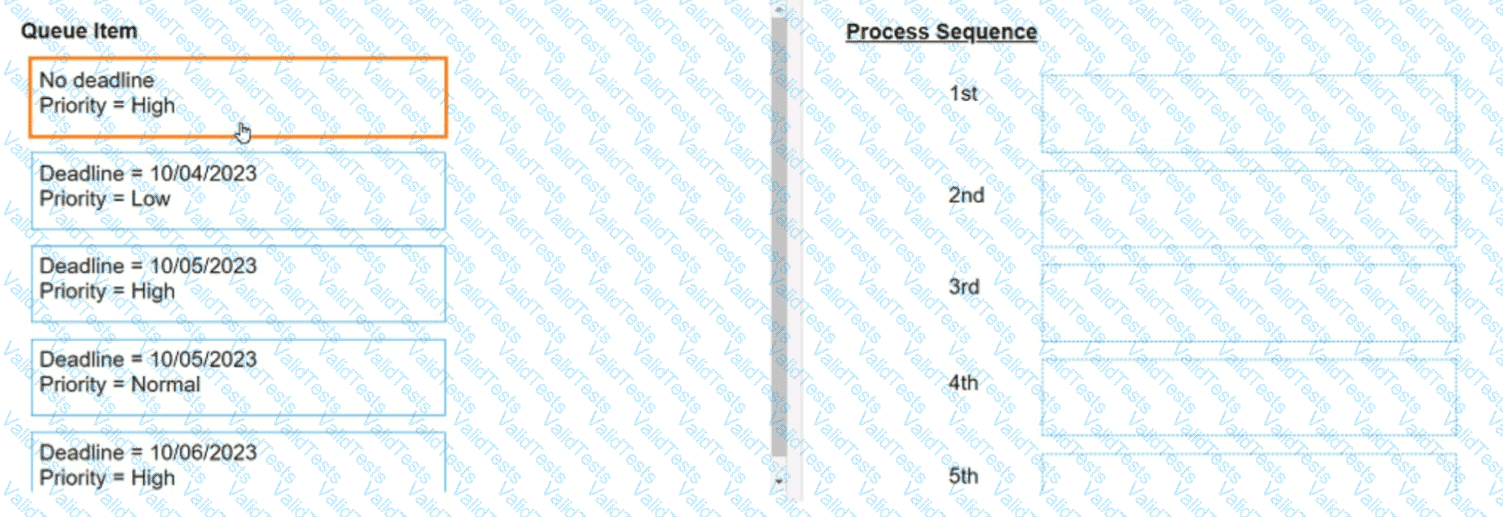
On 10/04/2023 five Queue Items were added to a queue. What is the appropriate processing sequence for Queue Items based on their properties?

Instructions: Drag the Queue Item found on the "Left" and drop on the correct Process Sequence found on the "Right".
Question # 31

Options:

Expert Solution
Questions # 32:

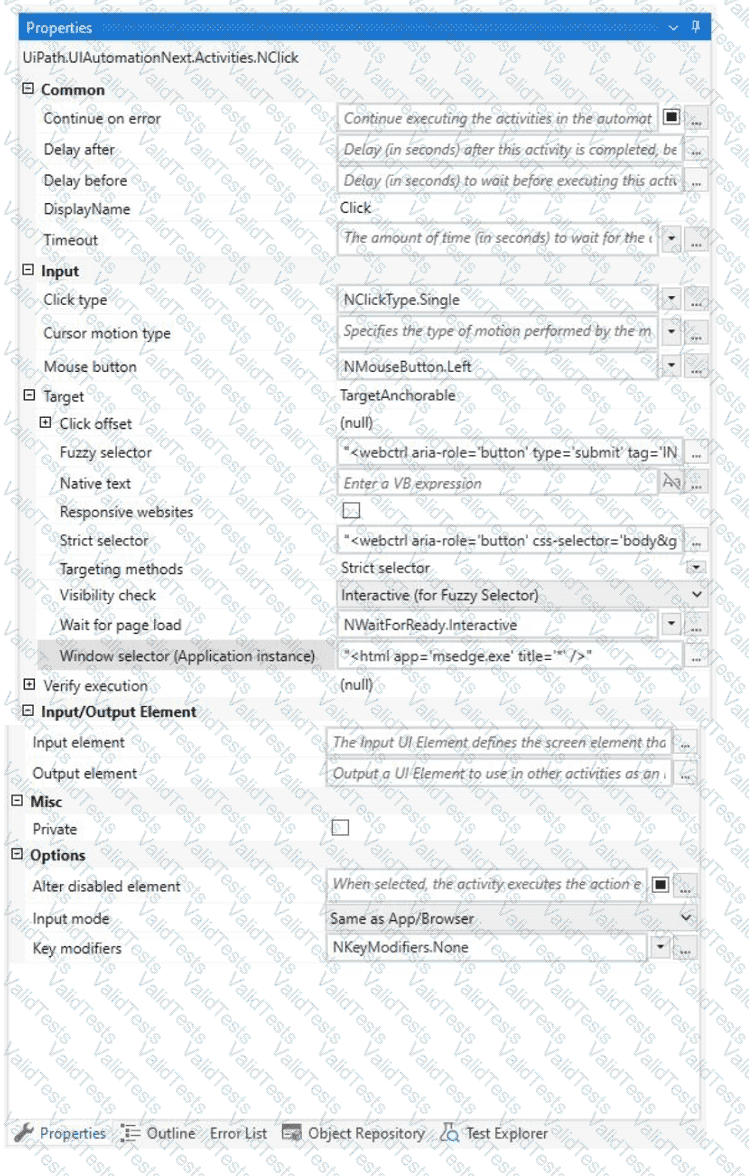
A developer configured the properties for a Click activity on an element inside a web page as shown in the following exhibit.
Question # 32

An animation on the web page never completely loads but the element indicated in the Click activity does load within the specified timeout duration. What occurs when this Click activity executes?

Options:

A.

Element is clicked once the element is fully loaded.

B.

Timeout error occurs without clicking on the element.

C.

Continues to the next activity after 30 seconds without clicking on the element.

D.

Waits 10 seconds before clicking on the element.

Expert Solution
Questions # 33:

A sales department is using UiPath attended automation to handle incoming sales requests through multiple forms and applications. They want to ensure the automation runs in parallel with other tasks.

What feature of trigger-based attended automation will best support this?

Options:

A.

Triggers that only run sequentially, ensuring that workflows never overlap with one another.

B.

Triggers based on application events but limited to one automation process at a time.

C.

Triggers that can run workflows intermittently, either one time, in sequence, or simultaneously.

D.

Triggers that monitor user input but cannot handle multiple workflows at the same time.

Expert Solution
Questions # 34:

When working with a long-running workflow involving form actions in Action Center, how is the job resumed after it has been suspended?

Options:

A.

The job resumes only after the assigned user completes the form action.

B.

The job resumes automatically after 30 minutes if the form action is not completed.

C.

The job resumes when any user with View permissions on Actions approves the form.

D.

The job resumes immediately when the form action is created, without waiting for completion.

Expert Solution
Questions # 35:

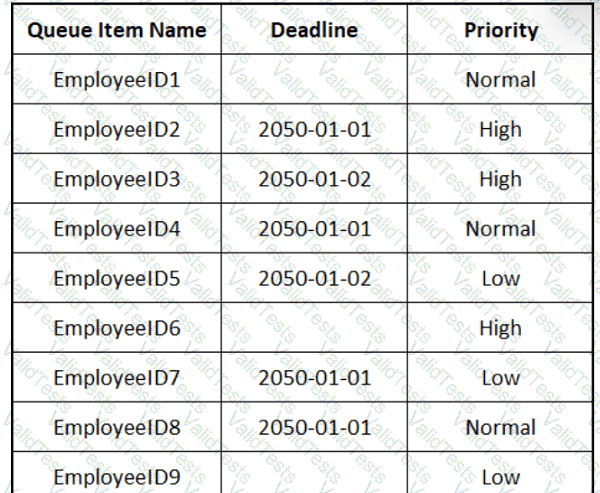
The provided exhibit displays the representation of the "Deadline" field using the yyyy-mm-dd format.
Question # 35

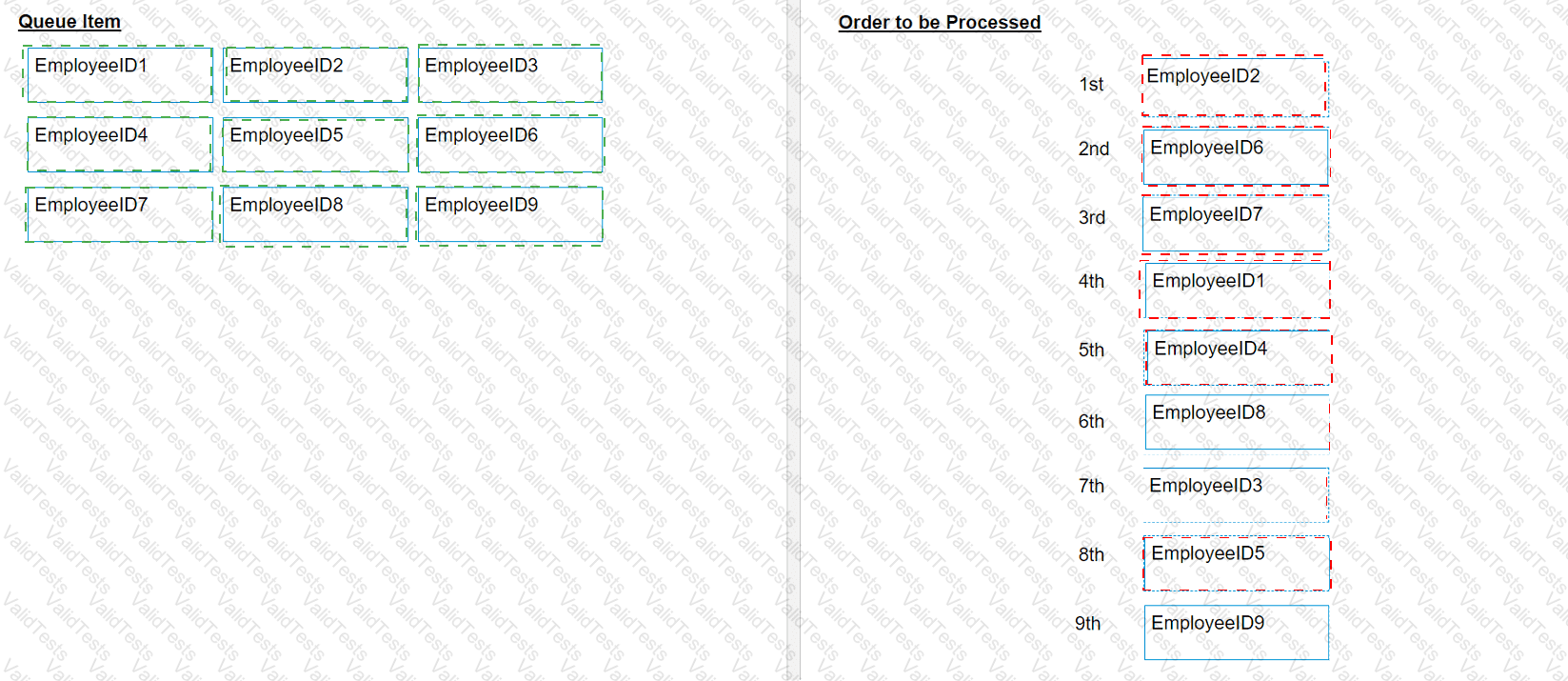
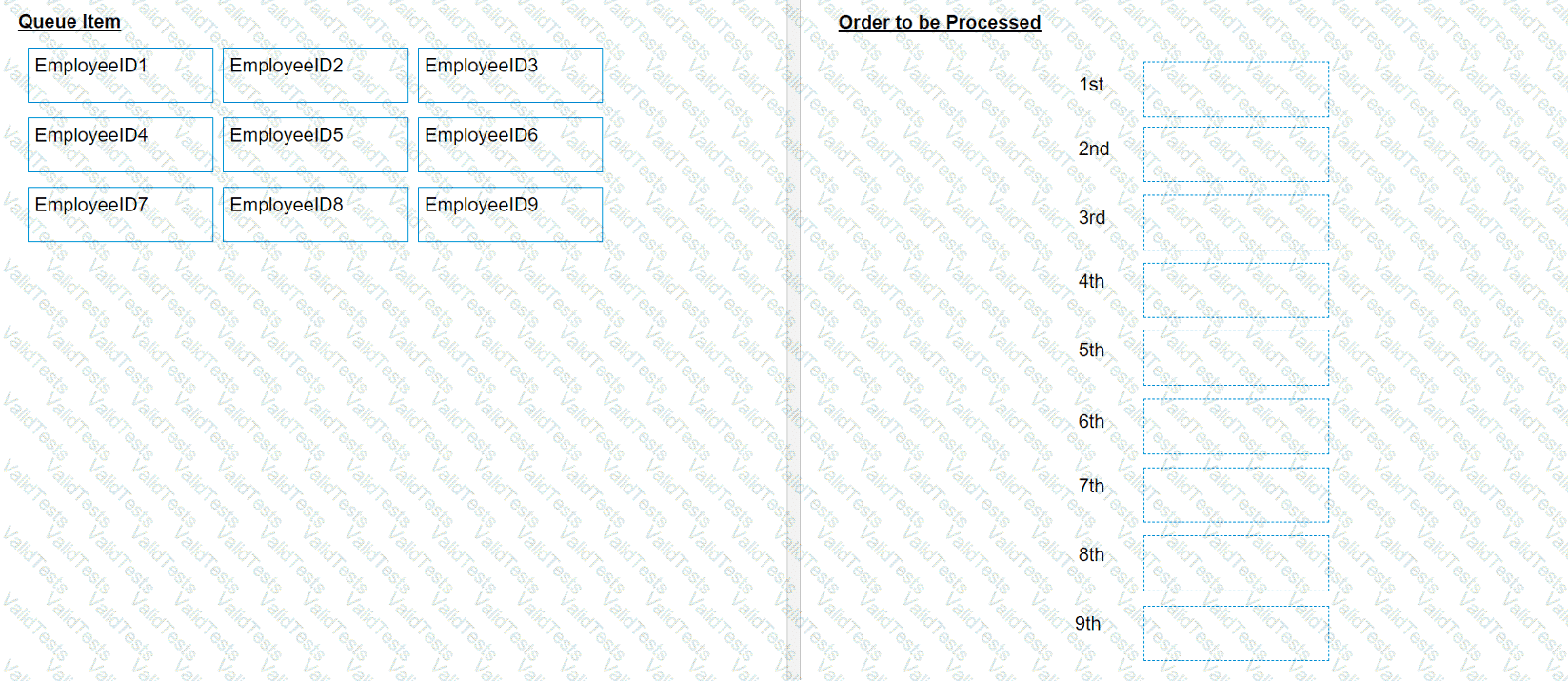
In what order should the Queue Items be processed by a single robot executing a Performer workflow?
Question # 35

Options:

Expert Solution
Questions # 36:

When should a developer log a coherent message with the Logging Level set as "Info" while building an automation project?

Options:

A.

Every time data is read from external sources.

B.

Every time an exception is caught in a Catch block

C.

Every time a variable or argument value is used.

D.

Every time the robot encounters an error processing a Queue Item.

Expert Solution
Questions # 37:

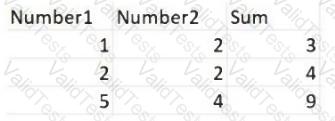
Consider testing a workflow that computes the sum of two numbers having the data driven test data from the Excel file below:
Question # 37

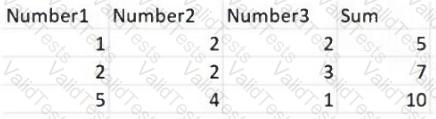
Expanding the functionality of the workflow to compute the sum of three numbers, the data needs to be updated as well to accommodate the new scenario:
Question # 37

What are steps to do that?

Options:

A.

Click Right on the Test Case and select Update Test Data

B.

Click Right on the Test Case and select Add Test Data.

C.

Click Right on the Test Case and select Refresh Test Data

D.

Click Right on the Test Case and select Remove Test Data.

Expert Solution
Questions # 38:

What is the output type returned when using a Get Test Data Queue Item activity?

Options:

A.

Queueltem

B.

Object

C.

Dictionary

Expert Solution
Questions # 39:

In a UiPath coded automation, what does the DelayAsync method do?

Options:

A.

It delays the termination of the automation by a specified period of time.

B.

It delays the start of the automation by a specified period of time.

C.

It suspends execution asynchronously for a specified period of time.

D.

It adds a pause between the execution of each activity in the automation.

Expert Solution
Questions # 40:

What is a pre-requisite for running InitAllApplications TestCase?

Options:

A.

Invoke InitAllSettings XAML file in Given.

B.

Invoke SetTransactionStatus XAML file in Given.

C.

Invoke CloseAllApplications XAML file in Given.

D.

Invoke KillAllProcesses XAML file in Given.

Expert Solution
Viewing page 4 out of 7 pages
Viewing questions 31-40 out of questions