Pre-Summer Special Limited Time 70% Discount Offer - Ends in 0d 00h 00m 00s - Coupon code: validbest

Pass the UiPath Certified Professional - Developer Track UiPath-ARDv1 Questions and answers with ValidTests

Exam UiPath-ARDv1 All Questions
Exam UiPath-ARDv1 Premium Access

View all detail and faqs for the UiPath-ARDv1 exam

Viewing page 7 out of 11 pages
Viewing questions 61-70 out of questions
Questions # 61:

What status does a job have when a schedule is triggered in

Orchestrator, but there are no available robots to execute it?

Options are :

Options:

A.

In progress

B.

Pending

C.

New

Expert Solution
Questions # 62:

What are the recording profiles are available in UiPath Studio?

Options are :

Options:

A.

Basic, Desktop, Web, and Citrix

B.

Basic and Desktop

C.

Automatic recording and Step-by-Step recording

D.

Click, Check, Type Into, and Select Item

Expert Solution
Questions # 63:

Where can the logging level of a robot be changed from?

Options are :

Options:

A.

Orchestrator, in the Edit Robot section, the Settings tab.

B.

The robot settings, which are accessed via the UiPath Robot icon in the System tray.

C.

You can not change the logging level.

Expert Solution
Questions # 64:

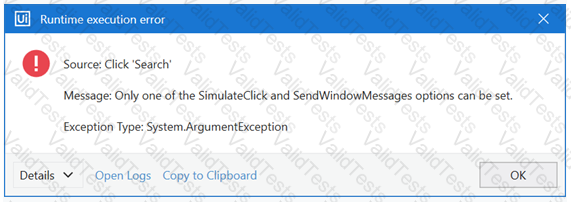
A developer has configured the Activity Project Settings for UI automation and a Click activity as shown below. What will be the result of executing the Click activity in Run mode?
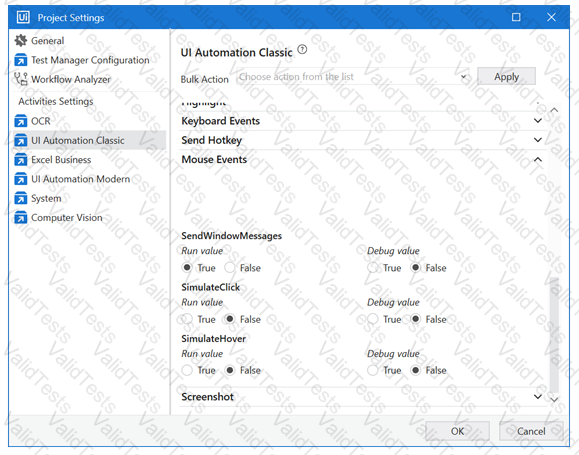
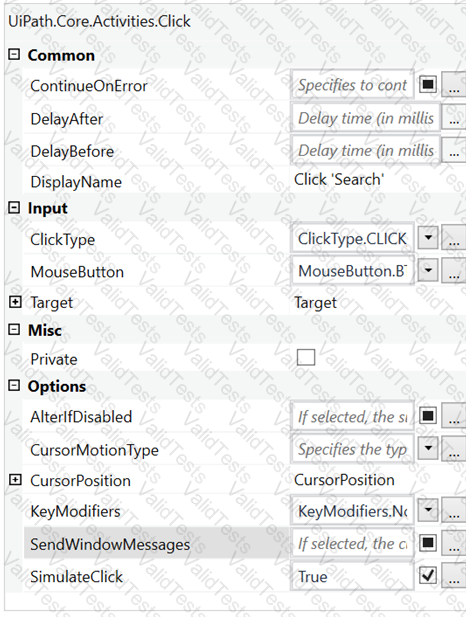
Question # 64

Question # 64

Options:

A.

Click activity will be executed by the default hardware method.

B.

Click activity will be executed using SimulateClick method.

C.

Click activity will be executed using SendWindowMessages method.

D.

An error will be thrown.

Expert Solution
Questions # 65:

A developer uses a State Machine for his process automation project. The developer wants to define conditions under which the automation project can pass from one State to another. What is the possible way to do so?

Options:

A.

Drag Transition activity from the Activities Panel to define the condition.

B.

Drag If activity from the Activities Panel to define the condition.

C.

Drag Flowchart Decision activity from the Activities Panel to define the condition.

D.

Connect states to generate a transition and define the condition in it.

Expert Solution
Questions # 66:

In the UiPath Robotic Enterprise Framework template, what should be the outcome of the Process Transaction state of the Main workflow when the application loops back to the Get Transaction Item state?

Options are :

Options:

A.

Application exception

B.

Business rule exception

C.

Success

Expert Solution
Questions # 67:

What kind of workflow should you create to define business rules?

Options are :

Options:

A.

Sequence

B.

Flowchart

C.

State machine

Expert Solution
Questions # 68:

What tags are verified in Internet Explorer to assess if an application is in the Interactive or Complete state?

Options:

A.

The  tag is used to check if the Ready state of the HTML document is Complete.

B.

, or  tags.

C.

The presence of   tag is verified.

D.

The  tag is used to check if the Ready state of the HTML document is set to Complete. Additionally, the Busy state has to be set to "False".

Expert Solution
Questions # 69:

How can you delay the Automatic Recording?

Options are :

Options:

A.

By hitting the Escape key

B.

By right clicking

C.

Not possible

D.

By hitting the F2 key

Expert Solution
Questions # 70:

A developer created automation in UiPath to process CVs of job candidates. This process is designed to help the HR team in their daily activities. Every day robot needs to process mails from the HR team sent to its Outlook account. Besides emails from HR, the robot also receives organizational emails and emails from other employees. There are several possible ways to set up the Get Outlook Mail Messages activity for the robot to only extract emails from the HR Team .

Please choose the incorrect way.

Options:

A.

"[SenderName] = 'HR Team" in the Filter property of the Get Outlook Mail Messages activity.

B.

"[From] = 'HR Team" in the Filter property of the Get Outlook Mail Messages activity.

C.

"[SenderEmailAddress] = 'hr.team@company.com'" in the Filter property of the Get Outlook Mail Messages activity.

D.

"HR Team" in the From property of the Get Outlook Mail Messages activity.

Expert Solution
Viewing page 7 out of 11 pages
Viewing questions 61-70 out of questions