Pre-Summer Special Limited Time 70% Discount Offer - Ends in 0d 00h 00m 00s - Coupon code: validbest

Pass the UiPath Certified Professional - Developer Track UiPath-ARDv1 Questions and answers with ValidTests

Exam UiPath-ARDv1 All Questions
Exam UiPath-ARDv1 Premium Access

View all detail and faqs for the UiPath-ARDv1 exam

Viewing page 9 out of 11 pages
Viewing questions 81-90 out of questions
Questions # 81:

A developer created a custom rule for Workflow Analyzer and wants to make it available only at the project level.

Which action should the developer perform?

Options:

A.

Create an external assembly (.dll) of the rule and copy it to the Studio install location.

B.

Create an external assembly (.dll) of the rule and copy it to the project location.

C.

Create a Nuget package (.nupkg) of the rule and publish it to Orchestrator.

D.

Create a Nuget package (.nupkg) of the rule and install it in a Studio project as a dependency.

Expert Solution
Questions # 82:

A developer needs to create an automation process that identifies a file with format "Monthly_Report_MMddyyyy.xlsx". The file name is saved to a variable called strinput.

To extract the date from strinput, which string manipulation method should be used?

Options:

A.

strinput.Substring(strInput.LastIndexOf("_")+1,8)

B.

strinput.Substring(strInput.IndexOf("_")+1,strInput.IndexOf(".")−1)

C.

strinput.Substring(strInput.IndexOf("_")+1.8)

D.

strinput.Substring(strInput.IndexOf("_")+1,strInput.IndexOf("."))

Expert Solution
Questions # 83:

A developer needs to reference the element in the first row of the "ID" column in the System.Data.DataTable, "DT".

Which expression is used to reference this element?

Options:

A.

DT.Rows(0).ID

B.

DT.Rows(1).ID

C.

DT.Rows(0).Item("ID")

D.

DT.Rows(1).Item("ID")

Expert Solution
Questions # 84:

A developer used the Robotic Enterprise (RE) Framework to implement an automation of a website. For security reasons, the credentials for the login are stored in the Orchestrator.

Which steps should the developer perform to use these credentials in the project?

Options:

A.

Add a row in the Constants sheet in Config.xlsx with the name of the Orchestrator asset. Use the Get Credential activity in the login workflow to get the username and password.

B.

Add a row in the Settings sheet in Config.xlsx with the name of the Orchestrator asset.

Use the Get Credential activity in the login workflow to retrieve the username and password.

C.

Add a row in the Assets sheet in Config.xlsx with the name of the Orchestrator asset. Use the Get Credential activity in the login workflow to get the username and password.

D.

Add a row in the Assets sheet in Config.xlsx with the name of the Orchestrator asset.

In the login workflow, retrieve the username and password by referencing the Config dictionary.

Expert Solution
Questions # 85:

Which file in the Robotic Enterprise (RE) Framework reads the Data/Config.xlsx file and retrieves assets from Orchestrator into the process?

Options:

A.

KillAllProcesses.xaml

B.

InitAllApplications.xaml

C.

InitAllSettings.xaml

D.

Process.xaml

Expert Solution
Questions # 86:

In UiPath Studio, what describes project validation and workflow analysis?

Options:

A.

Validation of the file or project is performed whenever the Workflow Analyzer is triggered.

B.

Validation of the file or project is performed after the Workflow Analyzer finishes the report.

C.

Validation of the file or project is performed only if the user triggers Validate File and Validate Project.

D.

Validation of the file or project is performed only when running or debugging.

Expert Solution
Questions # 87:

A developer wants to create a process for a Call Center user. This process must:

1.Interact with application windows that are minimized or in the background.

2.Allow the user to interact with separate desktop applications at the same time.

Which workflow activity requires modifications to some of the properties' default values to ensure this process runs in the background?

Options:

A.

Get Text

B.

Element Exists

C.

Select Item

D.

Type Into

Expert Solution
Questions # 88:

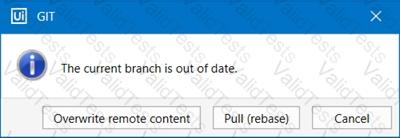
A developer is using GIT for version control. While the developer is attempting to Commit and Push a local file to the repository, the following pop-up message is displayed:
Question # 88

What is the reason for the pop-up message?

Options:

A.

Project was not properly checked out in Studio and merge failed into the master.

B.

Local repository is not synchronized with the remote one.

C.

Opened project was disconnected from the source control.

D.

Local version was not connected to any branch.

Expert Solution
Questions # 89:

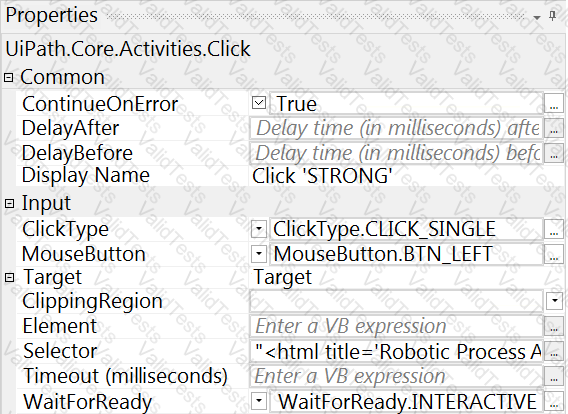
A developer configured the properties for a Click activity on an element inside a web page as shown in the exhibit. An animation on the web page never completely loads but the element specified in the Click activity does.
Question # 89

What occurs when this Click activity executes?

Options:

A.

Timeout error occurs without clicking on the element.

B.

Waits 10 seconds before clicking on the element.

C.

Continues to the next activity after 30 seconds without clicking on the element.

D.

Element is clicked once it is fully loaded.

Expert Solution
Questions # 90:

During the development of a process, a certain label text must be retrieved. After retrieving the text, a button must be clicked and the following occurs:

1.The loading of the label text element takes longer than 30 seconds.

2.The loading of the button takes longer than 30 seconds.

3.The retrieving of the data or clicking the button must be tried until successful.

Based on UiPath best practices, what must the developer use to ensure that an error is thrown if the label text or the button element does not load?

Options:

A.

Use the Get Text activity with the default timeout and set the ContinueOnError property to "True". Use the Click activity in the Retry Scope activity.

B.

Use the Get Text activity with the default properties in a Retry Scope activity. Use the Click activity with the default properties in a Retry Scope activity.

C.

Modify the Get Text activity by increasing the timeout property. Use the Click activity to click the button with the default settings.

D.

Use the Get Text activity with the default timeout and set the WaitForReady property to "None" in a Retry Scope activity.

Modify the Click activity by increasing the timeout property and set the ContinueOnError property to "True".

Expert Solution
Viewing page 9 out of 11 pages
Viewing questions 81-90 out of questions