Summer Certification Special Limited Time 70% Discount Offer - Ends in 0d 00h 00m 00s - Coupon code: validbest

Pass the Cisco CCNP Collaboration 300-810 Questions and answers with ValidTests

Exam 300-810 All Questions
Exam 300-810 Premium Access

View all detail and faqs for the 300-810 exam

Viewing page 4 out of 7 pages
Viewing questions 31-40 out of questions
Questions # 31:

Which two Cisco Unity Connection logs are used to troubleshoot issues with Message Waiting Indicators? (Choose two.)

Options:

A.

Connection IMAP Server

B.

Connection Mailbox Sync

C.

Connection Notifier

D.

Connection Message Transfer Agent

E.

Connection Conversation Manager

Expert Solution
Questions # 32:

A collaboration engineer is troubleshooting a Cisco Jabber IM and Presence issue Cisco TAC asked the engineer to generate a client-side problem report Which set of actions must the engineer perform to find and download the problem report logs?

Options:

A.

Click the Help menu select Report a problem and follow the instructors

B.

Click Settings Help and follow the instructions

C.

Click Settings Help Reports and follow the instructions

D.

Click Admin select Logs and follow the instructions

Expert Solution
Questions # 33:

Which step is the first for web-based single sign-on login?

Options:

A.

Authenticate.

B.

Redirect to IdP to get authenticated.

C.

Present authentication assertion.

D.

Request access to protected service.

Expert Solution
Questions # 34:

A collaboration engineer is troubleshooting an issue with Cisco Jabber for Windows clients Users in a new branch location report that 'cannot locate server is displayed when they launch the client When the engineer manually configures the server settings on a client, the dient logs in successfully. The Cisco IM and Presence servers are located across the WAN at the corporate HQ Which action resolves the issue?

Options:

A.

Reinstall the Jabber clients with UPN_DISCOVERY_ENABLED=false

B.

Add a firewall rule to allow TCP/8443 from the branch to HQ

C.

Add a _collab-edge _Us.company com SRV record to the branch DNS server

D.

Add a _cisco-uds_tcp company com SRV record to the branch DNS server

Expert Solution
Questions # 35:

To redirect calls from the phone extension for user A to the voicemail greeting, which call routing rule should be used in Cisco Unity Connection?

Options:

A.

Attempt Forward forwarded routing rule

B.

Opening Greeting direct routing rule

C.

Attempt Sign-In direct routing rule

D.

Opening Greeting forwarded routing rule

Expert Solution
Questions # 36:

What submits credentials to the LDAP server during a call that uses SAML SSO?

Options:

A.

Cisco UCM server

B.

Service provider

C.

Browser-based Client

D.

IdP

Expert Solution
Questions # 37:

Which statement describes a role of AXL communications in the BLF Plug-in Service of the Cisco UAC?

Options:

A.

The AXL communications allow registered attendants to log in to Cisco UCM and receive calls.

B.

The AXL communications enable Device Resolution Manager to resolve the device statuses of operator and system devices.

C.

The AXL communications is required after installation to verify that the specified CTI manager or managers and Cisco UAC versions match.

D.

The AXL communications is required after installation to verify that the specified CTI manager or managers and Cisco UCM versions match.

Expert Solution
Questions # 38:

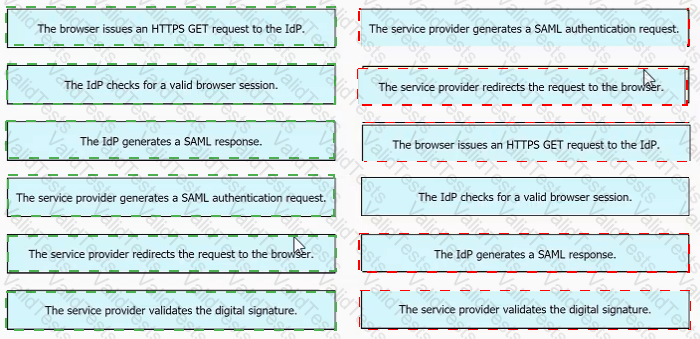
Drag and drop the steps of the SAML SSO process from the left into the order on the right.
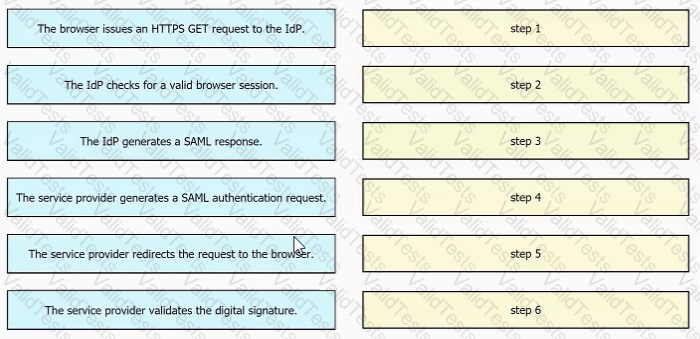
Question # 38

Options:

Expert Solution
Questions # 39:

An engineer needs to configure calendar integration between Microsoft Exchange and a Cisco IM and Presence server The engineer created the resource mailboxes and now needs to add impersonation Which command accomplishes this task using the Exchange Management Shell from Microsoft Exchange?

Question # 39

Options:

A.

Option A

B.

Option B

C.

Option C

D.

Option D

Expert Solution
Questions # 40:

The persistent chat feature is configured in a Cisco Jabber deployment that is running Cisco Unified IM and Presence 11.5 SU6 Desktop clients are working but mobile clients are not displaying persistent chats. Which configuration Is necessary to enable the Jabber persistent chat feature on mobile devices?

Options:

A.

while logged into IM and Presence server Administration, go to 'Messaging', then Settings", and check the checkbox for the 'Enable persistent chat for mobile" field

B.

add the false line to the Jabber configuration file that is used by all Jabber devices

C.

add the true line to the Jabber configuration rule that is used by mobile devices

D.

add "Enable_Persistent_Chat'' in the "Cisco Support Field' on the Jabber for mobile device configuration page on Cisco UCM

Expert Solution
Viewing page 4 out of 7 pages
Viewing questions 31-40 out of questions