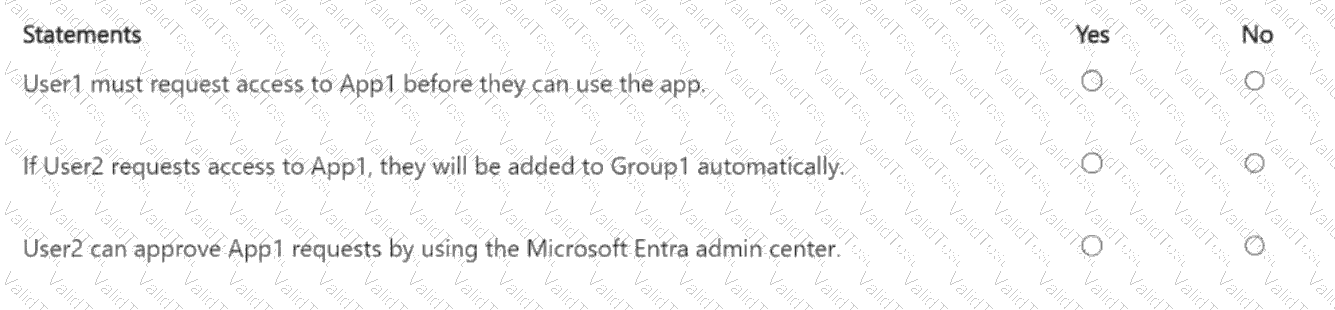
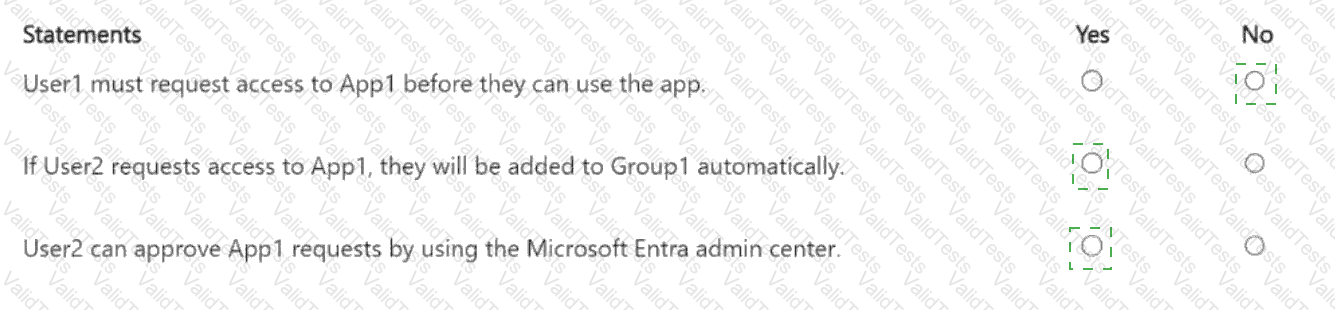
User1 must request access to App1 before they can use the app: No
If User2 requests access to App1, they will be added to Group1 automatically: Yes
User2 can approve App1 requests by using the Microsoft Entra admin center: Yes
Let’s break this down step by step based on Microsoft Entra ID self-service application access and the configured settings, as outlined in Microsoft Identity and Access Administrator documentation.
Understanding Self-Service Application Access in Microsoft Entra ID:
Self-service application access in Microsoft Entra ID allows users to request access to applications without needing an administrator to manually assign them. This is configured on a per-application basis.
The settings for App1 are:
Allow users to request access to this application: Yes– Users can request access to App1.
To which group should assigned users be added: Group1– Users who are granted access will be added to Group1, which provides the necessary permissions to use App1.
Require approval before granting access to this application: Yes– Access requests must be approved before the user is added to Group1.
Who is allowed to approve access to this application: User2– User2 is the designated approver for access requests to App1.
Statement 1: User1 must request access to App1 before they can use the app.
Analysis:
User1 is already a member of Group1, as stated in the question.
The self-service settings specify that users who are granted access to App1 will be added to Group1. This implies that membership in Group1 is what grants access to App1.
Since User1 is already a member of Group1, they already have access to App1. In Microsoft Entra ID, if a user is already assigned to an application (either directly or via group membership), they do not need to request access through the self-service process—they can simply use the app.
The self-service access request process is for users who are not yet assigned to the app (i.e., not in Group1). Since User1 is already in Group1, they do not need to request access.
Conclusion:This statement isNo. User1 does not need to request access because they are already a member of Group1 and can use App1 immediately.
Statement 2: If User2 requests access to App1, they will be added to Group1 automatically.
Analysis:
User2 is not a member of Group1 (the question does not state that User2 is in Group1).
The self-service settings allow users to request access to App1, and the setting "To which group should assigned users be added: Group1" means that users who are granted access will be added to Group1.
However, the setting "Require approval before granting access to this application: Yes" means that User2’s request must be approved before they are added to Group1. The approver for App1 requests is User2 themselves, which introduces a potential conflict.
In Microsoft Entra ID, if a user is both the requester and the approver, the system typicallyallows them to approve their own request (unless additional policies prevent this, which is not specified in the question). Therefore, User2 can request access and approve their own request.
Once the request is approved, User2 will be added to Group1 automatically as per the self-service settings. The term "automatically" in the statement refers to the process after approval—once approved, the addition to Group1 happens without further manual intervention.
Conclusion:This statement isYes. If User2 requests access to App1 and approves their own request, they will be added to Group1 automatically.
Statement 3: User2 can approve App1 requests by using the Microsoft Entra admin center.
Analysis:
The self-service settings specify that User2 is the designated approver for access requests to App1.
In Microsoft Entra ID, approvers can manage access requests through the Microsoft Entra admin center (via the "My Access" portal or the "Access Requests" section, depending on their role and permissions).
User2, as the designated approver, will receive a notification (via email or the My Access portal) when a request is made. They can then log into the Microsoft Entra admin center, navigate to the access requests section, and approve or deny the request.
Even though User2 is not explicitly an admin, the fact that they are designated as the approver for App1 requests grants them the ability to approve requests through the Microsoft Entra admin center.
Conclusion:This statement isYes. User2 can approve App1 requests using the Microsoft Entra admin center.
Additional Considerations:
If User2 were not allowed to approve their own request (e.g., due to a separation of duties policy), Statement 2 might be affected. However, Microsoft Entra ID does not enforce such a restriction by default, and the question does not specify any additional policies.
The Microsoft Entra admin center is the primary interface for managing access requests, but users can also approve requests via email links or the My Access portal. The statement specifically mentions the admin center, which is a valid method.
Conclusion:
Statement 1:No– User1 does not need to request access since they are already in Group1.
Statement 2:Yes– User2 will be added to Group1 automatically after their request is approved (by themselves).
Statement 3:Yes– User2 can approve requests using the Microsoft Entra admin center.
[References:, Microsoft Entra ID documentation: "Configure self-service application access" (Microsoft Learn:https://learn.microsoft.com/en-us/entra/identity/enterprise-apps/configure-self-service), Microsoft Entra ID documentation: "Manage access requests" (Microsoft Learn:https://learn.microsoft.com/en-us/entra/identity/governance/access-reviews-overview), Microsoft Identity and Access Administrator (SC-300) exam study guide, which covers self-service application access and approval workflows in Microsoft Entra ID., , , , , , ]