Pre-Summer Special Limited Time 70% Discount Offer - Ends in 0d 00h 00m 00s - Coupon code: validbest

Pass the Trend Micro Deep Security Deep-Security-Professional Questions and answers with ValidTests

Exam Deep-Security-Professional All Questions
Exam Deep-Security-Professional Premium Access

View all detail and faqs for the Deep-Security-Professional exam

Viewing page 2 out of 3 pages
Viewing questions 11-20 out of questions
Questions # 11:

A Deep Security administrator wishes to monitor a Windows SQL Server database and be alerted of any critical events which may occur on that server. How can this be achieved using Deep Security?

Options:

A.

The administrator could install a Deep Security Agent on the server hosting the Windows Server 2016 database and enable the Integrity Monitoring Protection Module. A rule can be assigned to monitor the Windows SQL Server for any modifications to the server, with Alerts enabled.

B.

The administrator could install a Deep Security Agent on the server hosting the Windows Server 2016 database and enable the Log Inspection Protection Module. A rule can be assigned to monitor the Windows SQL Server for any critical events, with Alerts enabled.

C.

The administrator could install a Deep Security Agent on the server hosting the Windows Server 2016 database and enable the Intrusion Prevention Protection Module. A Recommendation Scan can be run and any suggested rule can be assigned to monitor the Windows SQL Server for any vulnerabilities, with Alerts enabled.

D.

This can not be achieved using Deep Security. Instead, the administrator could set up log forwarding within Window SQL Server 2016 and the administrator could monitor the logs within the syslog device.

Expert Solution
Questions # 12:

Based on the configuration setting highlighted in the exhibit, what behavior can be expected during a malware scan?
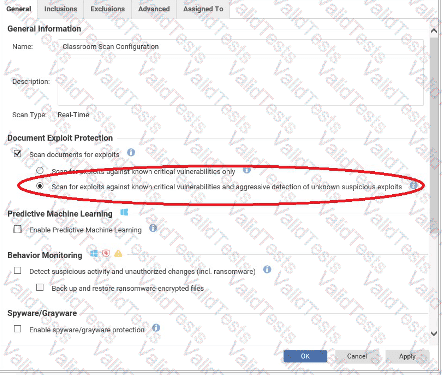
Question # 12

Options:

A.

With the highlighted setting enabled, Deep Security Agents will scan files for known viruses and malware using patterns and any files deemed suspicious will be submitted to a configured Deep Discovery Analyzer for further analysis.

B.

With the highlighted setting enabled, Deep Security Agents will scan files for viruses and malware using supplementary aggressive detection pattern files.

C.

With the highlighted setting enabled, Deep Security Agents will scan files for unknown malware using Predictive Machine Learning.

D.

With the highlighted setting enabled, Deep Security Agents will scan files for known malware as well as newly encounted malware by accessing the Suspicious Objects List.

Expert Solution
Questions # 13:

How can you prevent a file from being scanned for malware?

Options:

A.

Enable "File Types scanned by IntelliScan" in the Malware Scan Configuration prop-erties in the Deep Security Manager Web console. Click "Scan All Except" and type the filename to exclude from the scan.

B.

Edit the "Scan Exclusions" section of the dsa.properties configuration file on the Deep Security Agent computer to include the file name. Save the configuration file and restart the Deep Security Agent service.

C.

Add the file to the Exclusions list in the Malware Scan Configuration.

D.

Add the file to the Exclusions list in the "Allowed Spyware/Grayware Configuration".

Expert Solution
Questions # 14:

Based on the following exhibit, what behavior would you expect for the Application Control Protection Module?
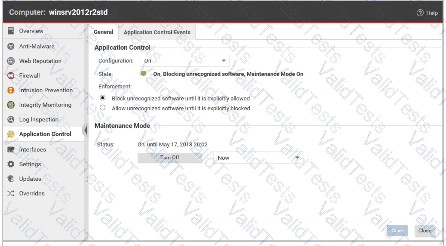
Question # 14

Options:

A.

Since this computer is in Maintenance Mode, updates to the Application Control Protection Module will be applied.

B.

Since this computer is in Maintenance Mode, new or changed software will be automatically added to the list of Allowed software in the currently active ruleset.

C.

Since this computer is in Maintenance Mode, Application Control will allow any Blocked software to temporarily run.

D.

Since this computer is in Maintenance Mode, Application Control will ignore any Blocked software in the currently active ruleset.

Expert Solution
Questions # 15:

While viewing the details of the Firewall Protection Module, as displayed in the exhibit, you note that a few rules have already been assigned. You try to disable these rules, but they can not be unassigned. Why can the displayed rules not be unassigned?
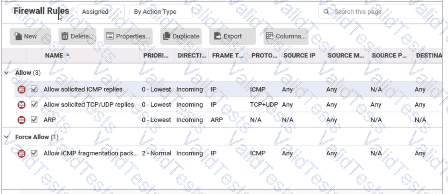
Question # 15

Options:

A.

The rules displayed in the exhibit have been hard-coded with the details of the policy. These rules will automatically be assigned to all Firewall policies that are created and can not be unassigned.

B.

The rules displayed in the exhibit have been assigned to the policy at the parent level. Rules assigned to a parent policy can not be unassigned at the child level.

C.

The rules displayed in the exhibit were assigned to the policy automatically when a Recommendation Scan was run. Rules assigned through a Recommendation Scan can not be disabled once assigned.

D.

The rules displayed in the exhibit can not be unassigned as the administrator currently logged into the Deep Security Manager Web console does not have the permissions necessary to unassign rules.

Expert Solution
Questions # 16:

Based on the policy configuration displayed in the exhibit, which of the following statements is true?
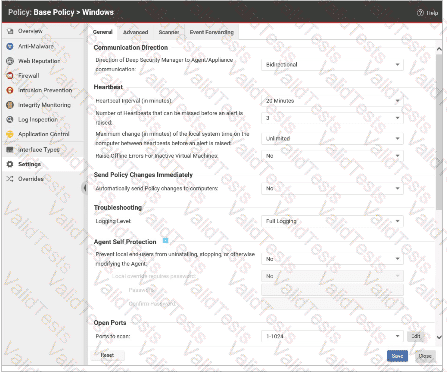
Question # 16

Options:

A.

Changes to any of the Deep Security policies will be sent to the Deep Security Agents as soon as the changes are saved.

B.

Administrators with access to the protected Server will be able to uninstall the Deep Security Agent through Windows Control Panel.

C.

Deep Security Agents will send event information to Deep Security Manager every 10 minutes.

D.

If the Deep Security Manager does not receive a message from the Deep Security agent every 20 minutes, an alert will be raised.

Expert Solution
Questions # 17:

A Recommendation Scan is run to determine which Intrusion Prevention rules are appropriate for a Server. The scan is configured to apply the suggested rules automatically and ongoing scans are enabled. Some time later, an operating system patch is applied. How can you determine which Intrusion Prevention rules are no longer needed on this Server?

Options:

A.

The README file provided with the software patch will indicate which issues were addressed with this release. Compare this list to the rules that are applied to determine which rules are no longer needed and can be disabled.

B.

Since the rules are being applied automatically, when the next Intrusion Prevention Recommendation Scan is run automatically, any rules that are no longer needed will be automatically unassigned. These are rules that are no longer needed as the vulnerability was corrected with the patch.

C.

Since there is no performance effect when multiple Intrusion Prevention rules are applied, there is no need to determine which rules are no longer needed. The original recommended rules can remain in place without affecting the system.

D.

Since the rules are being applied automatically, when the next Intrusion Prevention Recommendation Scan is run automatically, any rules that are no longer needed will be displayed on the Recommended for Unassignment tab in the IPS Rules. These are rules that are no longer needed and can be disabled as the vulnerability was corrected with the patch.

Expert Solution
Questions # 18:

Which of the following correctly identifies the order of the steps used by the Web Reputation Protection Module to determine if access to a web site should be allowed?

Options:

A.

Checks the cache. 2. Checks the Deny list. 3. Checks the Approved list. 4. If not found in any of the above, retrieves the credibility score from Rating Server. 5. Evaluates the credibility score against the Security Level to determine if access to the web site should be allowed.

B.

Checks the cache. 2. Checks the Approved list. 3. Checks the Deny list. 4. If not found in any of the above, retrieves the credibility score from the Rating Server. 5. Evaluates the credibility score against the Security Level to determine if access to the web site should be allowed.

C.

Checks the Deny list. 2. Checks the Approved list. 3. Checks the cache. 4. If not found in any of the above, retrieves the credibility score from Rating Server. 5. Evaluates the credibility score against the Security Level to determine if access to the web site should be allowed.

D.

Checks the Approved list. 2. Checks the Deny list. 3. Checks the cache. 4. If not found in any of the above, retrieves the credibility score from the Rating Server. 5. Evaluates the credibility score against the Security Level to determine if access to the web site should be allowed.

Expert Solution
Questions # 19:

The maximum disk space limit for the Identified Files folder is reached. What is the expected Deep Security Agent behavior in this scenario?

Options:

A.

Any existing files are in the folder are compressed and forwarded to Deep Security Manager to free up disk space.

B.

Deep Security Agents will delete any files that have been in the folder for more than 60 days.

C.

Files will no longer be able to be quarantined. Any new files due to be quarantined will be deleted instead.

D.

Deep Security Agents will delete the oldest files in this folder until 20% of the allocated space is available.

Expert Solution
Questions # 20:

Which of the following Protection Modules does not benefit from Recommendation Scans?

Options:

A.

Log Inspection

B.

Integrity Monitoring

C.

Firewall

D.

Intrusion Prevention

Expert Solution
Viewing page 2 out of 3 pages
Viewing questions 11-20 out of questions